


Your iPhone is more than a tool; it’s a bridge to your family, your work, and your world. When you notice the signs of a failing iphone battery, such as apps that stutter or a device that grows uncomfortably warm, the rhythm of your day breaks. You shouldn’t have to carry the constant anxiety of a looming black screen. Reliable. Swift. Essential.
Understanding these warnings is the first step toward reclaiming that lost reliability. We believe in transparency, craftsmanship, and the simple joy of a device that just works. This guide reveals the subtle signals that your battery is reaching its end and explains the path to total restoration. We’ll walk you through the professional repair process used here at SIMSIM, ensuring your device returns to the peak performance you deserve. It’s time to move past the frustration and rediscover the seamless experience of a healthy iPhone in the heart of the Melbourne CBD.
Key Takeaways
- Learn to distinguish between your device’s chronological age and its chemical vitality to better anticipate its future needs.
- Identify the subtle signs of a failing iphone battery, from sluggish app performance to those frustrating shutdowns when your screen still shows 20% power.
- Recognize the critical physical warnings, such as battery swelling, that signal a need for immediate care to protect your device’s internal circuitry.
- Master the simple steps to interpret your iPhone’s internal health diagnostics and understand what those “Important Battery Messages” truly mean for your daily use.
- Discover the path to restoration through the professional, rapid hardware services offered at our welcoming SIMSIM store at 80 Flinders St in the Melbourne CBD.
Understanding the Chemical Life Cycle of Your iPhone Battery
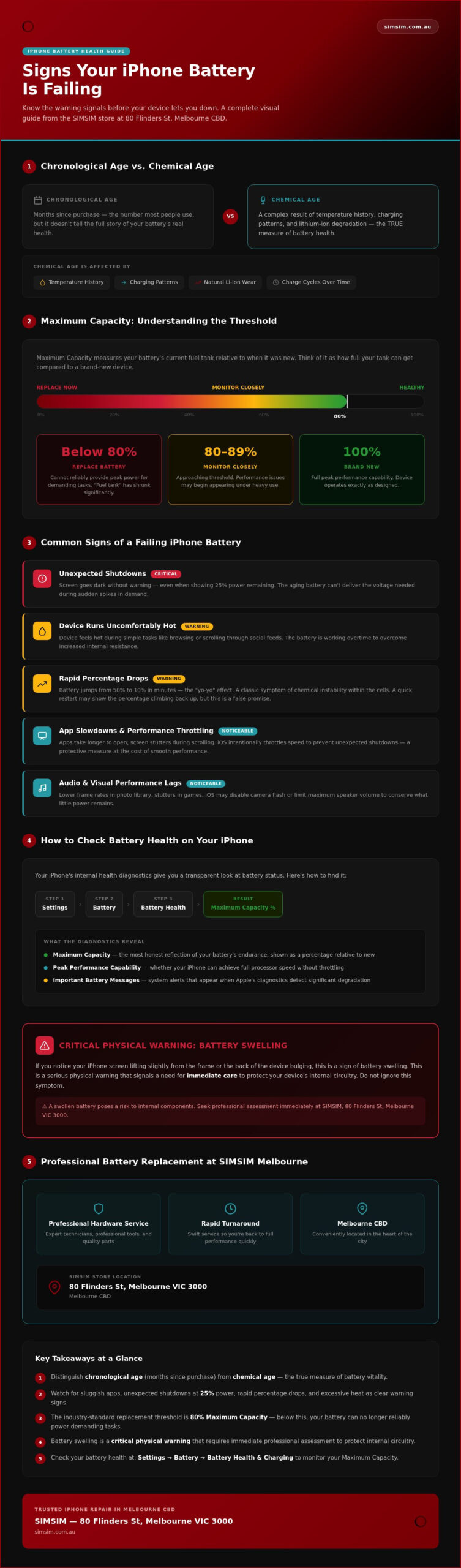
The heart of your iPhone isn’t just silicon and glass; it’s the sophisticated lithium-ion technology pulsing beneath the surface. This energetic core is what allows us to stay connected, capture memories, and manage our lives with a single tap. Yet, even as we move through 2026, the fundamental constraints of physics remain unchanged. We often think of our devices in terms of chronological age, counting the months since we left the store. However, the true health of your device depends on its chemical age. This is a complex dance of temperature history, charging patterns, and the natural wear of lithium-ion battery chemistry and degradation.
Every time you plug in your device, you’re engaging in a cycle. These charging cycles are the steady drumbeat of a battery’s life, and eventually, they lead to the familiar signs of a failing iphone battery. As the internal chemistry shifts, the battery’s ability to hold a charge naturally depletes. It’s a gradual process, often invisible at first, until the day your phone can no longer keep up with your pace. Vibrant. Vital. Essential.
What is Maximum Capacity?
When you glance at your Settings menu, the Maximum Capacity percentage is the most honest reflection of your battery’s endurance. Maximum Capacity is the measure of your battery’s current fuel tank relative to when it was new. While a brand-new device sits at 100%, the industry-standard threshold for replacement is 80%. Once you dip below this mark, the battery can no longer reliably provide the peak power needed for demanding tasks. It’s a signal that the "fuel tank" has shrunk, leaving you with less range for your busiest days in the Melbourne CBD.
Peak Performance Capability Explained
Your iPhone is designed to be intelligent. When the battery’s health declines, the internal processor must work harder to manage high-demand tasks. This relationship often leads to "throttling," where the device intentionally slows down its own speed to prevent an unexpected shutdown. If you’ve noticed your apps taking longer to open or the screen stuttering during a scroll, these are clear signs of a failing iphone battery struggling to maintain peak performance. It’s a protective measure, a way for the phone to save itself from a total crash, but it compromises the soulful, fluid experience you expect from your device. At our SIMSIM store, we see this often; it’s the device’s way of asking for a fresh start.
Common Signs of a Failing iPhone Battery in Daily Use
Living in the heart of the Melbourne CBD requires a device that can keep up with the rhythm of a busy morning. When your phone begins to falter, it isn’t just a technical glitch; it’s a disruption to your personal flow. One of the most glaring signs of a failing iphone battery is the sudden, unexpected shutdown. You might be checking your messages with 25% power remaining, only for the screen to go dark without warning. This happens because the aging battery can’t provide the necessary voltage during a sudden spike in demand. It’s jarring. Frustrating. Unreliable.
Heat is another silent messenger. If your device feels uncomfortably warm during simple tasks like browsing a news site or scrolling through social feeds, the battery is likely working overtime to overcome internal resistance. You’ll also notice that apps take significantly longer to launch than they did when the device was fresh from the box. That snappy, vibrant response you once loved starts to feel sluggish and tired. Even in 2026, these physical limitations persist, reminding us that every energetic heart has its limits.
The Frustration of Rapid Percentage Drops
Have you ever seen your battery jump from 50% to 10% in the time it takes to walk down Flinders St? This "yo-yo" effect is a classic symptom of chemical instability within the cells. Sometimes, a quick restart might even show the percentage climbing back up, but this is a false promise. This level of unpredictability makes planning your day nearly impossible, leaving you tethered to a wall charger. If you find yourself constantly hunting for a power outlet between meetings, you can book a diagnostic at our Melbourne store to find a permanent solution.
Audio and Visual Performance Lags
As the battery struggles, the iOS system compensates by scaling back power to vital components. You might notice lower frame rates when scrolling through your photo library or a slight stutter in your favourite games. In some cases, your iPhone might even disable the camera flash or limit the maximum volume of your speakers to protect the internal circuitry. These aren’t software bugs; they are survival tactics used by a power-starved processor. Recognizing these signs of a failing iphone battery early can prevent the deeper frustration of a device that fails you when you need it most. We believe your technology should be a source of joy, not a source of stress.
The Critical Warning Signs: When Failure Becomes a Risk
While daily glitches are frustrating, some signs of a failing iphone battery demand immediate attention to protect your device and your safety. When the internal cells reach a certain level of degradation, they can begin to off-gas. This isn’t just a technical failure; it’s a physical transformation that threatens the integrity of your entire device. If you ignore the earlier warnings, you risk permanent internal circuitry damage that can render a phone unrepairable. Urgent. Physical. Critical. We want your device to remain a safe, reliable companion in your pocket.
We’ve seen how a small, neglected issue can grow into a significant problem that compromises the soul of your iPhone. By recognizing these physical changes early, you’re not just saving your phone; you’re ensuring your own safety. A failing battery can exert immense pressure on internal components, leading to cascading failures that are far more difficult to resolve than a simple power issue. We believe in proactive care to keep your digital life running smoothly.
Identifying a Swollen Battery
You might first notice a slight lift where the screen meets the metal frame. Sometimes, it’s so subtle you only feel it when the phone is in your hand. A "spongy" sensation when you press on the display is a major red flag. This pressure from within can cause white spots or strange discoloration on the screen, as the battery literally pushes against the delicate display layers. Recognizing these physical signs of a failing iphone battery early can prevent the screen from cracking or popping out entirely. Ignoring this often leads to needing an iPhone Screen Repair Melbourne professionals usually see when maintenance has been delayed too long.
The Risk of Thermal Events
There’s a fine line between a device that feels warm and one that is dangerously hot. When "warm" turns into "uncomfortably hot" during basic use, the battery is likely experiencing an internal short. In extreme cases, a compromised battery can lead to a thermal event. If your device begins to smoke, hiss, or emit a sweet, metallic smell, you must act fast. Place the device on a non-flammable surface and stop using it immediately. Safety is our primary concern at SIMSIM. Bringing your device into our store at 80 Flinders St ensures that expert technicians can safely remove the volatile component and restore your peace of mind. We take pride in our manual craftsmanship and the meticulous care we give to every device that enters our space in the Melbourne CBD.
How to Check Your iPhone Battery Health at Home
You don’t need to be a technician to start understanding the health of your device. iOS provides a window into the energetic heart of your iPhone, allowing you to monitor its vitality with ease. By exploring the built-in settings, you can often confirm the signs of a failing iphone battery before they become a critical risk. It’s about taking ownership of your technology with a sense of pride and care, ensuring your device remains a reliable companion for your life in the Melbourne CBD.
While the main dashboard offers a quick overview, there’s more to the story. For those who want a deeper look, the "Analytics & Improvements" section under Privacy & Security holds raw logs. These files contain specific cycle counts and actual milliamp-hour readings that the main menu might gloss over. Understanding this data helps you decide when to trust the software and when it’s time to seek a physical inspection from a professional.
Navigating the iOS Battery Menu
To begin your check, open Settings and tap on Battery. From there, select Battery Health & Charging. This screen is your primary dashboard. You’ll see the Maximum Capacity percentage, but you should also look for the Performance Management section. If your phone has experienced an unexpected shutdown, this feature may be enabled to prevent another crash. You can also toggle Optimised Battery Charging here, which helps the battery age more gracefully by waiting to finish charging past 80% until you need it. Steady. Intelligent. Protective.
Sometimes, your iPhone will speak to you through an "Important Battery Message." This notification is a clear signal that the system has detected significant degradation or an unverified component. It’s a humble request for attention that shouldn’t be ignored. When you see this message, it’s a confirmation that the signs of a failing iphone battery have moved from subtle to critical.
Diagnostic Apps vs. Professional Tools
The App Store is full of free diagnostic tools, but many of these offer surface-level data that can be misleading. They often rely on the same software hooks as the internal menu, providing little additional value beyond what you can see in Settings. At our SIMSIM store, our technicians use specialized hardware to measure voltage stability and internal resistance directly. This ensures we provide the most accurate Apple Repair Services available. Software is a great starting point, but manual craftsmanship and professional tools provide the final word on your battery’s true condition. If the numbers don’t match the lag you feel, you can book a professional battery diagnostic at our 80 Flinders St store today.
Professional Battery Replacement at SIMSIM Melbourne
Once you’ve recognized the signs of a failing iphone battery, the path to restoration should be as seamless as the device itself. We’ve built SIMSIM on a foundation of trust and technical excellence, right in the heart of the Melbourne CBD. Our commitment to you is simple: rapid service that doesn’t compromise on quality. We use high-quality replacement parts designed for longevity, ensuring your iPhone regains its original vitality. Your data remains a top priority; since a battery replacement is a hardware-focused procedure, we take every precaution to ensure your digital life stays exactly where it belongs. Secure. Intact. Protected.
When you walk through our doors at 80 Flinders St, Melbourne VIC 3000, you’re entering a space dedicated to the art of the fix. We understand that your time is precious, especially for the local professionals who rely on their devices for every meeting and connection. Our technicians bring a steady hand and a deep respect for the manual craftsmanship required to open these sophisticated devices. It’s about more than just a new part; it’s about restoring the soul of your technology. We’ve seen how a fresh battery can breathe new life into an aging device, making it feel just as snappy as the day you first held it.
The SIMSIM Experience: Hospitality and Expertise
We’ve created an environment that feels personal and inclusive, a far cry from the clinical atmosphere of typical repair centers. At our store, we believe in a transparent diagnostic process. There are no hidden fees or confusing jargon; we explain what your device needs with the same honesty we’d offer a family member. This soulful approach is why so many people in the Melbourne CBD choose us. We treat every repair as a gift to the community, prioritizing the health of your device over a mere transaction. Knowledgeable. Generous. Humble. It’s our way of ensuring that the signs of a failing iphone battery are addressed with the care they deserve.
Booking Your Visit to Flinders St
We’ve made it effortless to find a time that fits your schedule. Our online booking tool allows you to secure a guaranteed slot, so you aren’t left waiting when you have a busy day ahead. If you’re curious about the meticulous care we take, you can visit SIMSIM Repairs on YouTube for a behind-the-scenes look at our process. We show you the precision of our methods because we’re proud of the quality we deliver. When you’re ready to leave the frustration of a dying phone behind, book your battery replacement at our Melbourne store and let us welcome you into the SIMSIM family. We look forward to seeing you at 80 Flinders St.
Restoring Your Connection to the World
Your iPhone is the energetic heart of your daily rhythm, and keeping it healthy is a gesture of care for your digital life. We’ve explored how to identify the signs of a failing iphone battery, from the subtle stutter of an app to the more urgent physical warnings of a swollen display. Understanding the difference between chronological age and chemical vitality empowers you to act before a minor frustration becomes a major risk. At SIMSIM, we take immense pride in providing a soulful, transparent repair experience that honors the manual craftsmanship your device deserves.
Our expert technicians at our 80 Flinders St store are dedicated to rapid service in the Melbourne CBD, using only high-quality parts to ensure your phone feels vibrant once more. Don’t let a dying battery tether you to a wall charger or disrupt your flow. Restore your iPhone’s performance—Book your battery replacement at SIMSIM Melbourne today. We are ready to welcome you into our space and return your device to its peak potential. Your story continues with a full charge.
Frequently Asked Questions
How long does an iPhone battery replacement take at SIMSIM?
Most battery replacements at our SIMSIM store are completed rapidly, often while you wait or take a short walk through the Melbourne CBD. We understand that your time is a precious commodity. Our expert technicians prioritize efficiency without ever rushing the delicate manual craftsmanship required. Rapid. Reliable. Refreshed. This swift turnaround ensures you can reconnect with your world and return to your professional commitments at 80 Flinders St without a long wait.
Will I lose my photos and data when you change the battery?
Your photos, messages, and memories remain secure during a standard battery replacement as it is a hardware-focused procedure. While we take every precaution to protect your information, we always recommend a fresh backup before any repair to ensure total peace of mind. At SIMSIM, we treat your device with the same care and devotion we would show our own. Secure. Intact. Protected. We keep your digital life whole while we restore its energetic heart.
Is my iPhone still water-resistant after a battery repair?
Opening an iPhone to replace the battery naturally breaks the original factory adhesive seal that provides water resistance. While our technicians use high-quality replacement seals to help protect your device from dust and minor splashes, remember that no repaired device is fully waterproof. We focus on meticulous manual craftsmanship to ensure the best possible protection. Meticulous. Manual. Mindful. We advise being careful around liquids after any internal hardware service at our SIMSIM store.
Can a bad battery make my iPhone screen look glitchy?
A failing battery can certainly cause visual disturbances, ranging from stuttering animations to strange discoloration on the display. If you notice the signs of a failing iphone battery, the system may throttle performance, leading to a glitchy feel during use. A swollen battery can physically push against the screen from the inside, creating white spots or pressure marks. Addressing the power source often resolves these soulful, fluid performance issues. Vibrant. Snappy. Clear.
What is the cost of iPhone battery replacement in Melbourne?
The cost of restoring your device depends on your specific iPhone model and the high-quality parts required for the repair. We believe in a transparent diagnostic process. We invite you to visit our store at 80 Flinders St for a clear assessment. Our team focuses on providing value through expert technicians and reliable hardware. Honest. Fair. Professional. This ensures your investment leads to a long-lasting result for your daily power needs in the Melbourne CBD.
How can I make my new iPhone battery last longer?
To preserve the health of your new battery, avoid exposing your device to extreme temperatures and use high-quality charging cables. Enabling the Optimised Battery Charging feature in your settings allows the software to learn your routine. By managing these small daily habits, you can delay the signs of a failing iphone battery and enjoy a snappy experience for many seasons. Cool. Calm. Collected. It’s a simple way to honor your device’s longevity.
Do you offer a warranty on your battery replacement services?
We stand behind our work by using high-quality replacement parts and employing expert technicians who are dedicated to their craft. Every service at SIMSIM is framed as a gift to the Melbourne community, prioritizing the soul of the product and the satisfaction of the owner. We focus on rapid and reliable service. Passionate. Generous. Humble. Our primary goal is your peace of mind, knowing your device has been handled with professional expertise.
Is it worth replacing the battery on an older iPhone 11 or 12?
Replacing the battery in an iPhone 11 or 12 is a sustainable way to extend the life of a still-capable device. These models often have many years of software support remaining, and a fresh power source can eliminate the sluggishness that makes them feel outdated. Investing in professional hardware restoration at our store is a humble, practical choice. Sustainable. Smart. Soulful. It honors the legacy of your device while saving you from a replacement.