

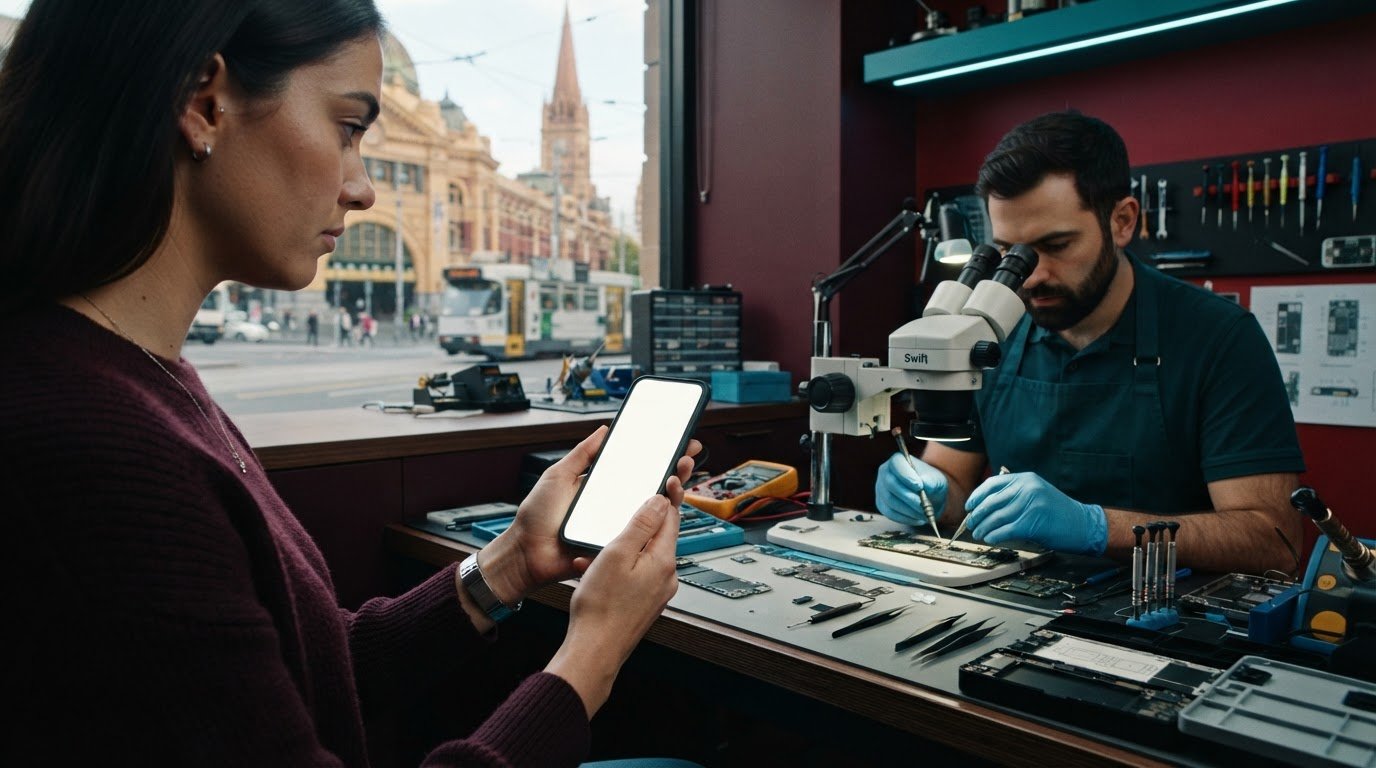
Imagine standing on the corner of Flinders and Swanston, reaching for your pocket to check your next meeting, only to find your iPhone frozen on a glowing white Apple logo. It is a moment of pure, sharp, visceral anxiety. Your schedule, your photos, and your connection to the world are trapped behind a glass screen that refuses to budge. We understand that this isn’t just a gadget; it is your lifeline. If you are searching for a way to fix phone stuck on apple logo melbourne, you are likely feeling the weight of potential data loss and the disruption to your busy day. It’s frustrating. It’s isolating. It’s stressful.
You shouldn’t have to choose between a working device and your precious memories. We believe in a transparent, soulful approach to repair that prioritizes your peace of mind. In this guide, we will share the exact steps to revive your iPhone from a boot loop, from simple button sequences to advanced diagnostics. You will learn the difference between a software glitch and a complex hardware failure. We will also show you how our expert team at the SIMSIM Repairs store at 80 Flinders St can help you get back to your life with your data intact.
Key Takeaways
- Identify the root cause. Distinguish between a fleeting software glitch and a deep hardware failure, ensuring you choose the most graceful path to recovery.
- Protect your memories. Master the precise button sequences for a force restart and learn to navigate Recovery Mode safely to preserve your cherished data.
- Expert local care. Discover why seeking expert help to fix phone stuck on apple logo melbourne at our store at 80 Flinders St, Melbourne VIC 3000 is the most reliable way to revive a silent device.
- Craftsmanship you can trust. Explore the meticulous diagnostic process we use in the CBD, where we treat every logic board repair with care, honesty, and devotion.
- Future-proof your device. Gain practical insights on preventing future boot loops by prioritizing high-quality components and mindful system storage management.
The Frustration of the Apple Logo Loop: Why It Happens
We’ve all felt that sudden, sinking feeling. You restart your device, expecting the familiar glow of your home screen, but instead, you are met with a static Apple logo that refuses to fade. This is the start of a boot loop. It’s a cycle where the iPhone attempts to wake up, fails its internal checks, and restarts in a desperate, endless loop. For those seeking to fix phone stuck on apple logo melbourne, understanding this rhythm is the first step toward a solution. By understanding bootloop cycles, we can see that this isn’t just a random glitch; it’s a complex dialogue between the software and hardware that has suddenly been interrupted. It is persistent. It is stubborn. It is exhausting.
Software Glitches vs. System Corruption
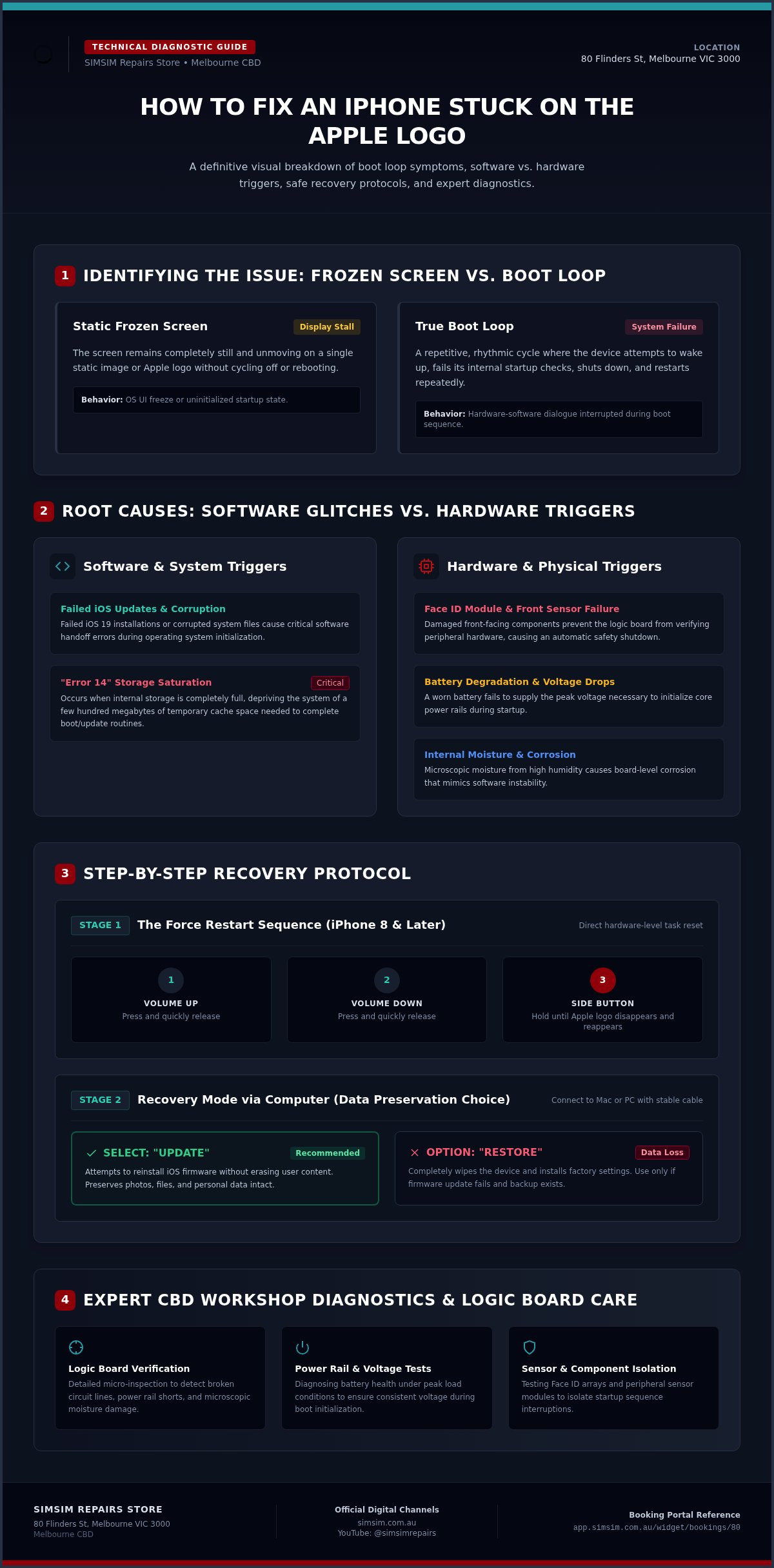
Often, the culprit is a modern update that didn’t quite find its footing. Whether it’s a failed iOS 19 installation or a corrupted system file, the software can become tangled during the handoff between versions. One of the most common heartaches we see at our store is the dreaded "Error 14." This occurs when your iPhone’s internal storage is so full that it lacks the temporary cache space to complete a simple update. Without a few hundred megabytes of breathing room, the system panics and shuts down. It’s vital to distinguish between a screen that is simply frozen and a true boot loop. A frozen screen stays still; a boot loop is a repetitive, rhythmic failure to launch that requires a more nuanced touch to resolve.
Hardware Triggers You Might Not Expect
Sometimes the silence is caused by something far deeper than code. A damaged front-facing sensor or a faulty Face ID module can interrupt the startup sequence before it even begins. If the phone’s logic board cannot verify these peripheral parts, it may halt the boot process entirely as a safety measure. We also frequently find that battery degradation plays a significant role. If a battery is old and worn, it might lack the peak voltage required to initialize the operating system. Even microscopic amounts of moisture from a humid day can cause internal corrosion that mimics a software error. When you need to fix phone stuck on apple logo melbourne, our technicians at SIMSIM at 80 Flinders St look beyond the screen to find these hidden hardware whispers, ensuring your device returns to you with its soul intact.
How to Fix an iPhone Stuck on the Apple Logo: Step-by-Step Troubleshooting
When your world stops at a glowing logo, the first instinct is often to panic. Don’t. There’s a sequence, a rhythmic process to reviving a stalled device that we’ve practiced a thousand times. Before you assume the worst, there are several paths you can take from the comfort of your home or office to breathe life back into your iPhone. If these steps feel daunting, remember that our technicians at SIMSIM are always ready to help you fix phone stuck on apple logo melbourne with a gentle, expert touch.
The Force Restart Method
The first and most vital step is the "Force Restart." It isn’t just a simple power cycle; it’s a direct command to the hardware to drop all current tasks and begin anew. For those using an iPhone 8 or any later model, the sequence is a quick dance: press and release the Volume Up button, press and release the Volume Down button, and then hold the Side button. You must be patient. Hold that Side button until the Apple logo disappears and then reappears. Following the official iPhone force restart instructions ensures you have the timing right. If the screen remains black throughout this process, it might suggest the battery is too depleted to initialize, or a hardware component is interfering with the power rails.
Using Recovery Mode Without Losing Data
If a restart doesn’t break the loop, we must look deeper. Recovery Mode allows your iPhone to communicate with a computer even when the main operating system is failing. Connect your device to a Mac or a PC using a high-quality cable. A stable connection is paramount; a flickering cable can interrupt a firmware push and cause further corruption. Once the computer recognizes the device, you’ll be presented with a choice: "Update" or "Restore." This is the moment where your data hangs in the balance. Always choose "Update." This option attempts to reinstall the iOS software while keeping your photos, messages, and apps intact. It’s a soulful way to mend the system without losing your history.
For those rare cases where Recovery Mode isn’t enough, DFU (Device Firmware Update) mode remains the final software frontier. It is a silent, black-screen state that allows for a total reload of the device’s firmware. It’s a delicate operation, often requiring precise finger work. If you’ve tried these sequences and still find yourself searching for a way to fix phone stuck on apple logo melbourne, the issue likely resides in the physical circuitry. You can book a professional diagnostic at our store at 80 Flinders St, where we treat every repair as a commitment to our Melbourne community.
Beyond the Basics: When Your iPhone Requires Professional Diagnostic Tools
Logic Board and Microsoldering Solutions
Logic board repair is an art form defined by extreme precision and patience. A single shorted capacitor, often no larger than a grain of sand, can halt the entire startup sequence by grounding a vital power rail. At our store, we don’t rely on guesswork or simple part swaps. Our technicians utilize advanced thermal imaging cameras to detect microscopic heat spikes, revealing the exact location of internal shorts that the naked eye could never see. This level of Apple repair expertise allows us to perform component-level microsoldering, reviving the original board rather than discarding it. It is a process of restoration. It is meticulous. It is honest. It is professional.
The Critical Importance of Data Recovery
Your memories are the heartbeat of your iPhone. When your device is trapped in a loop and returns a specific "Error 1110" or "Error 14," it often signals that the NAND memory chip is critically full or failing. Standard consumer tools like iTunes are designed to wipe and reset, but we prioritize the preservation of your photos, messages, and contacts. We use professional software suites that can bypass standard communication errors to extract data from a struggling system. While ACCC repair remedies and consumer guarantees provide a framework for your rights as a customer in Australia, the real security comes from choosing a team that treats your data with the same devotion they would their own. At SIMSIM, we understand that a working phone is good, but a working phone with your life’s history intact is what truly matters. We invite you to step into our store at 80 Flinders St, Melbourne VIC 3000, where we bridge the gap between technical failure and a successful, data-safe recovery.
Choosing a Trusted Repair Store in the Melbourne CBD
The heart of Melbourne is a pulse of energy, ambition, and connection. When your digital life falters, you shouldn’t have to trek to a distant suburb for a compromise. Choosing a professional destination to fix phone stuck on apple logo melbourne means seeking a partner who values your time and your device’s integrity. At SIMSIM, we’ve built our store on a foundation of trust, quality, and accessibility. We believe that a repair is not just a transaction. It is a promise. It is an act of restoration. It is a service to our city.
Quality remains the silent hero of every successful repair. While some might tempt you with lower prices, they often rely on inferior components that lack the precision of original-spec parts. These cheap alternatives frequently trigger the very boot loops you are trying to escape. We prioritize premium parts and back our work with a comprehensive warranty. This transparency ensures you never encounter the hidden fee traps that often plague less established businesses in the suburbs. We offer a clear, honest path back to a working device.
The CBD Advantage for Busy Professionals
Location is the ultimate convenience for the modern professional. Our store at 80 Flinders St, Melbourne VIC 3000, is perfectly positioned for those who move through the city. You can drop your device with us during your morning coffee run. You can pick it up, fully revived, before your evening commute from Flinders Street Station. We have designed our space to be a hub of technical excellence in the center of the CBD, making expert support accessible to everyone who works or lives in the city heart.
Why SIMSIM Stands Apart
We are modern traditionalists. We respect the legacy of the devices we handle while embracing the cutting-edge tools required for complex internal circuitry. Our commitment goes beyond simple fixes; we offer a sophisticated, personal service experience that makes you feel like a guest, not just a customer. You can explore our guide to iPhone screen repair in Melbourne to see our holistic approach to device health. For those who want to see our technical devotion in action, we invite you to visit the SIMSIM YouTube channel where we share the secrets of our craft.
Your device deserves the best care Melbourne has to offer. We invite you to book your diagnostic visit today at our Flinders Street store and experience the difference that expert care makes.
Seamless Repairs at SIMSIM: Booking Your Visit to 80 Flinders St
Stepping into our store at 80 Flinders St is the first step toward reclaiming your digital life. We have designed our space to be an oasis of technical clarity in the bustling heart of the Melbourne CBD. When you arrive, you won’t find a cold, clinical counter. Instead, you’ll be greeted with the warmth and hospitality that defines our professional approach. Our diagnostic process is built on a foundation of absolute transparency. We listen to the story of your device, assessing the internal signals of the logic board to provide an honest, clear path forward. It is about more than just a fix; it is about restoring the connection you have with your world. If you need to fix phone stuck on Apple logo Melbourne, you deserve a team that values your history as much as your hardware.
Our technicians treat every repair as a commitment to the community. We understand the anxiety of a silent screen, and we respond with a sophisticated balance of nostalgic care and modern energy. When you bring your device to us, you are being invited into a private story of restoration. We don’t just swap parts; we mend the internal circuitry of the technology. Meticulous. Honest. Professional. These are the pillars of our service. We prioritize the preservation of your data and the longevity of your device, ensuring that every interaction feels personal and inclusive.
Our Flinders Street Location
You can find us at 80 Flinders St, Melbourne VIC 3000, just a short, graceful walk from the iconic Flinders Street Station. We have chosen this location to be the premier destination for those who need to fix phone stuck on Apple logo Melbourne without leaving the city. Our store hours are tailored to the rhythm of city life, offering a welcoming environment where your device’s history is respected. Before you visit, try to note down any specific events that preceded the boot loop, such as a full storage warning or a minor splash of water. These details are the vital insights we use to craft a perfect repair strategy. If you have your original charging cable, bringing it along can help us rule out external power issues during our initial assessment.
Book Your Diagnostic Appointment Now
We know that your time is a precious commodity. To ensure the fastest turnaround for complex Apple logo fixes, we encourage you to use our streamlined booking system. An appointment guarantees that our expert technicians are ready to prioritize your device the moment you walk through our doors. It is a simple, modern way to access traditional craftsmanship. You can book your iPhone repair at SIMSIM here to secure your spot. For a deeper look at our meticulous methods and the passion we bring to every logic board, we invite you to explore the SIMSIM YouTube channel. We are here to host your repair journey with the care, devotion, and expertise you deserve.
Reclaim Your Connection in the Heart of Melbourne
A frozen screen doesn’t have to mean a frozen life. By understanding the rhythm of your iPhone’s startup sequence, you’ve already taken the first step toward a solution. Whether your device needs a simple software nudge or the meticulous touch of our logic board experts, there is always a path back to your memories. When you choose to fix phone stuck on apple logo melbourne with our team at SIMSIM, you are choosing a partnership built on transparency and technical devotion. We believe in preserving the soul of your technology through expert craftsmanship and honest communication.
Our store at 80 Flinders St, Melbourne VIC 3000, stands as a premier destination for busy professionals who refuse to compromise on quality. As expert data recovery specialists, we utilize high-quality parts and professional labor to ensure your device returns to you stronger than before. You don’t have to navigate this digital silence alone. We are ready to host your repair journey with the care and precision your iPhone deserves. Book your expert iPhone repair at our Melbourne CBD store today and let us bring your device back to life.
Frequently Asked Questions
How long does it take to fix an iPhone stuck on the Apple logo at your Melbourne store?
The time required to restore your device depends on whether the issue is a software glitch or a hardware failure. Simple software refreshes can often be completed within a few hours. If our technicians need to perform intricate logic board repairs to fix phone stuck on apple logo melbourne, the process may take longer. We always prioritize a thorough diagnostic at our store to give you an accurate timeline and ensure your iPhone receives dedicated care.
Will I lose my photos if my iPhone is stuck on the Apple logo?
Preserving your memories is our highest priority during any repair. While a boot loop can be stressful, our specialists use advanced data recovery techniques to extract photos and messages even when the system is unresponsive. We always attempt to update your firmware rather than performing a factory restore. This soulful approach to technology ensures that your life’s history remains intact while we work to resolve the underlying startup failure at our Flinders Street location.
Is it worth repairing an older iPhone model like the iPhone 11 or 12?
Repairing an iPhone 11 or 12 is often a wise and sustainable choice compared to the high cost of a new device. These models remain powerful and capable of running modern software. If the issue is a failing battery or a simple sensor short, a professional repair at SIMSIM can extend the life of your phone for years. It’s an honest way to honor the value of your existing technology while saving you from unnecessary expenses.
How much does it cost to fix a boot loop issue in the Melbourne CBD?
The cost to resolve a boot loop varies based on the specific parts and labor required to mend your device. Software-based recoveries differ in complexity from hardware interventions like charging port replacements or logic board repairs. We provide transparent, honest assessments after a physical diagnostic at our store in the CBD. Our focus is on providing high-quality results that protect your investment without the hidden fees often found in less professional environments.
Can a full storage warning cause my phone to get stuck on the Apple logo?
Yes, a critically full storage drive is one of the most frequent triggers for a permanent hang. When your iPhone lacks the space to index files or process updates, it can trigger a kernel panic and a subsequent boot loop. If you need to fix phone stuck on apple logo melbourne because of storage exhaustion, our technicians can use specialized tools to bypass these errors. We aim to clear the system cache while protecting your important personal data.
Do you provide a warranty for iPhone repairs at SIMSIM?
We stand behind every repair with a comprehensive warranty on both our professional labor and the high-quality parts we use. This commitment is a reflection of our pride in our craftsmanship and our devotion to the Melbourne community. You can trust that your device is being handled by experts who prioritize long-lasting results. We believe in transparency and follow all Australian Consumer Law guidelines to ensure you feel secure and supported throughout the entire repair process.
What should I do if my iPhone gets stuck on the Apple logo after a water spill?
You should power down your device immediately and seek a professional water damage diagnostic. Liquid ingress can cause internal corrosion that shorts out serial bus lines, leading to a stuck Apple logo. Avoid using rice, as this can accelerate damage. Our technicians at 80 Flinders St use specialized tools to remove moisture. You can see our technical process in action on the SIMSIM YouTube channel before visiting us for a thorough assessment.
Do I need an appointment to visit your store at 80 Flinders St?
While we warmly welcome walk-in guests at our store at 80 Flinders St, we recommend booking an appointment for the fastest service. An appointment ensures that a technician is ready to begin your diagnostic the moment you arrive. You can easily secure your spot through our one-line booking system. This allows us to provide the sophisticated, personal attention your device deserves while respecting the rhythm of your busy day in the CBD.