

A flickering MacBook screen doesn’t always mean the whole display needs replacing. A MacBook screen flickering fix Melbourne owners can rely on starts with noticing when the flicker happens and what appears alongside it. The cause may involve software, display settings or hardware, so the symptom alone can’t identify the repair needed.
There are safe checks you can try without opening your MacBook, such as restarting it, reviewing display settings and checking whether macOS needs an update. If the flicker persists, an assessment can help distinguish a software issue from a fault that needs repair. SIMSIM Repairs offers MacBook screen replacement, but it isn’t automatically the right answer to every flicker.
This guide covers useful clues, simple checks and when to arrange an assessment. At SIMSIM Repairs’ Melbourne CBD store, expert technicians use genuine parts and assess devices without shortcuts or guesswork. The store is at 80 Flinders St, Melbourne VIC 3000.
Key Takeaways
- Screen flickering is a symptom, not a diagnosis. One visual clue can’t confirm that the display needs replacing.
- Software issues and hardware faults can look similar. Note when the flicker started and what seems to trigger it.
- Before seeking a macbook screen flickering fix melbourne, try safe software checks and back up accessible data.
- If flickering continues, arrange an assessment so expert technicians can identify the fault and suitable repair.
- SIMSIM provides MacBook screen replacement in Melbourne CBD, with genuine parts and transparent pricing available on request or through scheduling.
MacBook screen flickering in Melbourne: what the symptom can tell you
A flashing display can interrupt a work call, blur study notes or make a simple task frustrating. It’s tempting to assume the screen is failing, but flickering describes what you see, not the fault behind it. It doesn’t automatically mean the display needs replacing. When the flicker occurs and what else changes can help a technician decide what to investigate.
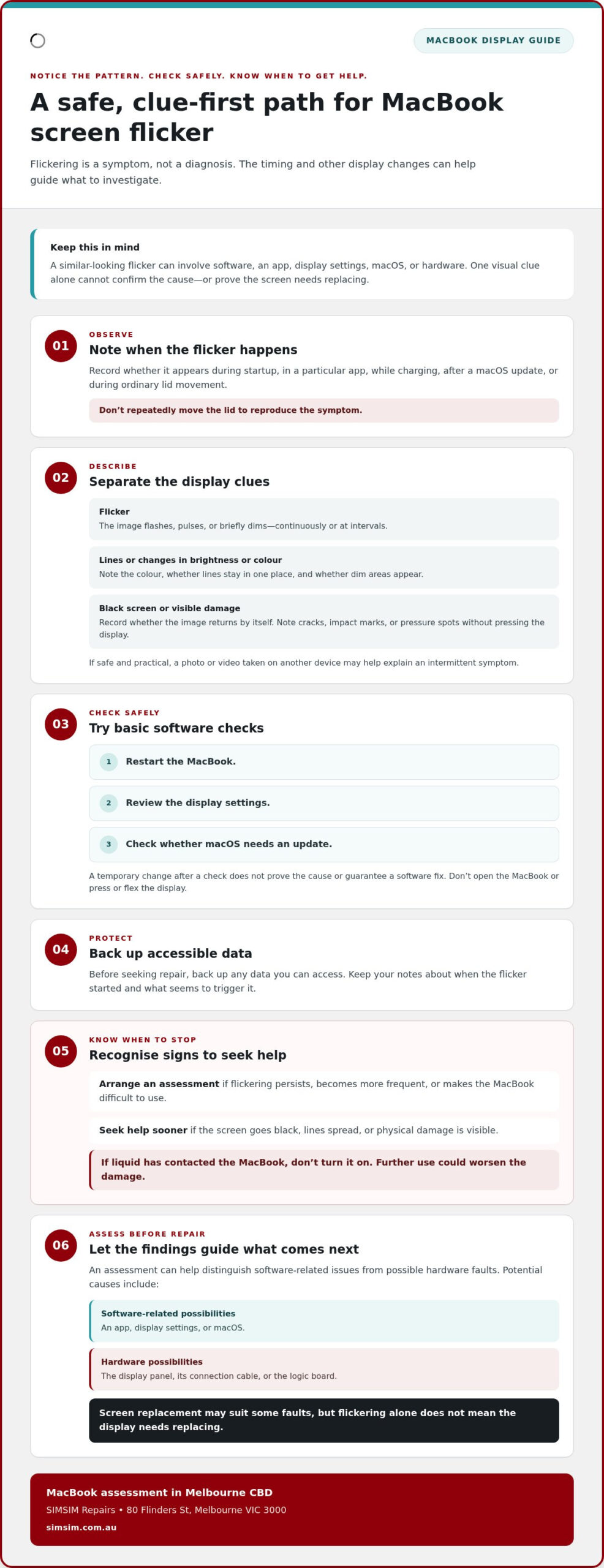
Notice whether the issue appears during startup, in a particular app, while charging or after a macOS update. If it seems related to opening or closing the lid, record that observation during ordinary use. Don’t repeatedly move the lid to reproduce the flicker. These details are useful clues, not a home diagnosis. For anyone considering a macbook screen flickering fix melbourne, clear observations can make the assessment more focused.
Which MacBook screen flicker patterns should you note?
Keep a short record of what the display does and when. Note whether the flicker is constant or intermittent, happens during a particular task, or first appeared at a certain brightness or while connected to power. If the screen changes when the lid moves during ordinary use, describe that too. Don’t press or flex the display to test it.
It also helps to distinguish flickering from other visible symptoms:
- Flicker: The image flashes, pulses or briefly dims, continuously or at intervals.
- Lines: Horizontal or vertical marks remain visible or appear alongside the flicker. Note their colour and whether they stay in one place.
- Black screen: The display goes completely dark, even if the MacBook seems to remain on. Record whether the image returns by itself.
- Physical damage: Cracks, impact marks or pressure spots are visible on the display. Don’t press the affected area to see whether the image changes.
Changes in brightness or colour are worth noting too. If it’s safe and practical, a photo or video captured on another device may help explain an intermittent symptom.
When should you stop troubleshooting and seek help?
Arrange a professional assessment if flickering persists, becomes more frequent or makes the MacBook difficult to use. Seek help sooner if the screen goes black, lines spread or you can see physical damage. Avoid opening the computer or attempting a repair yourself. Internal components can be damaged without the right tools and experience.
A flicker pattern is a clue, not proof of its cause. If liquid has contacted the MacBook, don’t turn it on. Further use could worsen the damage, so arrange professional help instead. Your notes can help the technician understand what you’re seeing.
What can cause a MacBook screen to flicker?
Different faults can create a similar-looking flicker. Software, an app, display settings or a macOS update may be involved. The display panel, its connection cable or the logic board are also possibilities. One symptom alone can’t distinguish between them. The timing you’ve observed gives useful context, but it isn’t a diagnosis.
A flickering screen is a symptom with multiple possible causes. Replacing the screen may be appropriate for some faults, but it isn’t an automatic fix for every flicker. An assessment helps identify what is happening before a repair is chosen.
Could macOS or an app be behind the flickering?
Think back to when the flicker began. Did it appear after a macOS update, or does it happen only while using one app? Note whether closing that app or restarting the MacBook changes the symptom. These observations can help narrow down what needs investigation, but a temporary change doesn’t prove the cause or guarantee a software fix.
For Apple’s general guidance on a display that won’t show an image, see Apple Support: Mac blank screen troubleshooting. Instructions can differ by MacBook model and macOS version, so check that any model-specific steps suit your device before applying them.
When might the fault involve display hardware?
If flickering appears as the lid moves during normal use, note when it happens and mention it during an assessment. A connection issue is one possibility, but that pattern can’t confirm a cable fault. A panel or logic-board issue may also affect the image. A technician needs to assess the MacBook to distinguish between possible causes.
- Flicker across the whole display can have more than one possible explanation. Note whether it occurs from startup or only after login.
- Lines, colour changes or dim areas can accompany display problems, but their appearance alone doesn’t identify a failed component.
- A symptom that changes with lid position is useful diagnostic context. Don’t repeatedly move the lid to try to reproduce it.
If liquid exposure is suspected, don’t turn on the MacBook. Further use could worsen damage. Water damage repairs generally take between 24 and 72 hours.
For a macbook screen flickering fix melbourne, the sensible next step is an assessment rather than guessing at a part. If the symptom continues, you can arrange a MacBook assessment with SIMSIM’s expert technicians. Their findings can guide whether screen replacement or another repair is appropriate.
Software fix or MacBook screen repair: how to tell what comes next
Look for a pattern before trying to identify a part. Flickering limited to one app may point towards a software-related issue, while symptoms that continue across different tasks may need closer assessment. Neither clue confirms the cause. A flickering display doesn’t automatically mean the entire screen needs replacing.
Use the comparison below to organise what you notice. It’s a guide to what to observe next, not a way to diagnose the MacBook at home.
| Symptom clue | Possible category | Safe observation | When to arrange assessment |
|---|---|---|---|
| Flicker appears in one app | App or software-related issue | Notice whether it happens in other apps, too. Restart once and see whether the same pattern returns. | If it spreads across apps, returns after restarting or disrupts normal use. |
| Flicker began after a macOS update | Software-related issue or another fault appearing at the same time | Record when the update and flickering occurred. Don’t assume one caused the other. | If the symptom persists or worsens rather than settling. |
| Flicker occurs across different apps or tasks | Software or display hardware are both possible | Note whether the pattern changes during ordinary use, without adjusting advanced settings. | If it’s recurring, worsening or making the screen hard to use. |
| Visible cracks, lines or other physical damage | Display hardware may be involved | Describe what you can see. Don’t press the screen or try to open the MacBook. | Arrange an assessment, especially if the display is difficult to use. |
What can a safe first check reveal?
Restart the MacBook and observe whether the flicker returns. Then compare ordinary use across different apps. For example, does the display remain steady in one app but flicker in another? Keep the check simple. Don’t open the computer, disconnect internal parts or attempt board repairs. Those steps can damage components and won’t reliably establish the cause.
A change after restarting is useful information, but it doesn’t prove the issue is fixed. If flickering returns, note what you were doing and share that detail during an assessment.
When is a professional MacBook assessment the better choice?
Arrange an assessment if flickering persists, gets worse or accompanies physical display damage. SIMSIM provides MacBook screen replacement, but it isn’t the right answer for every flicker. Expert technicians assess the device and use diagnostic testing to determine a suitable repair. The recommended approach is based on the assessment, rather than assumed to be a software fix, cable-only repair or full display replacement.
If you’re weighing up a macbook screen flickering fix melbourne, a professional assessment can turn uncertainty into a clear next step. You can schedule a MacBook assessment with SIMSIM.
How to prepare your MacBook for flickering-screen repair in Melbourne
A little preparation can make an assessment more useful and help you feel ready for the next step. You don’t need to identify the fault yourself. Focus on recording what you’ve noticed, protecting your data and arranging a visit.
- Write down the display symptoms. Note when the flickering began and whether it’s constant, intermittent or tied to a particular app or task. Include changes in brightness, charging or ordinary lid movement if you’ve noticed them. Describe the symptom instead of guessing which component has failed.
- Back up accessible data. If you can use the MacBook safely, make a full backup before bringing it in. If the display makes this difficult, don’t risk damaging the device or data by attempting a repair. Tell the technician what you can and can’t access.
- Arrange an assessment. Share your notes and the MacBook model, if you know it. SIMSIM provides diagnostic testing so expert technicians can assess the device before determining the repair approach.
What details should you bring to the assessment?
Bring the MacBook model if known, when the flicker started and any recent changes, such as an update or a new pattern of use. Describe what happens rather than naming a suspected fault. If available, a short recording made on another device can help show an intermittent symptom.
A passcode is recommended for full functionality testing. Without it, the camera, Wi-Fi and Bluetooth can’t be verified. Have it available for the assessment and provide it directly to the technician as needed.
How can you arrange a Melbourne CBD visit?
SIMSIM’s Melbourne CBD store is at 80 Flinders St, Melbourne VIC 3000 and operates from 9 am to 6 pm. Scheduling ahead gives you a clear way to arrange an assessment for a flickering MacBook display.
If you’re preparing for a macbook screen flickering fix melbourne, book an assessment through the SIMSIM online repair schedule. You can also visit the SIMSIM YouTube channel for repair-related guidance. Keep your symptom notes close and share them when you bring in your MacBook.
Book a MacBook screen flickering assessment with SIMSIM in Melbourne
A flickering display can leave you wondering whether you need a software adjustment, a targeted repair or a replacement screen. The symptom alone can’t answer that. SIMSIM provides MacBook screen replacement and laptop repair in Melbourne CBD. Expert technicians use diagnostic testing to help identify the fault before determining the repair approach.
Screen replacement is available, but it isn’t automatically required for every flickering display. An assessment connects what you’re seeing with an appropriate repair, rather than relying on assumptions about the symptom.
What should customers expect when arranging repair?
The repair service, diagnostic testing and genuine replacement parts are included as stated. SIMSIM’s expert technicians assess the MacBook and use their findings to determine a suitable repair. The recommendation depends on the device’s condition, so don’t assume a particular component fix or full-screen replacement before assessment.
Pricing is transparent and available on request or through the scheduling or quote system. You can review the pricing for the recommended work before deciding how to proceed.
Your notes about when the flickering occurs can give the assessment useful context. Share what you’ve observed, along with any relevant changes in how the display behaves.
Book your MacBook assessment at the Flinders St store
Arrange an assessment at SIMSIM’s Melbourne CBD store at 80 Flinders St, Melbourne VIC 3000. Schedule online and bring your MacBook in for diagnostic testing. The suitable repair and completion timing depend on the assessment.
For additional repair-related guidance, explore the SIMSIM YouTube channel. When you’re ready to take the next step, use the online schedule to organise an assessment and share what you’ve noticed about the flicker.
Schedule a MacBook repair assessment with SIMSIM.
Make your next step a clearer one
A flickering display can make it tempting to keep adjusting settings or put off deciding what to do. Instead, have the MacBook assessed so you can make decisions based on its condition, not guesswork. That’s a practical way to work towards returning to work, study and everyday use.
For Melbourne owners considering a macbook screen flickering fix melbourne, SIMSIM’s repair team can assess your MacBook and explain the suitable next step. SIMSIM has 142 Google reviews, Trustindex-verified, offering another point of reference as you decide where to arrange an assessment.
Take the first step today. Book a MacBook repair assessment with SIMSIM.
Frequently Asked Questions
Why is my MacBook screen flickering?
A MacBook screen can flicker because of software behaviour, an app, display settings or a hardware fault. For example, flickering that starts while using one program gives a different clue from flickering that appears across the whole desktop, but neither confirms the cause. Note what’s on screen and what you’re doing when it happens. For a macbook screen flickering fix melbourne, an expert assessment can identify what needs attention.
Can I fix a flickering MacBook screen without replacing the whole display?
Yes. A flickering display doesn’t always mean the whole screen needs replacement. The cause may be software-related or involve another component, so the suitable solution depends on diagnostic findings. You can try a basic restart and observe whether the flicker returns, but avoid opening the MacBook or attempting internal repairs. SIMSIM provides MacBook screen replacement when appropriate, with the recommendation based on assessment rather than the symptom alone.
Is it safe to keep using a MacBook with a flickering screen?
If the MacBook remains usable and there’s no suspected liquid exposure or visible damage, you may be able to use it briefly while arranging an assessment. Back up accessible files, and avoid relying on the display for important work if it’s worsening or becoming difficult to read. If liquid has contacted the device, don’t turn it on. Arrange professional help instead.
Why does my MacBook screen flicker when I move the lid?
Flickering that changes with lid position can be a useful clue because the display connection or another hardware component may be involved. It doesn’t prove that a cable has failed, and the symptom alone can’t identify the part at fault. Note whether it happens during normal opening or closing, but don’t repeatedly move or flex the lid to recreate the flicker. Share the observation during a technician’s assessment.
Can a macOS update cause MacBook screen flickering?
Flickering may appear after a macOS update, but timing alone doesn’t show that the update caused it. Record when the update occurred, when the display issue began and whether it appears in more than one app. A restart can offer another useful observation, but don’t assume it will resolve the problem. Avoid model-specific changes unless they’re appropriate for your MacBook and macOS version.
How much does MacBook screen flickering repair cost in Melbourne?
The cost depends on what the assessment finds, so there isn’t one price that applies to every flickering screen. A software issue and a fault requiring replacement parts can call for different work. SIMSIM provides transparent pricing on request or through the scheduling or quote system. The assessment helps establish which repair is appropriate before you decide how to proceed, rather than relying on a price guess based only on the symptom.
Where can I get a MacBook screen flickering fix in Melbourne CBD?
SIMSIM provides MacBook repair at its Melbourne CBD store at 80 Flinders St, Melbourne VIC 3000. Arrange an assessment online and bring a brief note about when the flickering occurs. It can help the technician understand what you’ve observed and determine an appropriate repair based on your MacBook’s condition. Book a MacBook repair assessment with SIMSIM.