

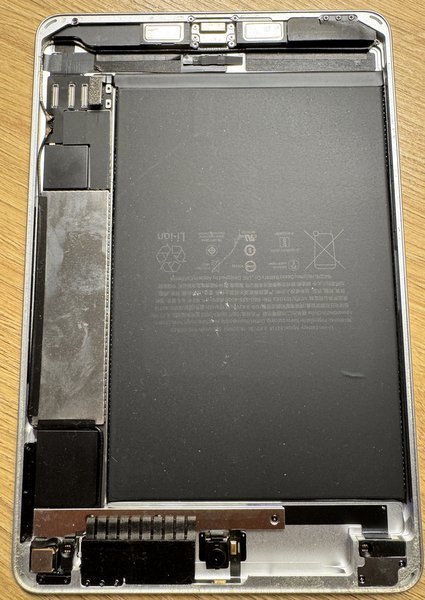
An iPad battery replacement doesn’t have one Melbourne-wide price. The cost depends on the iPad model and whether AppleCare covers the service. For AppleCare-covered service, the fee is the same at Apple and all Apple Authorised Service Providers. Outside that coverage, providers set their own fees and estimates.
It’s sensible to want a clear estimate before deciding what to do with a device you rely on every day. This guide explains how the model and service coverage affect the estimate, what to consider for out-of-warranty service, and how to arrange repair in Melbourne. The model and the repair needed shape the quote. You’ll also find practical points to consider when choosing a repair service.
Key Takeaways
- See why an iPad’s model and service coverage shape its battery service estimate.
- Learn how AppleCare service fees compare across Apple and Apple Authorised Service Providers.
- Understand why out-of-warranty estimates can vary between providers.
- Get a clearer sense of what to consider when arranging a repair in Melbourne.
- Find the next step for booking online or visiting the store at 80 Flinders St, Melbourne VIC 3000.
How Much Does iPad Repair Cost in Melbourne?
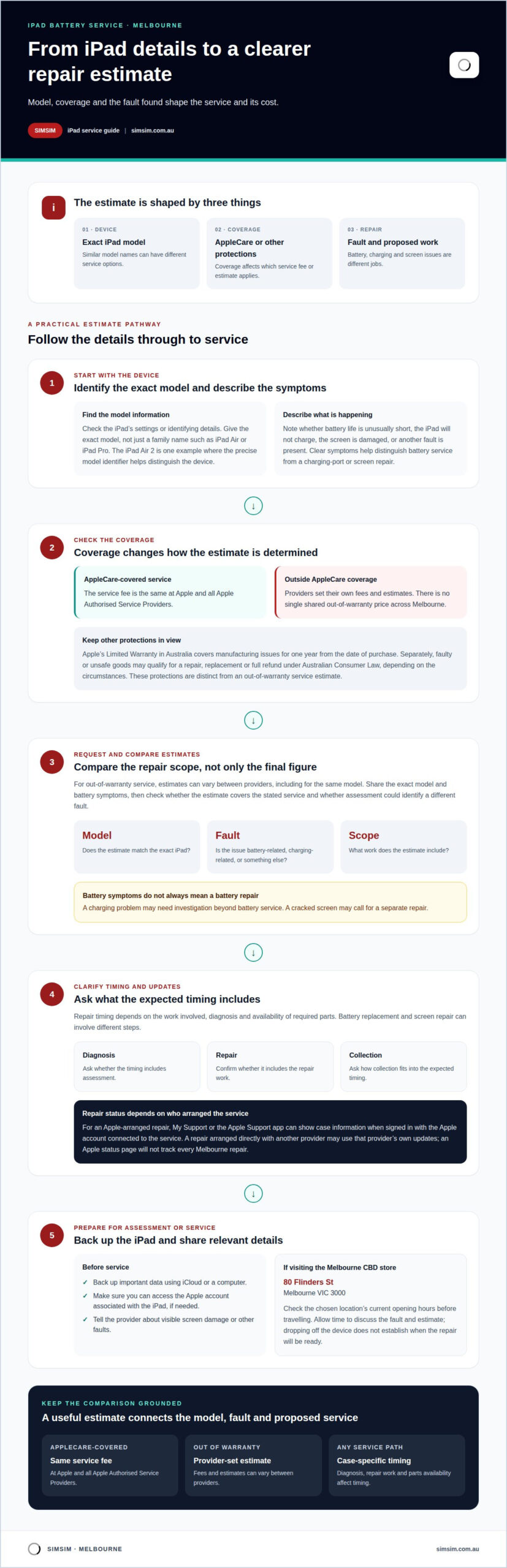
There isn’t one repair cost for every iPad. The estimate depends on the exact model, the service required and whether AppleCare covers the repair. For service covered by an AppleCare plan, the fee is the same at Apple and all Apple Authorised Service Providers. Outside that coverage, providers can set their own fees and estimates.
Battery service and screen repair are different jobs, so identify the fault before comparing estimates. A cracked screen, a battery that drains quickly and a device that won’t charge point to different repair needs. For an accurate quote, start with the iPad’s model information and describe the symptoms clearly. The price depends on the case and is given after a quote request; the model and required repair are key cost factors.
Turnaround time and repair updates
Repair timing depends on the work involved, the diagnosis and whether the required parts are available. A battery replacement and a screen repair can involve different steps. Ask for the expected timing as part of the estimate, including whether it covers diagnosis, repair and collection. This helps you plan for the time you’ll be without your device.
For an Apple-arranged repair, My Support or the Apple Support app can show information associated with the case. Sign in with the Apple account connected to the service and look for the case’s current status. A repair arranged directly with another provider may use that provider’s own updates, so an Apple status page won’t track every Melbourne repair.
Locations, hours and model details
Melbourne repair locations have their own opening hours, so check the chosen location’s current hours before travelling. In the CBD, the store address is 80 Flinders St, Melbourne VIC 3000. Allow time to discuss the fault and the estimate when you arrive; dropping off a device doesn’t itself establish when the repair will be ready.
Before requesting an estimate, note the iPad model shown in its settings or identifying information. This helps distinguish models with similar names and guides the assessment towards the right repair. Describe whether the concern is battery life, charging, a damaged screen or another fault. Clear symptoms help separate a battery issue from a charging-port problem or screen repair.
Apple’s Limited Warranty in Australia covers an iPad against manufacturing issues for one year from the date of purchase. Separately, the Australian Competition and Consumer Commission says faulty or unsafe goods may qualify for a repair, replacement or full refund under Australian Consumer Law. These protections depend on the circumstances and are distinct from an out-of-warranty service estimate.
IPad battery replacement prices by model
Apple service pricing depends on the iPad model and coverage, while out-of-warranty estimates can vary by provider. Identifying the exact model helps clarify which service and estimate apply.
Battery Service Prices by Model
Apple’s Australian iPad battery service price depends on the model and coverage. For AppleCare-covered service, the fee is the same at Apple and all Apple Authorised Service Providers. For out-of-warranty service, providers can set their own fees and estimates, so there isn’t one shared price across Melbourne. The estimate should match the specific iPad and service required.
To compare estimates, provide the model name and describe the battery issue, such as unusually short use between charges. Ask whether the estimate covers the stated service, and whether the assessment identifies a different fault. A charging problem, for example, may need investigation beyond battery service. The price depends on the case and is given after a quote request; the model and required repair shape the cost.
Supported iPad Models
Supported models depend on the repair provider and the service being requested. Give the exact model, not only a family name such as iPad Air or iPad Pro. The iPad Air 2 is one example where the precise model identifier helps distinguish the device during assessment. Don’t assume that every model in a family has the same service options.
Before arranging service, find the model information in the iPad’s settings or identifying details. Share it with the provider alongside the battery symptoms. This gives technicians a clearer starting point for assessing the device. A model list should name supported generations and variants explicitly, as a broad label alone doesn’t establish that every version is covered.
Third-party battery replacement carries risks if the work or parts are unsuitable for the device. iPad batteries are glued in and require care during replacement, so the repair involves more than opening the case and swapping a component. Ask how the assessment distinguishes battery failure from a charging fault, and what the estimate includes. A clear explanation of the repair scope helps you understand the proposed work before proceeding.
Prepare your iPad by backing up important data before service. Use an iCloud or computer backup, and make sure you can access the Apple account associated with the device if needed. Tell the provider about visible screen damage or other faults, as a damaged display may affect handling during battery service. Keep the model details and backup information ready when arranging an assessment.
Out-of-warranty service estimates
An out-of-warranty estimate depends on the iPad model, the fault found and the proposed repair. Apple says Apple Authorised Service Providers can set their own service fees and provide their own estimates. Estimates may therefore differ even for the same model. Compare what each estimate includes, not just its final figure.
In Australia, Apple’s Limited Warranty covers an iPad against manufacturing issues for one year from the date of purchase. A battery concern outside that period may still need assessment to identify its cause; age alone doesn’t establish whether a fault is covered. A cracked screen or charging issue may also call for a separate repair rather than battery service.
Australian Consumer Law is a separate consideration. According to the Australian Competition and Consumer Commission, faulty or unsafe goods may qualify for a repair, replacement or full refund. Whether a remedy applies depends on the circumstances and the consumer guarantee involved. This is distinct from Apple’s Limited Warranty and from a paid out-of-warranty estimate.
Assessment fees are not one uniform amount across providers. An estimate should make clear whether an assessment fee applies, what it covers, and whether it is separate from repair work. If the diagnosis identifies a charging fault instead of a battery fault, the proposed work and cost factors may change. The price depends on the case and is given after a quote request.
Before approving iPad repairs, look for a written breakdown identifying the model, diagnosed issue and work included. It should distinguish assessment from repair charges and state whether parts and labour are covered by a repair warranty. Warranty terms vary, so the document should explain the coverage period, scope and exclusions rather than relying on a broad assurance.
Part descriptions matter, too. If an estimate uses the word “genuine,” it should identify what that means for the proposed component. A parts label alone doesn’t explain the repair process or warranty coverage. A clear estimate connects the part and labour to the diagnosed fault, so you can understand what the charge relates to.
Keep the estimate and any service record together after approval. If the same issue returns, those details help show what work was completed and what terms applied. For a charging problem, a separate charging-port assessment may be more relevant than battery service. You can book an assessment to begin arranging your next step.
Walk-in and online booking options
You can arrange a repair in Melbourne by booking online or visiting in person. Online booking gives you a clear starting point; a walk-in visit lets you bring the iPad and describe its symptoms directly. Choose the option that suits your schedule, and have the model details and fault ready. That preparation helps keep the first conversation focused.
To book online, use the booking button and enter the requested appointment details. Include the iPad model and explain what’s happening, such as rapid battery drain or charging that stops unexpectedly. Mention any cracked screen or unresponsive button, too. Clear details help distinguish a battery concern from another fault during assessment.
Before submitting, review the booking information for accuracy. Use an email address or phone number you can access, so appointment details reach you. Keep the confirmation on your phone or in your inbox. If your plans change, use the booking information to manage the appointment rather than arriving at a different time.
A walk-in can suit someone already in the Melbourne CBD who prefers an in-person conversation. The store is at 80 Flinders St, Melbourne VIC 3000. Bring the iPad itself and be ready to explain when the problem began, what charging looks like, and whether the device has other damage. These details help make the initial assessment more useful.
For either route, keep the iPad’s model information close. The model name helps identify the device, while a concise symptom description provides context. For example, “battery drains quickly, but charging works” is more useful than “it’s faulty.” Mention whether the issue changes when using another cable or power source, if you already know from normal use.
- Online: use the booking button and enter your appointment details.
- In person: bring the iPad to the Melbourne CBD address.
- For either option: provide the model and describe the fault.
- Before service: back up important data and keep your Apple account details accessible.
Plan an in-person visit around the store’s published opening hours. A booking helps organise an appointment, but it doesn’t specify the repair duration. The diagnosis, model and work required shape the next steps. If the issue is a charging fault rather than battery drain, the assessment may point to a different repair service.
If online booking suits you, book an appointment online and include the iPad model and symptoms. A few accurate details make the visit more purposeful, whether you’re coming from nearby or travelling into the CBD.
IPad battery replacement pricing in Melbourne
For iPad battery service in Melbourne, the model and diagnosed fault shape the estimate. There isn’t one price that applies to every iPad. Request a quote for the specific model and repair needed. That gives you a more useful starting point than comparing an iPad estimate with phone repair prices.
AppleCare coverage affects how to interpret an estimate. For service covered by an AppleCare plan, Apple says the fee is the same at Apple and all Apple Authorised Service Providers. For out-of-warranty service, providers can set their own fees and estimates. Compare the service scope and identified model, not just the provider name or a headline figure.
A useful quote discussion starts with the exact iPad model and a clear symptom. “Battery drains quickly” describes a different concern from “the iPad won’t charge.” A charging-port fault can affect charging without establishing that the battery needs replacement. Likewise, a cracked screen may require separate work, not automatic inclusion in battery service.
Ask for the estimate to distinguish the diagnosed issue from any additional work. For example, if the initial concern is battery life but the assessment points to a charging port, the proposed repair may change. If the screen is cracked, ask whether the estimate addresses only the battery concern or also includes screen replacement. This keeps the scope clear before you approve work.
Use these details to make an informed comparison between Melbourne estimates:
- Model: confirm the iPad’s exact model, rather than relying only on a family name.
- Coverage: note whether AppleCare applies or the service is out of warranty.
- Diagnosis: match the proposed repair to the symptoms, such as poor battery life or charging trouble.
- Scope: identify whether cracked-screen or charging-port work is separate.
These distinctions matter because a battery service estimate can’t be compared fairly with an iPhone screen replacement or a charging-port repair. Each addresses a different device and fault. For an iPad, the model and assessment are the practical basis for understanding what the estimate covers.
Before approving a repair, read the estimate for its service description and any separate charges. Keep the written details with your appointment information, so you can refer to the agreed scope. If battery symptoms are affecting your daily use, book an iPad assessment to start the pricing conversation.
The estimate depends on the iPad model and diagnosis, so request a quote for the specific device. For AppleCare-covered service, the fee is the same at Apple and Apple Authorised Service Providers; out-of-warranty providers may set their own fees.
SIMSIM Repairs: iPad Charging Port Repair
SIMSIM Repairs can help when an iPad’s charging problem points to its port rather than its battery. If the device charges intermittently or doesn’t respond as expected when connected, an assessment can identify whether the charging port needs repair. Battery drain and charging faults can feel similar, so describe exactly what happens.
For an iPad that won’t charge reliably, share the model and symptoms when arranging an appointment with SIMSIM Repairs in Melbourne CBD. This gives the repair team useful context before assessing the device. SIMSIM Repairs also handles other selected device repairs, including iPhone screen replacement and MacBook battery replacement.
Arrange an appointment with SIMSIM to discuss an iPad charging issue.
Choose your next step with confidence
The right next step starts with the symptom you want resolved. Keep your iPad’s model details and a brief description of the issue nearby, then use them to make your appointment more focused. If you’re considering iPad battery replacement in Melbourne, clearly describing what the device is doing can help guide the conversation.
SIMSIM Repairs offers iPhone screen replacement and MacBook battery replacement, alongside iPad charging-port repair. These services address different devices and faults, so describe the device you’re bringing and the problem you’ve noticed.
When you’re ready to arrange an appointment, book with SIMSIM Repairs. A considered next step can make it easier to get the right repair conversation underway.
Frequently Asked Questions
How much will it cost?
The estimate depends on your iPad model, the fault and the repair required. A battery concern may need assessment first, especially if charging symptoms suggest another issue. Share the exact model and describe what you’ve noticed when requesting a quote. This helps ensure the estimate relates to your device and proposed repair, rather than a general price for all iPads.
Is there a service guarantee?
Repair warranty terms are provided in the quote, so read them before approving work. Check what they cover, including parts and labour, and keep the quote with your service record. Apple’s Limited Warranty is separate: in Australia, it covers manufacturing issues for one year from the purchase date. Coverage depends on the issue and applicable terms, so don’t assume every battery repair is covered.
Where can I get a service?
You can arrange iPad service in Melbourne through Apple, an Apple Authorised Service Provider or a local repair service. If you visit SIMSIM Repairs, bring the iPad and explain the fault clearly. For example, describe whether the battery drains quickly, charging is unreliable, or both. Specific symptoms help the assessment focus on the right problem and distinguish battery concerns from charging faults.
Where can I get an iPad battery replaced in Melbourne?
In Melbourne, you can arrange service through Apple or an Apple Authorised Service Provider. Independent repair estimates may also be available locally, with fees set by each provider. For iPad battery replacement in Melbourne, have the exact model and symptoms ready when requesting an estimate. SIMSIM Repairs’ YouTube channel offers another way to explore its repair-related content.
How much does iPad battery replacement cost in Melbourne by model?
The estimate depends on the iPad model, coverage and service provider. AppleCare service fees are consistent at Apple and Apple Authorised Service Providers, while out-of-warranty providers can set their own estimates. Give the repairer the exact model identifier, rather than only “iPad Air” or “iPad Pro.” This helps ensure the estimate relates to the correct device and required service.
Which Melbourne repair stores offer iPad battery replacement and warranties?
Melbourne has Apple service channels, Apple Authorised Service Providers and independent repair services. Warranty terms differ, so read the quote for coverage of parts and labour before approving the work. Keep a copy with your service record as a reference if you need to discuss the completed repair. Written terms explain the applicable coverage more clearly than a general statement about a warranty.
How long does iPad battery replacement take in Melbourne?
Timing depends on the model, assessment and work required. An iPad with charging trouble alongside battery drain may need a different assessment from one showing battery symptoms alone. Describe both issues when arranging service, and ask how repair updates will be shared. Use the timeframe provided for your specific device to plan around being without it, rather than assuming every iPad follows the same schedule.
How can a repair professional check iPad battery health and determine when it needs replacement?
A professional can assess the iPad’s reported symptoms and condition before recommending battery service. Explain practical changes, such as needing to charge more often or seeing inconsistent charging. For iPad battery replacement in Melbourne, provide the model and symptom history during the assessment. This can help distinguish a battery concern from a charging-port fault, which may require a different repair.