

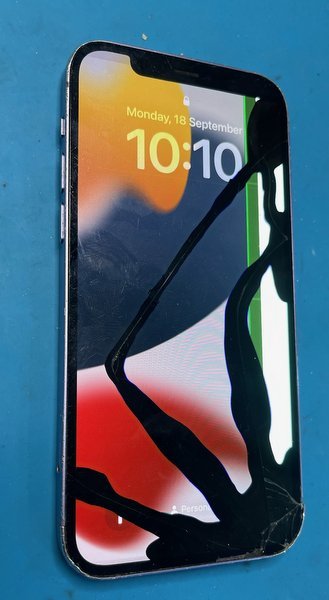
A green line, black spots or flickering don’t automatically mean your phone is beyond repair. If the display itself is damaged, a screen replacement may resolve the symptoms, but the right repair depends on the cause. For an iPhone, repair may be possible, though not every display fault has the same solution.
It’s unsettling when a familiar screen suddenly looks wrong, especially when the glitch makes messages, maps or everyday tasks harder to see. If you’re looking to fix a green line on your phone screen in Melbourne, this guide explains how a professional assesses the fault and what may happen next.
You’ll learn which screen repair options may suit green lines, black spots and flickering, what can affect the repair and its cost, and how booking and warranty work. We’ll also cover what to consider if the display freezes, glitches or shows pixel damage, so you can make a clear decision before arranging a repair.
Key Takeaways
- Green lines, black spots and flickering can point to a display fault that may be repairable; the cause helps determine the right fix.
- Screen types and parts can differ, so understand the available options and what each means for your repair.
- Freezing, glitching and pixel damage can affect how the display works. Learn what a professional diagnosis considers before repair.
- Australian Consumer Law guarantees are separate from a manufacturer’s warranty and can last longer, according to the ACCC.
- Reviews from multiple sources can help you assess a repair store’s service quality. Explore the YouTube channel and see the booking process.
Can you repair an iPhone screen with green lines, black spots or flickering?
Yes, an iPhone display with green lines, black spots or flickering may be repairable. A technician first assesses whether the fault is in the screen or another component.
Diagnosing Display Faults
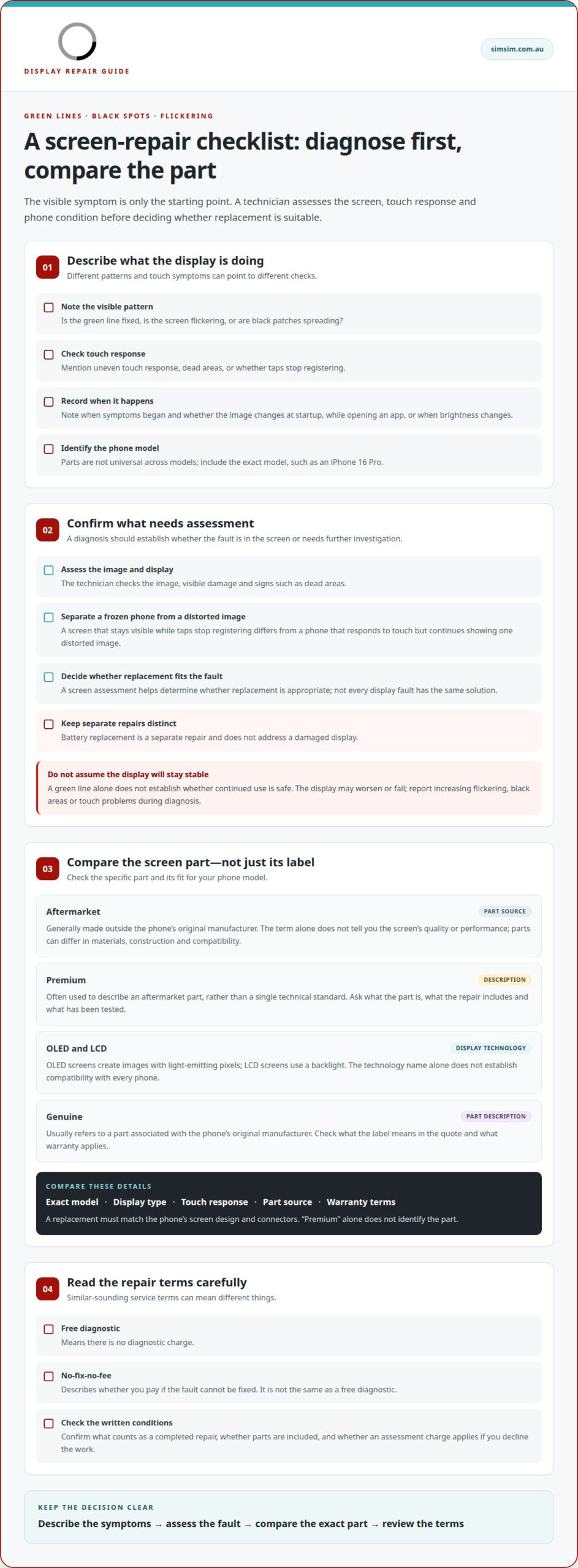
Diagnosis considers the visible pattern, touch response and whether symptoms change during normal use. A fixed green line, flickering, spreading black patches and uneven touch response are different signs. Note when each symptom appears to help describe the fault. The assessment should establish whether the issue is with the screen or needs further investigation.
Screen Diagnosis and Replacement
A screen assessment helps determine whether replacement is appropriate for the fault. A technician checks the image, touch response and display for signs such as dead areas or visible damage. If replacement is suitable, the screen option matters: the part and its compatibility affect how the display looks and responds. Battery replacement is a separate repair and does not address a damaged display.
Continued Use and Display Failure
A green line alone doesn’t establish whether continued use is safe, as this depends on the cause and condition of the phone. The display may worsen or fail, making the image difficult or impossible to use. If flickering, black areas or touch problems increase, report the change during diagnosis. A technician can assess the symptoms rather than assume the screen will remain stable.
Free diagnostics and no-fix-no-fee are different terms, not standard features of every repair. A free diagnostic means there’s no diagnostic charge; no-fix-no-fee describes whether you pay if the fault can’t be fixed. Read the written terms carefully. Check what counts as a completed repair, whether parts are included and whether an assessment charge applies if you decline the work.
Before arranging an assessment, note your iPhone model and when the line, spots or flickering began. Mention whether the image changes at startup, while opening an app or when brightness changes. These details help a technician assess the screen consistently. If you want to fix a green line on your phone screen in Melbourne, diagnosis is the practical first step, not a promise that every fault needs the same repair.
Aftermarket, premium, OLED and genuine screen options
Screen labels can describe a part’s source, display technology or positioning. For a mobile phone, including an iPhone, compare compatibility, display behaviour, touch response and the repair terms for the part. A label alone doesn’t show whether a screen will suit your phone.
Aftermarket generally describes a part made outside the phone’s original manufacturer. The term alone doesn’t tell you the screen’s quality or performance. Parts can differ in materials, construction and compatibility across phone models. The specific part and its repair terms matter more than the broad label.
Premium is often used to describe an aftermarket part, rather than a single technical standard. A “premium” label may not explain the part’s manufacturer, materials or testing. Treat it as a description, not proof of a particular feature. A useful comparison identifies the part category and explains what the repair includes.
OLED describes a display technology. OLED screens create images with light-emitting pixels, while LCD screens use a backlight. The distinction can affect how images appear, but the technology name alone doesn’t establish compatibility with every phone. A replacement must match the model’s screen design and connectors.
Genuine usually refers to a part associated with the phone’s original manufacturer, but the term should be considered alongside the specific repair details. Check what the label means in the quote, how the part is described and what warranty applies. These details help distinguish a clear parts description from a broad sales term.
Compare the part, not just the label
Start with the exact phone model, such as an iPhone 16 Pro, because parts aren’t universal across models. Then compare the display type, touch response, stated part source and warranty terms. A screen repair for an iPhone 16 Pro must be considered for that model, rather than assumed equivalent to another iPhone. Phone repairs should specify the replacement being fitted, not rely on “premium” alone.
Before choosing, consider what matters most: matching the original display experience, understanding the part’s origin or comparing repair terms. The right option depends on the model and the parts available for it. The repair explanation should also distinguish screen replacement from battery replacement, as they address separate components.
If you’re ready to discuss a screen option for your phone, book a repair assessment and include the phone model and display symptoms.
Display problems including freezing, glitching and pixel damage
A frozen image, flickering display and damaged pixels can look similar at first. The key distinction is whether the phone stops responding or only the image becomes distorted. A professional diagnosis separates these symptoms before identifying a suitable repair.
When the image freezes
If the same screen remains visible while taps stop registering, the issue may involve responsiveness rather than visible pixel damage. A technician assesses whether the phone itself has stopped responding or the display is failing to show changes. For example, a frozen home screen differs from a phone that responds to touch but continues showing one distorted image. That distinction guides the next checks.
A freezing complaint needs context. The technician can record whether it happens while opening an app, watching a video or returning to the home screen. If the phone responds again but a line or patch remains, that persistent mark is a separate display symptom. The description “screen frozen” can otherwise obscure two different behaviours.
Glitching and image distortion
Glitching may appear as flicker, brief flashes, horizontal bands or an image that shifts unexpectedly. Describe the behaviour and whether it affects one app or the whole display. A technician can compare the symptom across different screens and normal phone functions. This helps distinguish a recurring display fault from a temporary visual problem linked to one activity.
The pattern matters. A line that stays in the same place differs from distortion that moves or disappears. A technician should assess touch response alongside the image. For instance, a visible band with normal touch response differs from one covering an area where taps no longer register. These details help define the fault.
Pixel damage and charging symptoms
Pixel damage can look like a tiny dark dot, a bright point or a cluster forming a black patch. A fixed mark differs from a shifting glitch, while a growing dark area reduces how much of the display remains visible. Note the damage’s location and appearance so the technician can compare it during diagnosis. The pattern, not just the word “spot”, matters.
Include charging symptoms in your description, but don’t assume they identify the display fault. Tell the technician whether the screen issue appears while the phone is charging or also when it’s unplugged. This provides useful context without assuming the charger caused the problem. A phone that charges normally may still have a display issue, and separate symptoms need separate assessment.
The practical takeaway is simple: report what freezes, what flickers, where pixel marks appear and whether charging changes the symptom. These observations help a professional assess the display and decide what the next repair step should address.
Can Australian Consumer Law cover a phone screen green line after the manufacturer warranty expires?
Yes. In Australia, consumer guarantees under Australian Consumer Law are separate from a manufacturer’s warranty and can last longer, according to the ACCC. An expired warranty alone doesn’t settle whether a green-line fault is covered. Equally, seeing a line doesn’t establish that a consumer guarantee applies. The phone’s purchase details and the fault’s history help explain the situation.
Record what happened, when the line first appeared and whether the display changed afterwards. For example, note whether it appeared without a known incident or after the phone was dropped. These details describe the fault but don’t decide coverage by themselves. Keep the phone model, purchase receipt and warranty information together to make the timeline clear.
Next, describe the display symptom plainly. Note whether the green line stays in one position, flickers or appears with black spots or touch problems. A dated photo can show how the display looked at a particular time. If the fault changes, record that too. A clear record helps distinguish the original complaint from later damage or new symptoms.
Separate the technical assessment from the consumer-guarantee question. A screen diagnosis can describe the visible fault and whether replacement is technically appropriate, but it doesn’t determine by itself whether Australian Consumer Law applies. Keep any written diagnosis, repair estimate and warranty response with your purchase records. These documents help explain what was assessed and what each party said.
When reviewing the issue, compare the phone’s age, condition and fault history with your records. For instance, a line appearing during ordinary use is a different account from one appearing immediately after an impact. Neither example alone decides the outcome. Don’t treat the manufacturer’s warranty end date as the only relevant detail: the ACCC says consumer guarantees can continue beyond that warranty.
Preserve the timeline, purchase evidence and diagnosis before choosing a repair. Keep copies of messages and written responses, including explanations of the fault or warranty position. This gives you a clearer basis for discussing the screen problem and possible coverage. An expired manufacturer warranty matters, but it doesn’t automatically end the separate consumer-guarantee question.
Melbourne Phone Screen Repair: Comparing Repair Stores
Start with the fault and exact phone model, then compare repair stores using the same details. For example, a green line on an iPhone and a cracked Samsung Galaxy display are different repair requests. A useful comparison explains what the assessment covers, which screen part is proposed and what happens if the fault requires another repair.
Look beyond a single review
Read reviews from multiple sources, not just one platform. The ACCC says reviews from several sources can help you compare service quality and assess whether a business is genuine. Look for detailed accounts of the repair, communication and how concerns were handled. A comment naming a specific phone model and repair gives more context than a brief rating.
Compare the written information the store provides. It should identify the phone model, the fault being assessed and the proposed work. For example, an iPhone screen estimate should distinguish screen replacement from unrelated repairs. Clear wording helps you understand what the quote covers and gives you something concrete to refer to if the proposed work changes.
Compare parts and repair terms
Ask how the screen part is described, whether it is aftermarket or genuine, and what warranty terms apply. These labels aren’t interchangeable, and the wording should make the option clear. Check whether the terms cover the replacement part, repair work or both. A written explanation is easier to compare than a general assurance about quality.
Repair pricing depends on the phone model, screen part, diagnosis and repair scope. Compare quotes only when they describe similar work. One estimate may include a different part or repair scope from another. For example, a quote that includes diagnosis can’t be compared fairly with one that describes replacement alone.
Ask how the store handles a fault that screen replacement can’t resolve. The answer should explain the next step and any charge that could apply before work proceeds. Also note whether the store records the phone’s condition and the agreed repair. These details make the process easier to follow if the display has multiple symptoms.
Choose a Melbourne repair store whose explanation matches your phone model, symptoms and preferred screen option. Keep the quote and repair terms together so you can review them before deciding. For an assessment, book a phone screen repair appointment.
SIMSIM Repairs
SIMSIM Repairs in Melbourne CBD can help when a green line, black spots or flickering make your phone display difficult to use. For an iPhone with a screen fault, iPhone Screen Replacement is a practical next step after assessing the symptoms and repair options. Share your phone model and describe what the display is doing when booking, so the repair request starts with useful context.
If you’d like to learn more about the business, visit the SIMSIM YouTube channel. For help with your phone screen, contact SIMSIM Repairs.
Choose a clear next step for your phone
A damaged display can make everyday tasks harder. Before arranging a repair, consider what you rely on your phone for most, such as reading messages, using maps or handling work calls. This can help you explain the impact of the fault and decide what you need from the repair conversation.
If you’re deciding how to fix a green line on your phone screen in Melbourne, start with a professional assessment that fits your situation. You don’t need to settle every repair detail beforehand; a clear booking request gives you a place to begin. Include your phone model and a brief description of the display issue.
When you’re ready to take that step, book an appointment with SIMSIM Repairs. A considered next move can make the path forward feel simpler, and help you get back to using your phone with confidence.
Frequently Asked Questions
How long does it take?
Repair time depends on the phone model, fault and work required. A screen replacement may follow a different process from a diagnosis involving several components. For example, a green line alongside touch problems may require a broader assessment than a visible line alone. After identifying the device and symptoms, the repairer can provide a useful time estimate.
What causes a green line on a phone screen?
A green line commonly points to a display fault, though its cause can vary. A drop or pressure may damage screen components, while a fault can also appear without obvious external damage. If the line stays visible across different apps, mention that during assessment. Note whether it appeared after an impact or alongside flickering, black spots or touch problems.
Can a green line on a phone screen be fixed without replacing the display?
Sometimes, but it depends on the cause. If the fault is in another component or due to a temporary software issue, replacing the display may not be the right answer. A persistent line caused by display damage usually calls for screen replacement. A professional assessment helps distinguish these cases, so the repair addresses the fault rather than replacing a screen without a clear reason.
How much does it cost to repair a green line on an iPhone screen in Melbourne?
The price depends on the iPhone model, extent of damage, part used and repair scope. An estimate for one iPhone model may not apply to another, even if both show a green line. Request a quote for an individual price. Make sure it identifies your exact model and the screen work it covers.
How much does it cost to repair a green line on a Samsung screen in Melbourne?
The price depends on the Samsung model, damage extent, replacement part and repair scope. Galaxy models can require different parts, so a quote for one device shouldn’t be treated as a price for another. Request a quote for the specific repair. Include the exact model and describe additional symptoms, such as flickering or black patches, to help define the work.
How long does phone screen repair take in Melbourne, and is same-day service available?
Timing depends on the device, fault and repair scope. SIMSIM advertises many repairs as completed “within 30 minutes”, but that timing doesn’t mean every screen repair can be completed within that period or guarantee same-day service. For example, a repair involving additional damage may need a different assessment. Share the phone model and symptoms when booking to help establish the appropriate timing.