


What if the next tap makes it harder to understand what happened to your Pixel? When photos, messages or other important files disappear, it’s natural to keep trying fixes. But avoiding unnecessary use, resets and recovery apps may help keep the phone’s condition clear for assessment. If you’re looking for google pixel data recovery melbourne, start with care, not promises.
You want to know whether your data can be recovered and what to do before handing over your phone. This guide covers practical first steps, what an assessment may establish and why results depend on the device’s condition. Recovery isn’t guaranteed, so be cautious of anyone promising success before examining the phone.
We’ll also cover questions to ask about data handling and how to find local help. SIMSIM lists Data Recovery among its services at its Melbourne CBD store at 80 Flinders St, Melbourne VIC 3000, giving you a nearby option to discuss your Pixel and its circumstances. Clear expectations matter, as does understanding what a provider can establish before work begins.
Key Takeaways
- After data loss, avoid unnecessary troubleshooting that could complicate assessment, and note what happened before seeking help.
- A backup is a separate copy of your files. Recovery is an attempt to access data that’s missing or inaccessible.
- For google pixel data recovery melbourne, look for clear explanations of assessment, privacy and realistic outcomes rather than guaranteed-result claims.
- Record which files matter most and when you last had access to them, so you can explain the issue clearly.
- SIMSIM lists Data Recovery at its Melbourne CBD store, 80 Flinders St, Melbourne VIC 3000. Arrange a booking or visit the SIMSIM YouTube channel.
Google Pixel Data Recovery Melbourne: First Steps
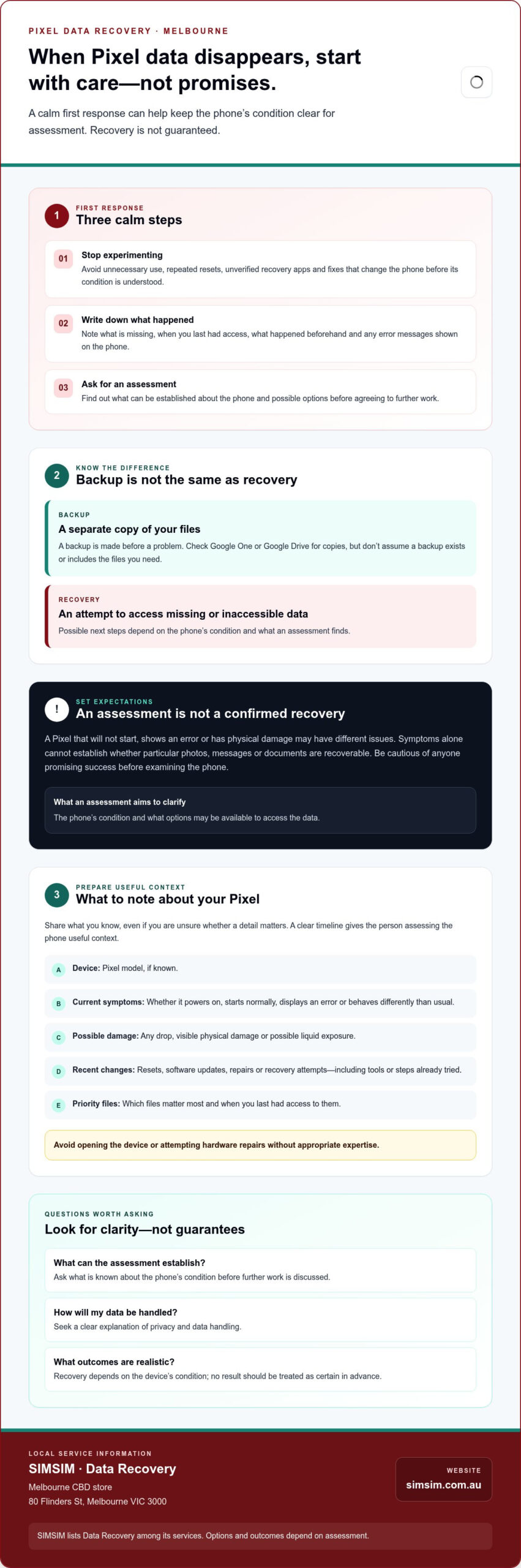
Missing photos, messages or work files can make every notification feel urgent. Start with three calm steps: stop experimenting, write down what you’ve noticed, and seek an assessment before trying more fixes. These actions can’t guarantee recovery, but they help preserve a clearer picture of the phone’s condition and what happened.
Backup and recovery are different. A backup is a separate copy made before a problem; recovery is an attempt to access data that’s now lost or inaccessible. For google pixel data recovery melbourne, possible next steps depend on the phone’s condition and what an assessment finds.
What should you do when Pixel data disappears?
Pause unnecessary use. Avoid unverified recovery apps, repeated resets and other fixes that change the phone before its condition is understood. Don’t open the device or attempt hardware repairs without appropriate expertise. Instead, note when you first noticed the problem, what happened beforehand, any recent changes and the exact error messages displayed. These details can help explain the sequence during assessment.
- Stop experimenting: Avoid further resets or installing recovery tools.
- Record symptoms: Note what’s missing, when it was last available and what the phone is doing now.
- Arrange an assessment: Ask what can be established before agreeing to further work.
Does Pixel data recovery mean restoring a backup?
No. Restoring an existing backup means copying saved data onto a device. Recovery involves trying to access data that isn’t currently available, potentially because of a device problem. Check Google One or Google Drive for copies, but don’t assume a backup exists or includes the files you need. This general overview of the data recovery process explains how approaches can differ according to the cause and type of data loss.
SIMSIM lists Data Recovery and serves customers from its Melbourne CBD store at 80 Flinders St, Melbourne VIC 3000. You can book a time to discuss your device; any options and outcomes depend on assessment. For more from SIMSIM, visit the SIMSIM YouTube channel.
How Google Pixel Data Recovery Assessment Works
An assessment aims to clarify the phone’s condition and what options may be available to access the data. It isn’t the same as a confirmed recovery. A Pixel that won’t start, shows an error or has suffered physical damage may have different issues. Symptoms alone can’t establish whether particular photos, messages or documents are recoverable.
At a high level, What is data recovery explains the broader goal: retrieving data that can’t be accessed normally. For a phone, the useful question is what its condition allows, not simply whether it powers on.
What information helps a technician assess a Pixel?
Share a clear account of the device and what has happened. These details help frame the assessment, but they don’t determine the result in advance. If you can, note:
- The Pixel model, if known.
- Whether it powers on, starts up normally, displays an error or behaves differently than usual.
- Any drop, visible physical damage or possible liquid exposure.
- Recent resets, software updates, repairs or recovery attempts, including tools or steps already tried.
Be candid, even if you’re unsure whether a change matters. For example, mention a reset that didn’t resolve the problem or an update after which files became inaccessible. A straightforward timeline gives the person assessing the phone more useful context than a guess about the cause.
Why recovery outcomes can’t be guaranteed in advance
The phone’s condition and access to the data both matter. A device may appear to have one obvious fault, but its outward symptoms alone can’t show what’s happening internally or whether the files you need remain accessible. An initial assessment can help identify the condition and discuss possible next steps; it shouldn’t be presented as proof that recovery has succeeded.
Recovery prospects depend on the device diagnosis and available data access. Before proceeding, ask what the assessment has established, which options may be considered, what limitations remain and how findings will be communicated. A responsible explanation separates what’s known from what’s uncertain, without promising particular files or results.
If you’re looking for google pixel data recovery melbourne, SIMSIM lists Data Recovery among its services. You can book a time to discuss your Pixel, with any options dependent on assessment. For more information from SIMSIM, visit the SIMSIM YouTube channel.
How to Compare Google Pixel Data Recovery Options in Melbourne
Choosing a provider is about more than finding someone nearby. Look for a clear explanation of the assessment, how your information will be handled and what the provider can confirm before you agree to proceed. For google pixel data recovery melbourne, direct questions help you compare services without relying on promises or unverified success rates.
| What to compare | What to look for | Question to ask |
|---|---|---|
| Assessment clarity | A description of what the initial assessment aims to establish. | Can you assess the issue I’ve described before discussing likely outcomes? |
| Communication | Findings, possible next steps and limitations explained plainly. | How will you tell me what the assessment found? |
| Privacy | Clear information about what access is needed and how personal data is handled. | What information or access do you need, and how is it handled? |
| Realistic claims | Outcomes described as dependent on diagnosis and available data access. | What can’t you confirm until the device has been assessed? |
A responsible provider explains uncertainty before you proceed. Prefer a clear account of the process over language promising guaranteed results. Your Pixel may contain private messages, photos and account information, so ask what access is required and who may handle the device or data. Don’t assume a provider’s privacy practices; ask directly and make sure the answer is understandable.
Questions to ask before choosing a recovery service
Describe the symptoms and ask whether the provider can assess the reported Pixel issue before discussing likely results. Find out what information or access they’ll need, how they handle personal data, and how they’ll communicate findings, available options and limitations. If an answer is vague, ask for clarification before agreeing to proceed.
How to recognise unrealistic recovery promises
A guaranteed recovery claim deserves a follow-up question: what has been established about your particular device before that promise is made? Confirm estimates and service details directly with the provider rather than inferring them from another phone’s experience. Avoid comparisons based on unverified success rates or technical claims that aren’t explained in a way you can assess.
SIMSIM lists Data Recovery among its services. To discuss an assessment, you can book a time with SIMSIM and ask what information is needed and how findings are communicated. For more from SIMSIM, visit the SIMSIM YouTube channel.
Prepare Your Google Pixel Before Bringing It for Data Recovery
A little preparation can make the first conversation clearer without changing the phone’s condition. Before seeking google pixel data recovery melbourne, gather the details you can safely share and pause further troubleshooting until you’ve spoken with a suitable provider. You don’t need to diagnose the fault yourself.
What details should you bring to an assessment?
Write a short timeline: what happened before the data disappeared, when you last saw the files and what the phone is doing now. Note the Pixel model if you know it, along with any visible damage or error messages. Include previous resets, software updates, repairs or recovery attempts, even if they didn’t help.
Be specific about what matters most. “Photos from a recent trip” or “messages from a particular period” gives a clearer picture than “everything.” You might find it helpful to list:
- The important file types or categories, and when they were last available.
- The phone’s current symptoms, including whether it powers on or displays an error.
- Any steps already taken, in the order you tried them.
- Relevant account or device details, but only if requested through an appropriate, secure process.
Don’t put passwords or sensitive account details in public comments or ordinary messages. Ask the provider what information is actually needed and how to share it securely. Don’t assume an assessment requires your account password.
What should you avoid doing before professional advice?
Keep the device history steady. A factory reset changes the phone’s current data state, so don’t reset it while trying to preserve files. Avoid unfamiliar recovery tools and repeated setting changes, too. If the Pixel is damaged, ask a qualified provider before attempting further troubleshooting or opening the device yourself.
If you’ve already tried something, record what you did and when. Clear, honest details are more useful than trying to undo each step or conceal an attempt. Bring the phone and your notes, but don’t make additional changes just to prepare for an appointment.
SIMSIM lists Data Recovery among its services. You can book a time to discuss your Pixel and its symptoms; any options depend on assessment. For more information from SIMSIM, visit the SIMSIM YouTube channel.
Arrange Google Pixel Data Recovery Help at SIMSIM in Melbourne
If you’re looking for google pixel data recovery melbourne, SIMSIM is a local option for discussing your phone and its symptoms. SIMSIM lists Data Recovery among its services and serves customers from its Melbourne CBD store at 80 Flinders St, Melbourne VIC 3000.
Contacting a provider is a first step towards understanding your options, not confirmation that particular files can be recovered. Share what you know about the Pixel and ask whether the reported issue can be assessed. The device’s condition and available data access will shape what can be established, so treat any outcome as uncertain until assessment.
What to expect when contacting SIMSIM Repairs
When arranging help, describe the problem plainly: for example, whether the phone won’t start, displays an error or became inaccessible after a particular event. Mention the Pixel model if known and any resets, updates, repairs or recovery attempts. You don’t need to diagnose the cause yourself. A clear history gives the team context for discussing next steps.
Before proceeding, confirm directly whether your model and reported issue can be assessed, what the assessment involves and what information or access may be required. If you have privacy questions, ask how personal data is handled and how findings or limitations will be communicated. Confirm details such as pricing, timing and available options directly rather than making assumptions.
Book a Melbourne data recovery assessment
Have your notes ready before booking: the device model if known, its current symptoms, what happened beforehand and which files matter most. Keep passwords out of public comments or ordinary messages; ask how to provide any necessary information securely. This helps you explain the issue without making more changes to the phone.
When you’re ready, book a time to discuss your Pixel with SIMSIM. The store is at 80 Flinders St, Melbourne VIC 3000. Booking a discussion doesn’t guarantee recovery; any options depend on what assessment can establish. For more information from the team, visit the SIMSIM YouTube channel.
Take the Next Step with Clear Expectations
Missing Pixel files can feel urgent, but a careful first response helps you make a clearer next move. Avoid unnecessary resets and unfamiliar recovery tools. Note what happened, which files matter most and when you last had access to them. A backup is a separate saved copy; recovery is an attempt to access data that’s lost or inaccessible.
If you’re considering google pixel data recovery melbourne, remember that an assessment can help establish the device’s condition and possible options, but it can’t guarantee that particular files will be recoverable. Ask what the assessment involves, how your data is handled and how findings and limitations will be explained.
SIMSIM lists Data Recovery among its services and serves customers from its Melbourne CBD store at 80 Flinders St, Melbourne VIC 3000. When you’re ready to discuss your Pixel, book a data recovery assessment with SIMSIM. You can also explore the SIMSIM YouTube channel for more information. Take it one step at a time, and seek clear answers before deciding what to do next.
Frequently Asked Questions
Can data be recovered from a Google Pixel that will not turn on?
Possibly, but a phone that won’t turn on needs assessment before anyone can say what data may be accessible. The cause of the failure and the device’s condition matter, and symptoms alone can’t confirm whether specific files can be recovered. Avoid repeated attempts to power it on or trying unverified fixes. Note what happened before it stopped working, then ask a provider what an assessment can establish.
What should I do first if data disappears from my Google Pixel?
Stop unnecessary use and avoid factory resets, unfamiliar recovery apps or repeated troubleshooting. Write down when you noticed the missing data, what happened beforehand, and any error messages or steps you’ve already tried. Note which files matter most and when you last had access to them. You can also check Google One or Google Drive for existing copies, but don’t assume a backup includes the files you need.
Can a factory reset recover missing Pixel data?
No. A factory reset isn’t a way to recover missing files. It resets the device and may remove data stored on it, so avoid doing one if you’re trying to preserve the phone’s current state. If you’ve already reset the Pixel, tell the provider when and why. Recovery options depend on the device’s condition and whether the data remains accessible after the reset.
Can Google Pixel data be recovered after water damage?
It may be possible, but water exposure can affect the phone in ways that aren’t clear from its outward appearance. Turn it off if you can do so safely, don’t charge it, and avoid opening or attempting to dry it with heat. Seek a professional assessment and explain when the exposure happened and what you’ve tried since. No particular file or recovery outcome can be promised before diagnosis.
How much does Google Pixel data recovery cost in Melbourne?
The cost of Google Pixel data recovery in Melbourne depends on the device’s condition and what an assessment finds. SIMSIM doesn’t publish a recovery price here, so contact the provider directly to ask about assessment details and any costs before proceeding. Request a clear explanation of what is included and whether further work would need your approval. Don’t rely on prices quoted for a different device or issue.
Is Google Pixel data recovery guaranteed?
No provider should be assumed to guarantee recovery before assessing the Pixel. Diagnosis helps establish the phone’s condition and whether the data may be accessible, but it can’t always confirm that particular files will be retrieved. Be cautious about definite promises made without examining the device. Ask what the assessment can determine, what limitations may apply, and how findings and next steps will be explained before you decide.
Where can I get Google Pixel data recovery in Melbourne CBD?
SIMSIM Repairs lists Data Recovery among its services and serves customers from its Melbourne CBD store at 80 Flinders St, Melbourne VIC 3000. If you’re considering google pixel data recovery melbourne, share the Pixel model if known, its symptoms and any troubleshooting history, then confirm assessment and privacy details directly. Book a data recovery assessment with SIMSIM, or visit the SIMSIM YouTube channel.