


A Pixel that keeps restarting isn’t automatically facing a hardware failure. Finding a Google Pixel bootloop fix in Melbourne starts with distinguishing a possible software fault from symptoms that may point to damaged hardware.
It’s understandable to suspect an update when a phone gets stuck in a restart cycle. Reports of Pixel bootloops followed Google’s March, April and May 2026 software updates, with affected reports spanning the Pixel 6 series through the Pixel 10 lineup. A separate reported bug affected certain Pixel 6 and Pixel 7 devices with multiple user profiles after updating to Android 14.
This guide explains which Pixel generations have appeared in reports, how the March 2026 update may relate to bootloops, and what signs can suggest a repair issue rather than a software one. You’ll also learn why the distinction matters before choosing a next step, especially if the phone is overheating, repeatedly restarting, or holding important data. Clear clues, careful decisions, and a more confident path forward.
Key Takeaways
- Repeated restarts alone don’t prove hardware failure; overheating can contribute to a bootloop or result from it, so the pattern of symptoms matters.
- Bootloop reports span several Pixel generations, while a separate Android 14 issue involved certain Pixel 6 and Pixel 7 phones with multiple user profiles.
- Consider the timing of a bootloop alongside Google’s March 2026 update, but don’t assume every restart problem has the same cause.
- A professional can assess whether software recovery or hardware diagnosis is the more appropriate path and take care around data that may not be backed up.
- SIMSIM offers Google Pixel Camera Lens Repair for camera lens damage, a separate issue from a bootloop.
When a bootloop may require hardware repair
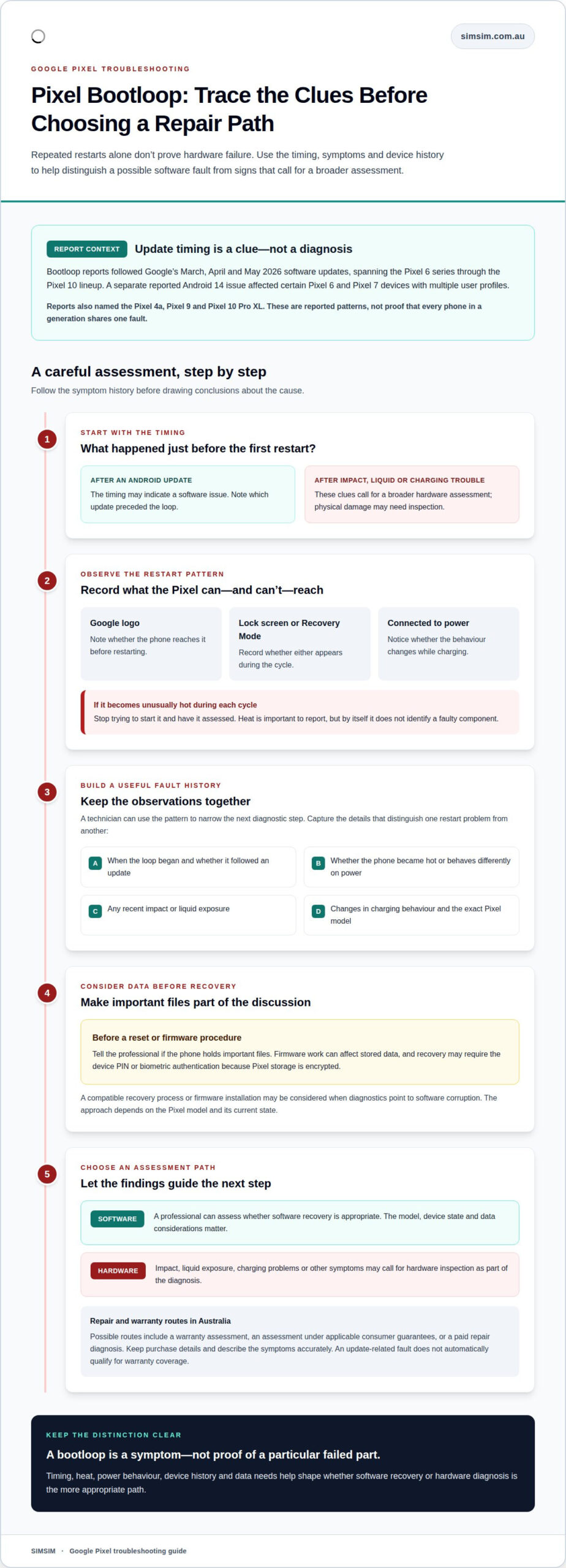
A software fault is only one possible cause of a Pixel restarting repeatedly. Overheating may contribute to a bootloop, or repeated restarts may generate heat. If the phone becomes unusually hot during each cycle, stop trying to start it and have it assessed. Heat alone doesn’t identify a faulty component, but it’s an important symptom to report.
Consider what happened before the first restart. A bootloop that began immediately after an Android update may indicate a software issue. A Pixel that was dropped, exposed to liquid, or already having charging problems needs a broader hardware assessment. If it began restarting after an impact and now won’t stay powered on, a technician can inspect for physical damage before considering software recovery.
Other clues include restarting outside an update, failing to reach the lock screen, or behaving differently when connected to power. These signs don’t prove that a particular part has failed, but they help build a useful fault history. Note when the loop began, whether the phone became hot, and any recent impact, liquid exposure, or change in charging behaviour.
Can a professional fix a Pixel bootloop with the Google Pixel Repair Tool or firmware flashing? A professional may use a compatible recovery process or install firmware when diagnostics point to software corruption. The approach depends on the Pixel model and its current state, and firmware work can affect stored data. Discuss data-preservation options before proceeding.
Google Pixel bootloop warranty and repair options in Australia depend on the device’s purchase and fault history. Possible routes include a warranty assessment, an assessment under applicable consumer guarantees, or a paid repair diagnosis. Keep purchase details and describe the symptoms accurately. An update-related fault does not automatically qualify for warranty coverage.
Google Pixel repair turnaround and warranty in Melbourne depend on the fault, diagnostic findings, and whether a required component is available. Software recovery and hardware repair involve different work, so identifying the cause matters. For a warranty assessment, the device’s condition and fault history also inform the process. The word “bootloop” alone isn’t enough for a reliable estimate.
A careful assessment separates symptoms from conclusions. A technician can record whether the Pixel reaches the Google logo, restarts while charging, or gets hot during repeated cycles. Those observations help distinguish a software recovery path from a hardware inspection. If the phone holds important files, mention that before any reset or firmware procedure.
Affected Pixel generations
Bootloop reports involve several Pixel generations, not one clearly isolated model. The Pixel 4a, Pixel 9 and Pixel 10 Pro XL have all appeared in reports. Separately, a reported Android 14 bug affected certain Pixel 6 and Pixel 7 devices that had multiple user profiles before updating. These are distinct reported patterns, not proof that every phone in those generations shares one fault.
Reports following the March 2026 Pixel Drop cover Pixel phones from the Pixel 6 series through the Pixel 10 lineup. That wider range matters when a technician assesses a restart problem: the model helps identify relevant software history, but it cannot establish the cause by itself. A Pixel 9 restarting after an update, for example, needs its own symptom and device history considered.
- Pixel 4a: included in broader bootloop reports, but not identified as part of the specific Android 14, multiple-profile bug.
- Pixel 6 and Pixel 7: certain devices with multiple user profiles before the Android 14 update were affected by the reported bug.
- Pixel 9 and Pixel 10 Pro XL: named in bootloop reports, alongside broader reports across the Pixel 6-to-Pixel 10 range.
How does a technician use force restart and Recovery Mode to diagnose a Google Pixel bootloop? A controlled force restart shows whether the phone can exit its current cycle, while Recovery Mode helps assess whether it can reach a separate recovery environment. The response helps narrow the next diagnostic step, but neither result alone identifies a failed component.
Model and update history give the technician useful context. They can record the exact Pixel model, whether multiple user profiles were present, and whether the bootloop began after an Android update. A Pixel 6 with several profiles before Android 14, for example, fits the reported software pattern more closely than a device without that history. It still requires individual diagnosis.
For newer models, reports do not mean every restart is caused by the same update or software fault. The technician considers when the loop began, whether the phone reaches the Google logo or Recovery Mode, and whether it responds differently while connected to power. A Pixel 10 Pro XL that cannot reach recovery needs a different assessment from one that enters recovery reliably.
Data matters, too. Pixel storage is encrypted, so recovery may require the device PIN or biometric authentication. If files are important, mention that before recovery work begins. For help with device data, book a data recovery assessment with SIMSIM.
Pixel boot loop after the March 2026 update
Reports of Pixel bootloops began after users installed the March 2026 Pixel Drop. Further reports followed Google’s April and May 2026 software updates. A Google Pixel bootloop fix in Melbourne starts by examining this timeline alongside the phone’s symptoms, rather than assuming the update caused every restart.
The reports span Pixel phones from the Pixel 6 series through the Pixel 10 lineup. That range gives a technician useful context, but it doesn’t establish the cause for an individual device. A Pixel that started looping immediately after an update presents a different clue from one that began restarting before the update or after physical damage.
A technician can compare when the bootloop began with the device’s update history, then assess whether it reaches Recovery Mode. Access to that environment shows how far the phone gets through startup. The result informs the diagnostic path, but doesn’t identify a faulty component on its own.
Reports also followed Google’s April and May 2026 updates. The April 2026 Pixel update had been released, while a possible bootloop fix was discussed for the following month’s patch. That sequence is useful context, not a reason to assume another update will resolve every affected phone. The device model, software state, and startup behaviour still matter.
- Start date: when the restart cycle began in relation to the March 2026 Pixel Drop.
- Update history: whether the phone also received Google’s April or May 2026 software update.
- Startup behaviour: whether Android reaches the Google logo, opens Recovery Mode, or restarts earlier.
- Device model: whether it falls within the reported Pixel 6-to-Pixel 10 range.
If diagnosis points to a software fault, a professional may consider a Rescue OTA intended for the specific Pixel model. Installing it may require a device-specific sideloading process. The recovery file must match the device, and the phone’s current software state should be considered before proceeding.
For example, a Pixel 8 that begins looping after the March update shares the reported timing, but that alone doesn’t prove the update is responsible. A Pixel that started rebooting earlier needs its own assessment. The right Google Pixel bootloop fix in Melbourne depends on those individual clues, including whether recovery remains accessible.
To discuss the symptoms and next diagnostic step, book a Pixel bootloop assessment.
Recovery Mode may be considered when a phone is boot looping, overheating, or draining its battery. Its behaviour during startup can help inform the next step. A Rescue OTA for the specific Pixel model is another possible option, installed by sideloading with ADB or Fastboot. These are possible approaches, not proof of what caused the restarts. Because the Rescue OTA is model-specific, it should not be treated as a generic update for any device. A technician can discuss whether either option suits the phone’s symptoms and software state.
Pixel bootloop symptoms
A Google Pixel bootloop often follows a repeating pattern: the Google logo appears, the screen goes dark, and the logo returns. Some phones restart before reaching the lock screen; others display it briefly first. Note the exact sequence, since where the cycle stops helps describe the fault.
Pay attention to what the Pixel can still do between restarts. Does it display a charging symbol, respond to button presses, or reach Recovery Mode? A phone that reaches Recovery Mode behaves differently from one that never gets past the startup logo. These observations help a technician assess the device without assuming every bootloop has the same cause.
- Repeated logo: the Google logo appears at the same point before each restart.
- Interrupted startup: Android doesn’t reach the lock screen, or it appears only briefly.
- Changing response: the Pixel responds to charging or button presses differently between cycles.
- Heat or damage: note unusual warmth, recent impact, or liquid exposure when describing symptoms.
How can a technician back up or recover data from a bootlooping Google Pixel? If the phone can be accessed, a technician can assess whether important files can be backed up before repair. Pixel storage is encrypted, so access may require the device PIN or biometric authentication. Complex recovery involving water damage or chip-level work may take 1-3 business days.
A factory reset carries a different risk: it can erase local data. If the Pixel remains accessible, back up important files before resetting. During professional diagnosis, the technician considers whether the device can reach Android or a recovery environment and whether its data is accessible. Decide about a reset with any files stored only on the phone in mind.
Google Pixel bootloop repair in Melbourne starts by recording the model and symptoms, then assessing the startup sequence, update timing, and signs of physical damage. A Pixel that reaches Recovery Mode provides different diagnostic information from one that repeatedly stops at the logo. Share any PIN or authentication details needed for authorised data access, and say whether files are backed up.
For a Melbourne diagnosis, a repair professional can use these details to distinguish software recovery from hardware assessment. Bring the Pixel and explain when the restart cycle began, what appears onscreen, and whether important data needs preserving. A clear history helps shape the next diagnostic step without treating a factory reset as the automatic answer.
How to fix a Google Pixel bootloop without losing data
Data preservation starts with diagnosis, not a factory reset. A technician first records the Pixel model, startup behaviour, and when the bootloop began. They also establish whether Android, Recovery Mode, or neither is accessible. These details help determine whether files might still be reached before a recovery process changes the device.
If the Pixel can enter Android, a technician may assess whether Safe Mode allows limited access to the operating system. An unlocked phone, or a locked Google phone that can be unlocked through a terminal, may offer this route. If access works, prioritise backing up important files before attempting more extensive software recovery.
Pixel storage is encrypted, so access to recovered data may require the device PIN or biometric authentication. A technician needs that authentication where the recovery process requires access to the files. If water damage or chip-level work is involved, complex Google Pixel data recovery cases may take 1-3 business days.
A model-specific Rescue OTA may be considered when diagnostics point to a software issue. A professional can choose an appropriate recovery approach for the device and assess whether it could affect stored data. This differs from making a factory reset the first step. A reset can erase local files, so discuss backup access and data priorities beforehand.
- Record the symptoms: note whether the Pixel reaches the Google logo, Android, or Recovery Mode.
- Check access: assess whether Safe Mode or another available route allows files to be backed up.
- Protect authentication: establish whether the device PIN or biometric access is available for encrypted storage.
- Choose recovery carefully: weigh software recovery against reset-related data loss before proceeding.
Before a factory reset, the Google account email address and password used to set up the Pixel are needed. If the password was changed within 24 hours of the reset, support advice says to wait another 24 hours before logging in. This account requirement is separate from backing up local files, which a reset can erase.
If your Pixel holds important photos, messages, or documents, state that data is a priority before recovery work begins. A professional can assess access options before choosing a reset or firmware route. No recovery path should be treated as a substitute for an existing backup.
Book a Pixel bootloop assessment with SIMSIM Repairs to discuss recovery options before a reset is considered.
An unlocked phone, or a locked Google phone that can be unlocked through a terminal, may be able to enter Safe Mode and access the operating system with limited app use. This may offer a limited opportunity to assess access before choosing a reset, rather than assuming a reset will protect local files.
A factory reset can erase local data, so back up important files first if you can still access them. Keep the distinction clear: Safe Mode may allow limited app use, while backing up depends on being able to reach the files. If they remain accessible, prioritise preserving them before resetting; a reset is not a substitute for a backup.
SIMSIM Repairs: Google Pixel Camera Lens Repair
SIMSIM Repairs provides Google Pixel Camera Lens Repair when the camera lens is cracked or damaged. This is separate from a bootloop: lens repair addresses physical camera damage, while repeated restarts need their own diagnosis. If your Pixel has both issues, describe each one.
A cracked lens may affect the camera even after the phone starts normally. A bootloop interrupts startup and won’t be fixed by replacing a camera lens. Keeping the two issues separate helps identify the right next step.
If your Pixel needs camera lens attention, contact SIMSIM Repairs to arrange a booking. You can also find SIMSIM on YouTube.
Choose a clear next step for your Pixel
A bootloop can leave you weighing software recovery against a hardware diagnosis. A practical next step is to describe what the Pixel does during startup, when the issue began, and whether preserving data is a priority. This gives the discussion a clear starting point without assuming every restart has the same cause.
If you’re arranging a Google Pixel bootloop fix in Melbourne, share these details when you contact SIMSIM. SIMSIM offers Google Pixel Camera Lens Repair for a damaged camera lens, which is a separate issue from a bootloop. Other services include iPhone Screen Replacement, MacBook Battery Replacement, and iPad Charging Port Repair.
Bring your questions and the key details about your phone. Contact SIMSIM Repairs and book a time to discuss your Pixel. A calm, informed next step can make the way forward feel much clearer.
Frequently Asked Questions
How can a technician tell if a Pixel bootloop is caused by the battery, hardware, or software?
A technician compares the Pixel’s power behaviour with its startup and update history. If it behaves differently on battery power than when connected to a charger, that can help assess a possible battery or power issue. A fault that began after an update and allows access to recovery may point to software. Physical damage or inconsistent component behaviour can prompt hardware checks. These clues guide diagnosis, but no single symptom identifies the cause.
Google Pixel force restart and recovery mode steps
A user reported that holding Volume Up for 3-5 seconds while keeping Lock and Volume Down pressed helped exit a bootloop without losing data. A technician can also check whether the phone reaches Recovery Mode; the result helps guide diagnosis but does not identify a failed component by itself.