

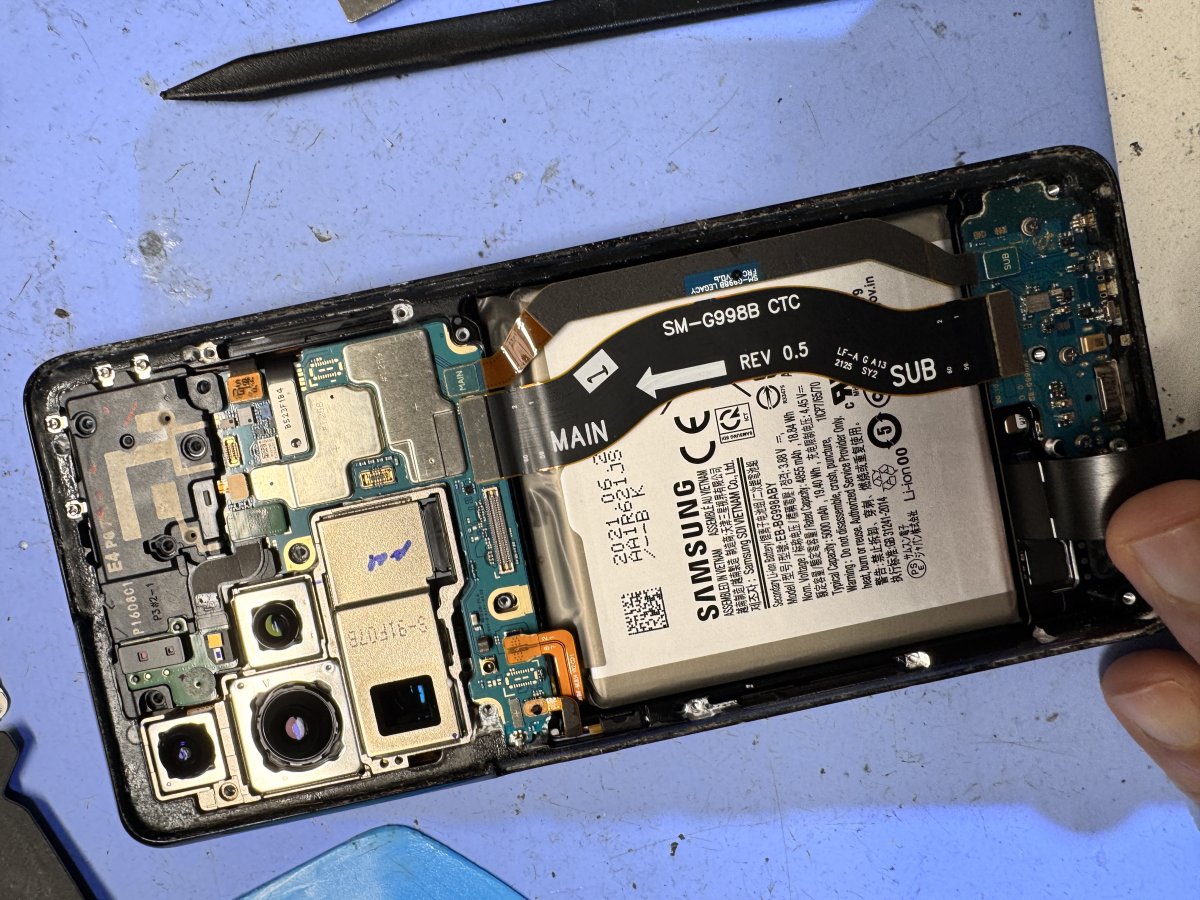
Does your Samsung phone charge only when the cable sits at just the right angle, or not at all? That’s frustrating, but the charging port isn’t always the cause. A cable or charger issue, debris, or another fault can create similar symptoms. For samsung phone charging port replacement melbourne, a professional diagnosis can identify what’s causing the problem before repair begins.
SIMSIM Repairs expert technicians assess and repair Samsung charging issues at the store at 80 Flinders St, Melbourne VIC 3000, in Melbourne CBD. Repairs use genuine replacement parts, and the service includes diagnostic testing. The technician assesses the device and explains the appropriate repair and pricing before work proceeds.
In this guide, you’ll learn what may cause unreliable charging, what to expect during a professional port repair, and how to prepare before booking or visiting. SIMSIM Repairs Melbourne CBD store is open 9 am-6 pm, so you can plan your visit and take the next step with a clearer picture of the process.
Key Takeaways
- Intermittent charging can point to a port issue, but symptoms alone can’t confirm the cause. Note when the connection drops or changes.
- With samsung phone charging port replacement melbourne, expect a professional diagnosis, technician-performed repair and diagnostic testing.
- Check whether the cable or charger may be contributing before assuming the phone’s port is faulty. Similar symptoms can have different causes.
- Before visiting SIMSIM’s Melbourne CBD store, note your phone’s charging behaviour and plan around the 9 am-6 pm operating hours.
- Arrange Samsung phone service with transparent pricing and genuine replacement parts at SIMSIM, 80 Flinders St, Melbourne VIC 3000.
Samsung Phone Charging Port Replacement in Melbourne: When Is Repair Needed?
Charging that cuts in and out can disrupt your day, especially when your phone only responds if the cable sits a certain way. That’s a reason to investigate, not proof that the charging port has failed. A damaged cable or charger can cause similar symptoms, so the pattern is useful to report but can’t confirm the cause.
Have the charging issue diagnosed before deciding on a repair. A technician can assess the device and determine whether the port needs attention or another issue may be affecting charging.
What signs can point to a Samsung charging-port problem?
Notice whether charging starts and stops, whether the phone fails to respond when connected, or whether the connection won’t stay reliable during ordinary use. These signs help describe the problem, but they aren’t a diagnosis. Modern Samsung phones commonly use USB-C; USB-C technology describes the connector, not the condition of the port in a particular device.
- Charging interruptions: The charging indicator appears and disappears, or charging stops unexpectedly.
- No response: The phone doesn’t appear to charge when connected.
- Unsteady connection: Charging doesn’t remain consistent during normal handling.
A cable or charger issue can look much the same. If you have a suitable alternative available, try it and check the cable and adapter for visible damage. Don’t force the connector or put tools inside the port. If the problem continues, leave inspection of the port and any internal causes to an expert technician.
When should you seek professional charging-port diagnosis?
Arrange a professional assessment if charging remains unreliable after basic external checks, or if you can’t tell whether the cable, charger or phone is responsible. The recurring pattern is useful information: note whether the phone charges intermittently, fails to respond, or loses its connection during normal use.
At SIMSIM, technicians assess the Samsung device before carrying out a repair. This helps establish whether charging-port replacement is the appropriate next step, rather than treating a symptom as a confirmed fault. For samsung phone charging port replacement melbourne, the process starts with understanding the charging problem and assessing the phone.
When arranging service, explain what happens when you connect the phone and whether you’ve tried another suitable cable or charger. That gives the technician a useful starting point without asking you to diagnose the device yourself. Book Samsung phone service with SIMSIM to arrange an assessment.
How Samsung Charging-Port Diagnosis and Replacement Work
A charging-port repair should begin with an assessment, not an assumption. At SIMSIM, the technician considers the reported charging behaviour and assesses the Samsung device before deciding whether port replacement is appropriate. The repair is based on the identified issue, rather than the symptom alone.
What happens during a professional charging-port repair?
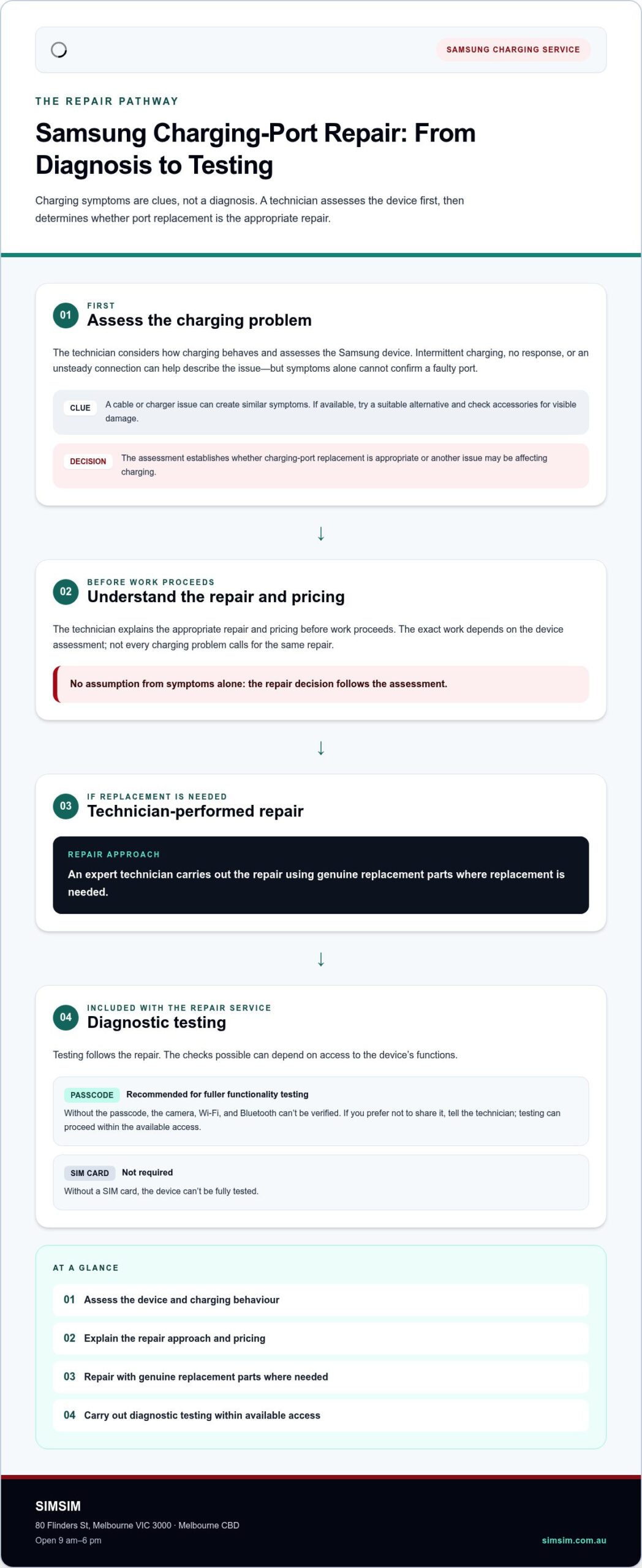
The process follows a clear sequence: diagnosis, technician-performed repair, then diagnostic testing. After assessing the device, the technician explains the repair approach and carries out the work using genuine replacement parts. SIMSIM doesn’t do shortcuts or guesswork. The exact work depends on the device assessment, so not every charging problem calls for the same repair.
If you’re comparing your observations with manufacturer guidance, Samsung’s official charging troubleshooting guide provides information about charging issues. It can help frame the concern, but it doesn’t replace an assessment of your phone. With samsung phone charging port replacement melbourne, the technician’s diagnosis guides the repair decision.
Expert technicians perform the repair and diagnostic testing at SIMSIM. If the assessment indicates a port repair, genuine replacement parts are used. The repair service includes diagnostic testing, so the process doesn’t stop as soon as the physical repair is complete.
What does diagnostic testing cover after repair?
Diagnostic testing is included with the repair service. The checks possible can depend on access to the device’s functions. Providing the device passcode is recommended for fuller functionality testing. Without it, the camera, Wi-Fi and Bluetooth can’t be verified. A SIM card isn’t required, but without one the device can’t be fully tested.
If you prefer not to share your passcode, let the technician know. Testing can still proceed within the available access, but certain functions will remain unverified. Consider this before your visit so you can make an informed choice about device access and understand the scope of testing.
The process is technician-led: an expert assesses the phone, performs the repair using genuine parts where replacement is needed, and carries out diagnostic testing. For Samsung charging-port service in Melbourne CBD, arrange a repair assessment with SIMSIM.
Charging-Port Repair or Another Charging Issue: How to Understand the Difference
Unreliable charging can leave you wondering whether the problem is with an accessory or the phone. A simple comparison can help you describe what’s happening, but it can’t confirm a fault. Treat each observation as a clue, not a diagnosis.
| What you notice | A cautious next step |
|---|---|
| Charging changes when you use a different known-compatible cable or charger. | If safe and available, try the alternative accessory and note whether the symptom changes. This doesn’t prove the phone’s port is defective. |
| The phone remains inconsistent or doesn’t charge with an alternative accessory. | Stop relying on repeated swaps as a diagnosis. Arrange a technician’s assessment of the device. |
| The connection doesn’t remain reliable during ordinary use. | Describe the pattern to the technician. Don’t force the connector or attempt to open the phone. |
| You’re unsure whether the accessory or phone is responsible. | Share what you’ve observed and leave the cause to professional assessment. |
Could the cable or charger be causing the charging problem?
It’s possible. A cable or charger issue can produce symptoms that resemble a phone fault. If you have a known-compatible accessory available and it’s safe to use, compare the phone’s response. A change in behaviour is useful information, but it doesn’t confirm that the port is faulty or rule out another cause. If charging trouble persists, have the phone assessed by a SIMSIM technician.
Keep the check external. Don’t push a connector into place, insert tools into the port, or try to replace components yourself. Testing different accessories can’t establish what’s happening inside the device. Instead, note what you tried and how the charging behaviour changed, if at all.
When is a technician’s assessment the clearest next step?
Arrange an assessment if the phone continues to charge inconsistently or not at all, including after you’ve tried a suitable alternative cable or charger. At SIMSIM, technicians assess the device before determining whether charging-port replacement is appropriate. Charging symptoms alone don’t confirm a battery, software or other issue; the technician’s assessment guides the next step.
There’s no need to open the phone or attempt a component replacement. Those actions won’t provide a reliable diagnosis and may complicate a professional assessment. For samsung phone charging port replacement melbourne, the useful next step is an expert assessment, not a guess about the cause. Arrange a Samsung repair assessment with SIMSIM and share the charging pattern you’ve noticed.
Prepare Your Samsung for Repair at SIMSIM Melbourne CBD
A little preparation can make your visit more straightforward. SIMSIM’s store is at 80 Flinders St, Melbourne VIC 3000, in Melbourne CBD, and is open 9 am-6 pm. Bring the Samsung phone and be ready to describe what happens when you try to charge it. For example, note whether charging fails to start, stops unexpectedly, or behaves differently with another suitable cable or charger.
What should you bring or provide for an in-store repair?
Bring the device and share the charging symptoms you’ve observed. You don’t need a SIM card for the repair, though its absence means the device can’t be fully tested. Providing the passcode is recommended for fuller testing, but that choice is yours. Without it, the camera, Wi-Fi and Bluetooth can’t be verified. If you prefer not to provide access, tell the technician so expectations around testing are clear.
Before handing over your phone, consider what you need to access during the day and make any personal arrangements that suit you. The most useful preparation is practical: bring the device, describe the charging behaviour, and decide whether to provide the passcode. There’s no need to attempt a repair yourself or bring tools.
If you’re arranging mail-in service, send the device only. Leave out accessories and the original packaging. They aren’t needed for the repair and increase shipping cost.
What should you know about repair timing and pricing?
SIMSIM advertises on-site fixes as “Repair within 30’”. This is a general service claim, not a guaranteed timeframe for every charging-port repair. The time required depends on the technician’s assessment, so don’t assume every device will be ready within that period.
Pricing is transparent and available on request or through the scheduling system. Review the available pricing information as part of arranging your service rather than relying on a guessed estimate or an unverified model-specific figure.
For samsung phone charging port replacement melbourne, useful first steps are planning around the store’s location and hours, bringing the phone, and describing the symptoms. Book online before your visit using the SIMSIM repair booking system.
Book Samsung Phone Charging-Port Replacement with SIMSIM in Melbourne
If charging problems are disrupting your routine, arrange a repair through SIMSIM’s online booking system or visit the Melbourne CBD store at 80 Flinders St, Melbourne VIC 3000. The store is open 9 am-6 pm. Booking online gives you a clear starting point for organising Samsung phone charging-port service.
How can you arrange a charging-port repair?
Use the online booking system to schedule a Samsung repair. Describe the charging issue in plain terms, such as whether the phone charges intermittently or doesn’t respond when connected. If you know your Samsung model, have its name available. You don’t need to diagnose the cause yourself.
You can also arrange service in person at the SIMSIM store at 80 Flinders St during its 9 am-6 pm operating hours. Bring the phone and explain what you’ve noticed to give the technician a useful starting point for assessment. Any repair decision follows that assessment, rather than an assumption based on symptoms alone.
For a supporting resource, visit SIMSIM’s YouTube channel.
What should you expect from SIMSIM’s repair service?
SIMSIM’s Samsung charging-port service is carried out by expert technicians. They assess the device, perform the repair using genuine replacement parts, and include diagnostic testing with the service. This provides a clear process, from understanding the issue through to testing after the repair.
Pricing is transparent and available on request or through the booking system, so you can review pricing information as you arrange service. Repair needs vary by device, and the technician’s assessment determines the appropriate work. SIMSIM advertises some on-site fixes as “Repair within 30’”, but this isn’t a guaranteed timeframe for every charging-port repair.
For samsung phone charging port replacement melbourne, SIMSIM offers local service in Melbourne CBD, expert technicians, genuine parts and diagnostic testing. Schedule online or visit the store at 80 Flinders St, Melbourne VIC 3000 during operating hours. Book a Samsung phone repair.
Take the Next Step with Confidence
Unreliable charging doesn’t have to leave you guessing. A repair booking gives you a practical way to arrange an assessment, with the issue considered before a repair is chosen. For samsung phone charging port replacement melbourne, book a visit to SIMSIM’s Melbourne CBD store at a time that fits your plans.
SIMSIM’s service is supported by 142 Google reviews, Trustindex-verified. If you’re considering where to start, this local feedback may offer added reassurance as you choose your next step.
Ready to arrange your Samsung charging-port repair? Book your Samsung charging-port repair with SIMSIM for a professional assessment at the Flinders St store.
Frequently Asked Questions
Can a Samsung phone charging port be replaced?
Yes. SIMSIM provides Samsung phone charging-port replacement in Melbourne, carried out by expert technicians. They assess the phone first to determine whether the port is the issue and replacement is appropriate. The service uses genuine replacement parts and includes diagnostic testing. You can also visit the SIMSIM YouTube channel.
How do I know if my Samsung charging port is damaged?
Charging symptoms alone can’t confirm port damage. A phone that charges intermittently, stops responding, or won’t maintain a connection needs assessment, since a cable or charger can cause similar behaviour. Note what happens with any accessories you’ve tried and share those observations with the technician. Avoid forcing a connector or opening the phone; professional diagnosis identifies the cause and guides the repair.
How long does Samsung charging-port replacement take in Melbourne?
Repair time depends on the device assessment, so there isn’t one duration for every Samsung charging-port job. SIMSIM advertises on-site fixes as “Repair within 30’”, but this isn’t a guaranteed timeframe for every port replacement. Use the online booking system to schedule and plan your visit around the store’s operating hours. The technician’s assessment guides the repair process.
How much does Samsung phone charging-port replacement cost in Melbourne?
SIMSIM’s pricing is transparent and available on request or through the online booking system. The cost depends on the device and appropriate repair, so a general estimate may not reflect your phone’s needs. Review pricing information while arranging service. The technician assesses the device to determine the appropriate repair.
Do I need my SIM card or passcode for a Samsung charging-port repair?
A SIM card isn’t required for the repair, but without it the device can’t be fully tested. Providing the passcode is recommended for fuller functionality testing. If you’d rather not share your passcode, let the technician know so they can explain which tests can be completed with the available access.
Can I mail my Samsung phone to SIMSIM for charging-port repair?
Yes, you can arrange mail-in service for your Samsung phone through SIMSIM’s mail-in process. Send the device only. Don’t include accessories or the original packaging, as these increase shipping cost and aren’t needed for the repair. Follow the mail-in form’s instructions for preparing the device. You can also visit SIMSIM’s Melbourne CBD store.
Where can I get a Samsung charging port repaired in Melbourne?
SIMSIM provides Samsung charging-port repair at its store at 80 Flinders St in Melbourne CBD. Arrange your visit online, then bring the phone and describe the charging behaviour you’ve noticed. The store is open 9 am-6 pm. Use the online booking system for Samsung phone repair to schedule your visit.