

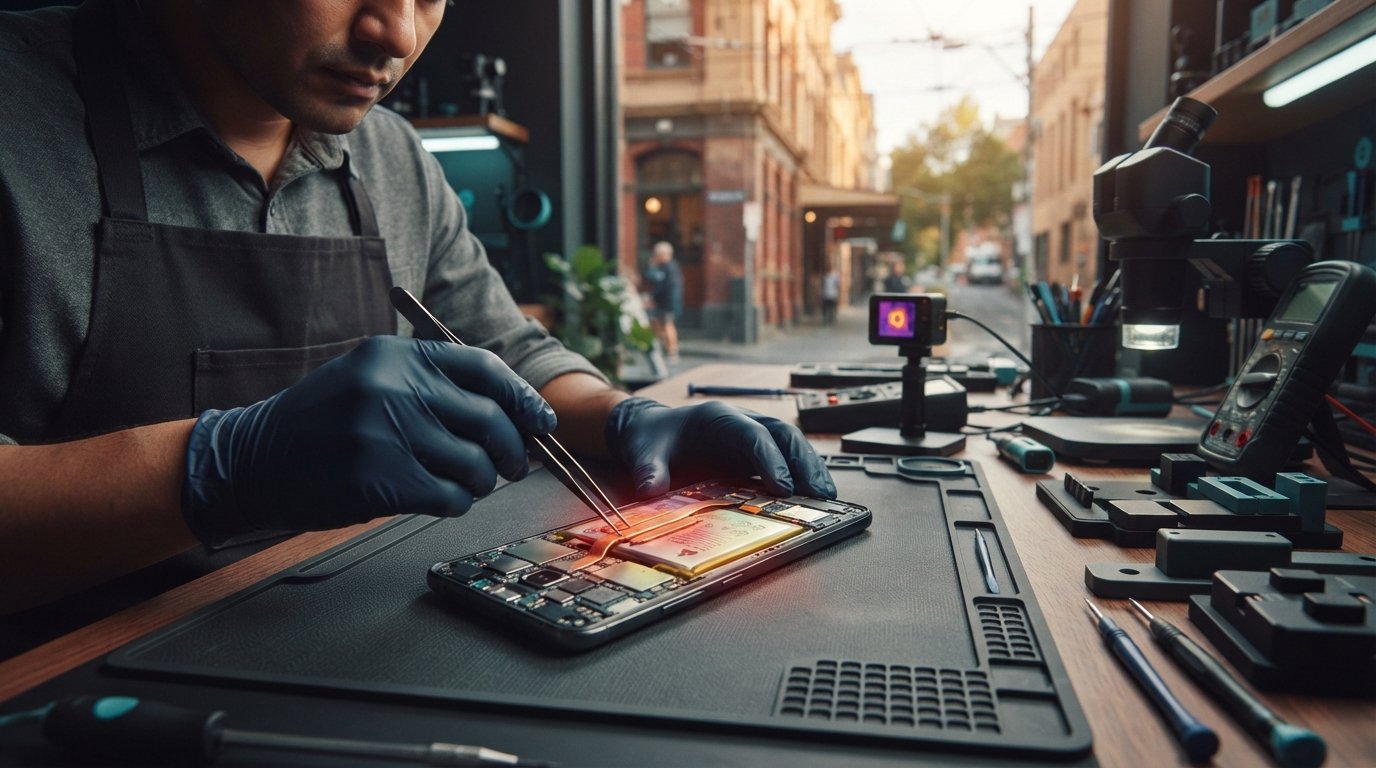
Watching your battery drain rapidly while the back glass grows alarmingly warm is deeply unsettling, especially when your device throttles performance or shuts down right in the middle of the Melbourne CBD. You shouldn’t have to guess whether a simple settings tweak will solve the problem or if an aging lithium-ion cell is putting your device at risk.
Discover proven steps to cool your overheating Samsung phone safely and learn when Melbourne CBD hardware specialists should intervene. Below, we outline immediate thermal safeguards, separate minor One UI glitches from dangerous battery swelling, and explain what to expect from a comprehensive diagnostic inspection at our dedicated 80 Flinders St store.
Key Takeaways
- Understand how local summer conditions push your Galaxy device past its optimal 35°C operating limit during daily commutes.
- Learn the immediate triage steps, including case removal and charging isolation, to prevent emergency system shutdowns.
- Identify the difference between temporary One UI background processing heat and localized hardware thermal runaway.
- Discover when to seek an expert samsung phone overheating fix melbourne users rely on to resolve battery degradation or charging port faults.
- Find out what to expect from a comprehensive walk-in diagnostic assessment at our dedicated SIMSIM store at 80 Flinders St in the Melbourne CBD.
Why Is Your Samsung Phone Overheating in Melbourne?
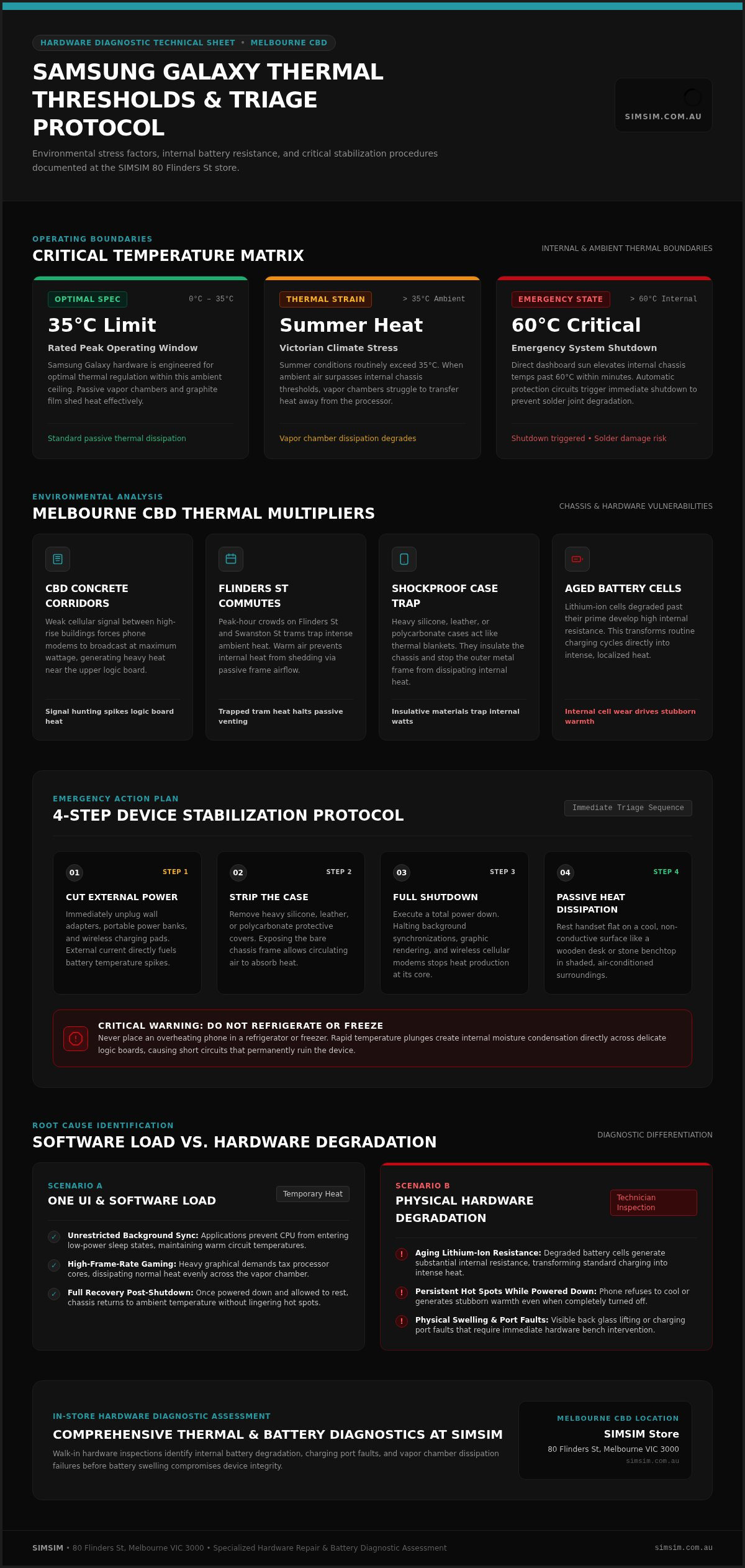
Every smartphone generates thermal energy during normal operation, but modern Samsung Galaxy devices depend on passive dissipation systems to shed that heat. Samsung rates its Galaxy lineup for peak performance in ambient temperatures between 0°C and 35°C. Once local temperatures push past that ceiling, the device’s vapor chamber and graphite layers struggle to transfer heat away from the internal processor.
When searching for a permanent samsung phone overheating fix melbourne residents often discover that external weather and internal stress compound each other.
Environmental & Local Melbourne Climate Factors
Victorian summer heat waves routinely cross 35°C, turning routine daily errands into extreme thermal environments for mobile hardware. Leaving your phone on a vehicle dashboard in direct sunlight can elevate internal temperatures beyond 60°C within minutes, triggering emergency shutdowns to protect delicate solder joints.
Similarly, crowded peak-hour tram rides along Flinders St or Swanston St trap significant ambient warmth. Heavy shockproof cases act like thermal blankets. They prevent the metal frame from venting heat during warm afternoon commutes.
Processor Demands vs. Internal Hardware Strain
Processing workloads also dictate thermal spikes. High-frame-rate gaming taxes the graphic cores heavily, while regular messaging generates barely any warmth. However, weak mobile connectivity changes this dynamic completely.
- Cellular Transmission Spikes: Moving through dense concrete corridors in the Melbourne CBD weakens signals. This forces your phone’s modems to broadcast at maximum wattage, producing severe heat near the upper logic board.
- Persistent Background Synchronization: Unrestricted background applications prevent the CPU from entering low-power sleep states, keeping internal circuits continuously warm.
- Aged Battery Resistance: Lithium-ion cells degraded past their prime generate substantially more internal resistance, transforming standard charging cycles into intense heat.
When software optimizations fail to lower these temperatures, physical wear is usually the culprit. In these situations, seeking a dedicated samsung phone overheating fix melbourne hardware technicians can provide ensures your battery and internal circuitry remain protected.
Immediate Troubleshooting: How to Cool Down Your Samsung Device
When your Samsung phone triggers a temperature warning, every second counts. Continuing to browse or stream pushes internal temperatures higher, accelerating component degradation. Taking prompt, methodical steps stabilizes your device before thermal protection circuits execute an emergency shutdown.
- Disconnect power sources immediately: Unplug wall adapters, power banks, and wireless charging pads. External current directly fuels battery heat.
- Strip protective cases: Heavy silicone, leather, or polycarbonate cases trap heat against the chassis. Removing them exposes the frame to circulating air.
- Power down completely: A total shutdown halts background services, wireless modems, and screen backlights, stopping heat generation at the source.
- Move to a shaded environment: Set the handset on a cool, hard surface in an air-conditioned room or out of direct sunlight.
Emergency Actions When Your Phone Feels Dangerously Hot
If the rear casing feels scorching to the touch, avoid drastic shortcuts. Never place an overheating phone in a refrigerator or freezer. Rapid temperature plunges create internal moisture condensation across delicate logic boards, causing short circuits that permanently ruin the device.
Instead, lay the handset flat on a non-conductive surface like a wooden desk or stone benchtop. Let passive airflow stabilize the chassis gradually. If your phone refuses to cool down even when powered off, book an inspection for a samsung phone overheating fix melbourne specialists can carry out in-person before battery swelling occurs.
One UI Software Settings to Curb Thermal Spikes
Once the device returns to normal operating temperatures, adjust software settings to prevent recurring spikes. One UI contains native throttling tools designed to balance system efficiency with thermal stability.
- Enable Power Saving: Navigate to Settings > Battery and toggle Power Saving on. This caps CPU clock speeds at 70%, keeping thermal output low during demanding workloads.
- Standardize Refresh Rates: Drop your display rate from 120Hz to 60Hz under Settings > Display > Motion Smoothness to relieve the graphics processor.
- Apply Deep Sleep: Put unused background applications into Deep Sleep via Background Usage Limits to prevent errant app processes from waking your processor continuously.
Safe Daily Charging Habits to Guard Battery Health
Charging habits directly influence internal hardware strain. Avoid gaming or using GPS navigation while plugged into a charger. During high Melbourne summer temperatures, consider turning off Super Fast Charging under battery settings to reduce the heat generated during rapid energy transfers.
Always inspect charging cables and adapters for physical wear. Bent USB-C pins or frayed wires increase electrical resistance, channeling excess thermal energy straight into your device’s charging assembly.
Software Glitch vs. Hardware Failure: Diagnosing the Root Cause
Pinpointing where heat concentrates across the phone’s chassis helps separate temporary firmware loops from catastrophic component breakdown. If thermal build-up originates near the top-third of your device alongside the camera module, the main logic board is running wide open. Heat concentrated squarely across the lower midsection points directly to the battery pack.
Software-induced thermal spikes disperse relatively quickly once errant apps close or the operating system restarts. In contrast, defective hardware generates persistent warmth. If your Samsung stays uncomfortably warm while sitting idle on a desk with the display off, internal resistance or a component short is constantly pulling current.
Recognising Battery Swelling and Physical Hazards
Degraded lithium-ion cells release gases as internal electrolytes break down under excessive heat. This gas expansion forces internal pressure outward against the display assembly and rear cover. Inspect your handset’s side profile under direct light to identify subtle structural changes.
- Back Glass Separation: Check for tiny gaps along the rear adhesive perimeter where the glass starts lifting from the midframe.
- Screen Warping: Look for discolouration, purple bleeding, or subtle flexing along the edges of the AMOLED display panel.
- Chemical Odours: Stop using the phone immediately if you detect a sweet, pungent smell resembling metallic fruit.
Never compress or clamp a swollen handset. Review our comprehensive Samsung phone repair Melbourne guide for detailed insights into chassis integrity and safe handling procedures.
Charging Port Faults and Thermal Circuit Throttling
The USB-C connector at the base of your handset acts as a high-amperage electrical gateway. Over months of daily use, compact pocket lint, conductive debris, and atmospheric moisture gather deep inside the port cavity. When you insert a fast charger, that compacted debris bridges adjacent pins, triggering resistive micro-arcs.
This electrical bridging produces localized scorching around the bottom frame, frequently confusing internal sensors into throttling charge speeds down to zero. In severe cases, current fluctuations damage the Power Management Integrated Circuit (PMIC) soldered directly onto the motherboard. A damaged PMIC fails to regulate incoming voltage, causing continuous thermal runaway until professional technicians replace the compromised flex assemblies. When hardware failures compromise daily usage, arranging a precise samsung phone overheating fix melbourne hardware technicians can execute at the component level remains the safest course of action.
Professional Repair Options for Overheating Samsung Phones
Persistent thermal warnings demand physical bench diagnostics rather than endless factory resets. When high temperatures resist basic software adjustments, bench testing isolates internal failures like shorted micro-capacitors, degraded charging flex assemblies, or compromised battery packs. Hardware testing evaluates electrical draw in real time, identifying whether a component leaks current while the device rests in standby.
Securing a lasting samsung phone overheating fix melbourne phone owners need begins with pinpointing the exact component generating waste heat. Precision multimeter tracing and thermal analysis identify localized power spikes before high thermal cycles melt internal solder joints or warp the display frame.
Why Battery Replacement Solves Chronic Overheating
Lithium-ion cells degrade naturally over hundreds of recharge cycles. As the liquid electrolyte inside thickens, internal electrical resistance climbs sharply. Instead of converting electrical charge efficiently into stored potential, the degraded battery releases that excess energy as raw heat.
A fresh Samsung Phone Battery Replacement immediately restores proper electrochemical balance, cutting operating temperatures during standard usage and fast charging. For a deeper look at structural chassis maintenance and long-term care, consult our phone repair Melbourne guide.
Evaluating Melbourne Repair Providers and Component Standards
Choosing the right repair team protects both your hardware investment and your sensitive files. Selecting low-grade aftermarket components often worsens thermal buildup because inferior cells lack factory-calibrated thermistors. Keep these essential standards in mind before handing over your handset:
- Diagnostic Rigour: Reliable technicians test power consumption across the motherboard instead of simply guessing which part has failed.
- High-Grade Components: Premium replacement batteries and charging ports match original equipment specifications, ensuring proper communication with Samsung power management software.
- Data Preservation: Hardware specialists perform hardware swaps without wiping local user files or requiring unnecessary device wipes.
- Clear Workmanship Guarantees: Dedicated Melbourne repair centres stand firmly behind their work with transparent service policies.
Don’t let a deteriorating battery or high-resistance charging assembly damage your smartphone’s delicate logic board. To restore cool, stable performance, book an expert diagnostic inspection online today.
Fast Samsung Phone Overheating Fix at SIMSIM in Melbourne CBD
When daily troubleshooting fails and your Galaxy continues to run hot, prompt hands-on diagnostics save your hardware from irreversible damage. Operating from our central Melbourne CBD location, our technicians isolate micro-shorts, high-resistance charging assemblies, and failing lithium cells using professional bench equipment. You receive clear diagnostic answers backed by practical hardware solutions.
Getting a fast samsung phone overheating fix melbourne workers can access during the business day doesn’t mean leaving your phone behind for days. Our walk-in store delivers thorough hardware assessments right in the city center, protecting your sensitive personal data while restoring device stability.
Convenient Flinders St Location for CBD Commuters
Positioned at 80 Flinders St, Melbourne VIC 3000, our dedicated store sits steps away from Flinders Street Station and major tram lines. This central position makes dropping off your device simple whether you’re commuting in from the suburbs or heading out on your lunch break.
City life moves quickly. Rather than navigating suburban industrial estates or mailing your phone away, you can consult with experienced technicians face-to-face right in the Melbourne CBD.
Transparent Testing and Safe On-Site Component Replacement
Every device entering our store undergoes thorough current-draw testing and battery capacity analysis. We check charging pin integrity, internal thermal dissipation layers, and power distribution paths to ensure we only service components that genuinely require attention.
- Targeted Hardware Swaps: We install precision-matched Samsung Phone Battery Replacement units, charging ports, and rear panels to re-establish factory thermal boundaries.
- Data Preservation Focus: Our hardware technicians work around your internal components without wiping your local storage, keeping your contacts and photos secure.
- Demonstrated Craftsmanship: We believe in open, honest repairs. You can watch practical tear-downs, component replacements, and diagnostic procedures directly on the SIMSIM YouTube channel.
Securing Your Melbourne CBD Diagnostic Appointment
Ignoring ongoing thermal warnings risks delaminating your AMOLED screen or triggering sudden system cutoffs during important calls. If your back casing feels hot to the touch or your phone drops charge rapidly under basic workloads, reliable support is ready nearby.
Reserve bench time directly through the SIMSIM booking platform or walk straight into our 80 Flinders St store. Take the straightforward step to secure a prompt samsung phone overheating fix melbourne users trust, and keep your Galaxy running safely throughout the year.
Keep Your Samsung Galaxy Cool and Protected Today
Tackling excessive phone heat early saves your motherboard and OLED screen from permanent thermal breakdown. Whether local summer temperatures trigger aggressive One UI throttling or an aging lithium cell dissipates power as waste heat, methodical troubleshooting gives you initial control over rising device temperatures.
When software adjustments fall short, our hardware technicians at SIMSIM deliver the definitive samsung phone overheating fix melbourne commuters rely on. Conveniently based at 80 Flinders St in the Melbourne CBD, our dedicated store pairs high-grade replacement components with fast on-site assessments to keep your handset running safely.
You can see our component testing and repair standards in action on the SIMSIM YouTube channel. Don’t let chronic heat jeopardize your phone’s battery or data. Simply book your Samsung diagnostic at SIMSIM Melbourne CBD and enjoy dependable mobile performance once again.
Frequently Asked Questions
Why does my Samsung phone get hot while charging?
Charging naturally generates heat as incoming electrical energy converts into stored chemical potential. Fast-charging protocols push higher wattages into your handset, temporarily raising temperatures. However, if your device becomes uncomfortably hot rather than mildly warm, worn USB-C charging port pins, damaged cables, or an aged battery with elevated internal electrical resistance are often responsible. Always charge on flat, hard surfaces to promote natural heat dissipation.
Is it dangerous if my Samsung phone feels very hot to touch?
Yes, sustained extreme heat presents genuine risks to your phone’s battery and internal circuitry. Modern Galaxy handsets automatically throttle performance or shut down when internal sensors detect dangerous operating limits. Persistent overheating can trigger lithium-ion cell swelling, screen delamination, or micro-soldering cracks across the motherboard. If the chassis feels too hot to hold comfortably, shut the handset down immediately and let it cool.
Can a software update fix Samsung phone overheating?
Software updates resolve overheating only if the thermal spike originates from an unoptimized background app, modem firmware bug, or runaway operating system loop. While patching One UI helps stabilize processor scheduling, it cannot repair physical component degradation. When you need a lasting samsung phone overheating fix melbourne technicians can determine whether the root cause is rogue background software or a failing physical battery.
How much does it cost to fix an overheating Samsung phone in Melbourne?
Total repair costs depend entirely on which component triggers the thermal surge. Resolving a software conflict or clearing physical debris from a port requires minimal labor, whereas replacing a degraded battery or scorched charging sub-board involves dedicated replacement components. Professional Melbourne technicians conduct a thorough physical diagnostic assessment first, ensuring you receive an accurate, transparent quote based strictly on the parts your handset actually requires.
How long does a Samsung battery replacement take at a Melbourne repair store?
A standard Samsung Phone Battery Replacement typically takes under an hour when carried out by experienced technicians at a dedicated walk-in store. Technicians carefully release the rear adhesive, disconnect the worn lithium pack, seat the fresh component, and re-bond the back glass securely. Booking your diagnostic time online ahead of visiting the Melbourne CBD helps ensure minimal turnaround time during your daily commute.
Will I lose my photos and apps during an overheating repair?
Hardware repairs focused on battery replacement, charging port restoration, or back glass re-sealing do not alter your internal memory storage. At our dedicated SIMSIM store at 80 Flinders St in the Melbourne CBD, technicians conduct physical hardware repairs without wiping your device. Even so, maintaining a routine cloud or desktop backup remains wise whenever your handset suffers from severe thermal instability.
Does Melbourne summer weather permanently damage Samsung phone batteries?
Repeated exposure to Melbourne summer heat waves permanently degrades lithium-ion chemistry. Ambient temperatures above 35°C break down internal electrolytes, which diminishes maximum charge capacity and drives up internal resistance. Securing a reliable samsung phone overheating fix melbourne specialists provide ensures compromised batteries are safely replaced before higher operating temperatures permanently warp your display or internal frame.