

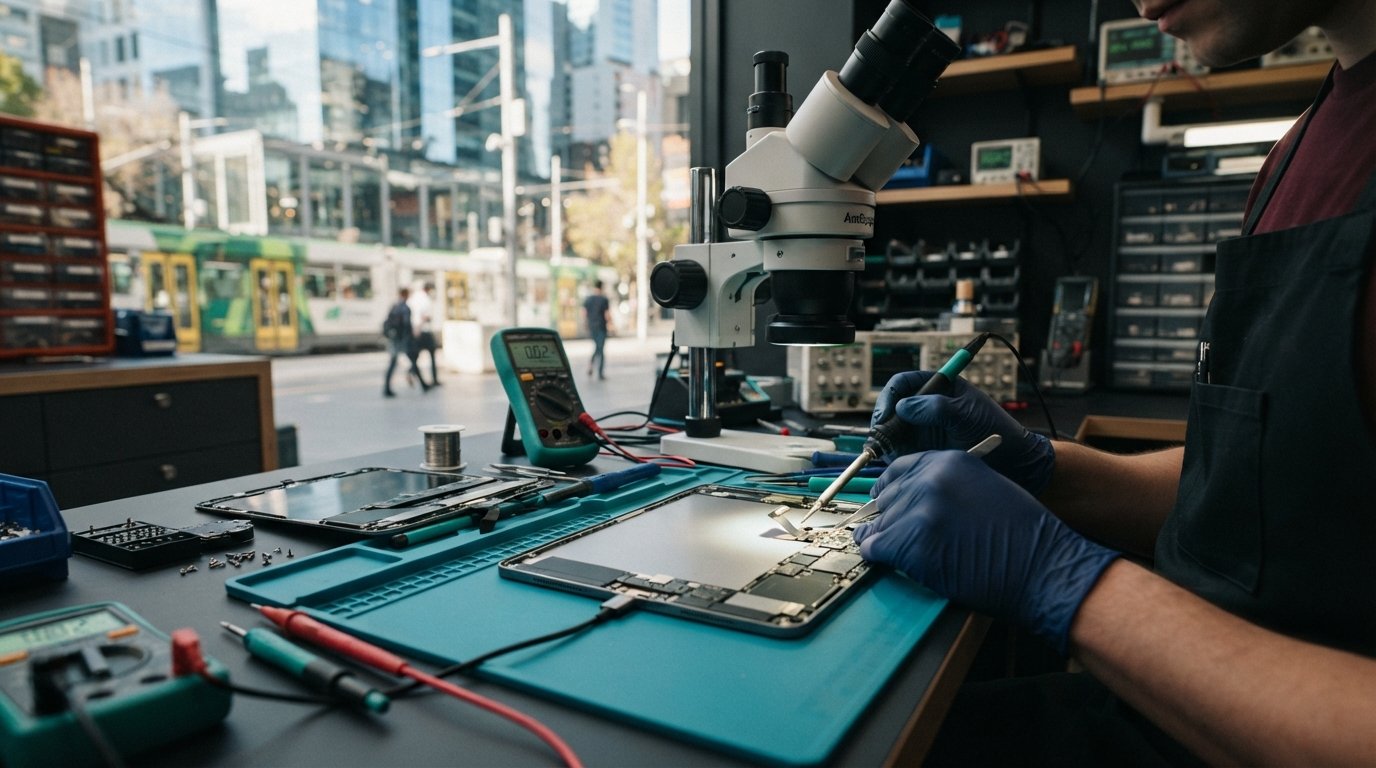
When your screen stays black, it’s easy to assume the worst, fearing a fried battery, a dead logic board, or the sudden loss of vital university coursework and work files. If you find yourself stranded during a busy schedule and need dependable iPad charging port repair Melbourne CBD technicians can provide, that frustration is completely understandable.
We know how disruptive lengthy repair delays can be when your daily workflow relies on your tablet. That’s why this guide walks you through the exact steps needed to resolve charging failures. You’ll learn how to safely troubleshoot the issue, determine whether simple lint removal or a full port replacement is necessary, and discover how precision diagnostics restore full power delivery to your device.
From essential triage checks to component-level hardware fixes, here is your roadmap to getting your iPad powered up and running again in the heart of Melbourne.
Key Takeaways
- Identify critical warning signs of connection failure, from loose pin alignment to intermittent charging warnings, before hardware damage escalates.
- Understand the delicate mechanical differences between 8-pin Lightning and 24-pin USB-C assemblies to avoid accidental pin damage during routine cleaning.
- Explore how professional iPad charging port repair Melbourne CBD technicians provide is an efficient, cost-effective alternative to buying a new device.
- Learn what happens during bench-level triage, including safe display assembly separation and precision power intake testing.
- Discover fast, reliable hardware solutions at the SIMSIM Flinders Street store designed around tight CBD study and work schedules.
Signs Your iPad Charging Port Needs Repair vs. Simple Troubleshooting
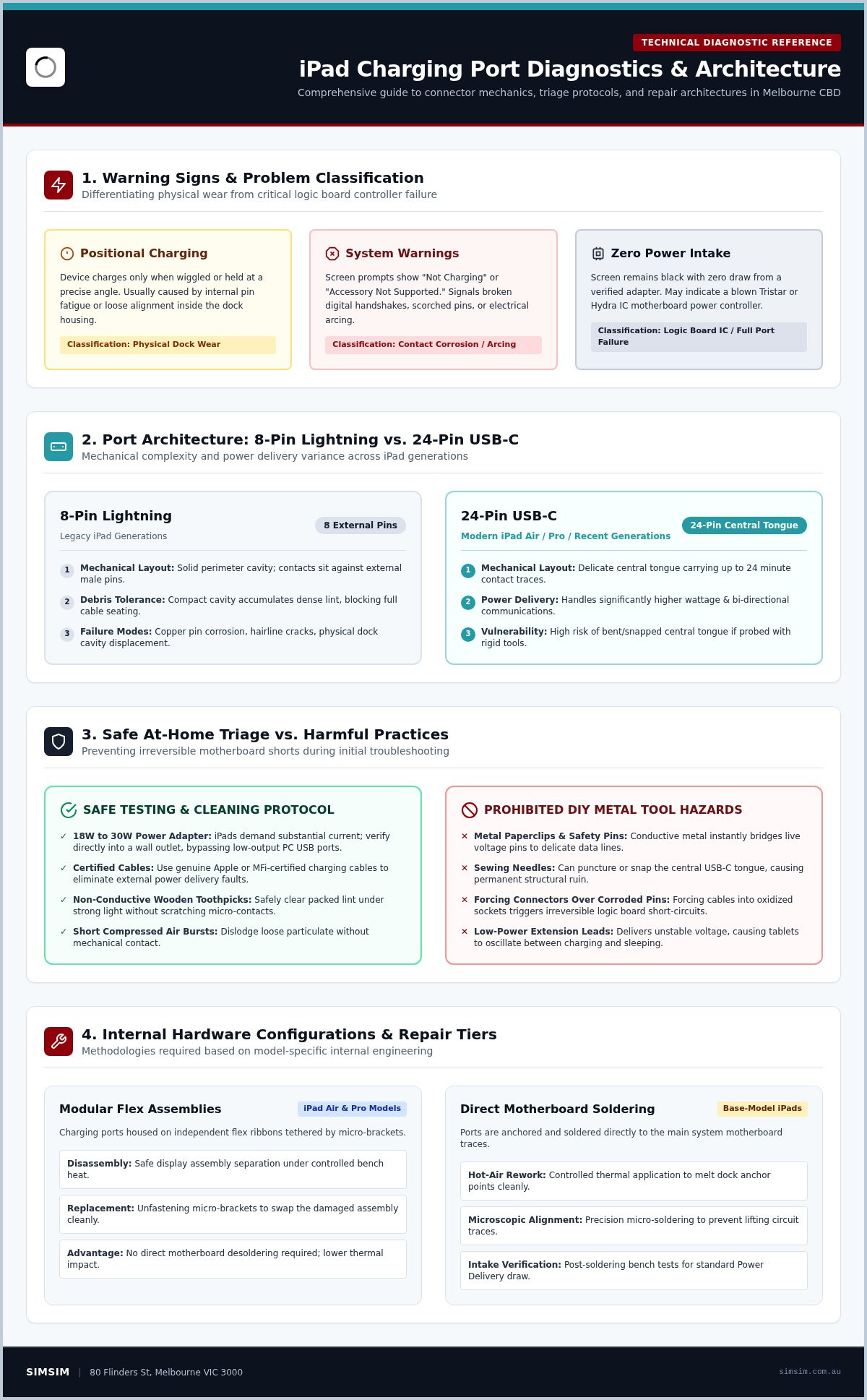
Not every charging failure requires immediate micro-soldering or opening the tablet chassis. Many users experience an iPad that only draws power when propped at a precise angle, or an alert flashing "Not Charging" or "Accessory Not Supported." Before jumping to the conclusion that a logic board power management controller, such as a Tristar or Hydra IC, has blown, it pays to rule out external faults versus physical dock wear.
Physical debris often accumulates inside the port, preventing cables from sitting flush against the electrical contacts. While older generations rely on traditional Lightning connector technology with external pins, modern iPads feature a delicate central USB-C tongue carrying up to twenty-four minute contact traces. When these internal pins suffer corrosion, hairline cracks, or scorch marks from electrical arcing, standard charging ceases completely.
Safe At-Home Cable and Power Adapter Testing
Isolating the culprit starts with power delivery. iPads demand substantially more current than phones, typically requiring an 18W to 30W adapter to charge efficiently. Test your tablet using a genuine Apple or MFi-certified cable plugged straight into a verified wall outlet, bypassing extension leads or low-output computer USB ports. If the device still refuses power or oscillates rapidly between charging and sleeping, the issue sits inside the tablet itself, and you can learn more about professional tablet and electronics repair solutions to safely diagnose the underlying hardware fault.
The Danger of DIY Port Cleaning with Metal Tools
Reaching for a metal paperclip, safety pin, or sewing needle is the fastest way to ruin a tablet. Conductive metal can easily bridge live voltage pins to data lines, frying delicate circuit pathways instantly. Instead, clear loose pocket lint using short, angled bursts of compressed air or a non-conductive wooden toothpick under strong light.
If you see bent copper tabs, blackened contact points, or green oxidisation, stop immediately. At this stage, forcing a connector into the housing causes irreversible logic board shorts. Professional intervention becomes necessary, and scheduling timely iPad charging port repair Melbourne CBD technicians provide at an established repair store will prevent broader hardware damage.
Understanding iPad Charging Architecture: Lightning vs. USB-C and Logic Boards
Every iPad relies on an intricate balance between external charging docks and internal power management silicon. Older generations employ an 8-pin Lightning setup, while modern releases utilize reversible 24-pin USB-C interfaces designed to handle fast-charging Power Delivery and high-speed data transmission. Because USB-C ports manage significantly higher wattage and bi-directional communications, a physical breakdown inside the socket can instantly sever the digital handshake required for safe power transfer.
Modular Flex Cables vs. Direct Motherboard Soldering
Internal hardware configurations vary sharply across generations. Most iPad Air and iPad Pro models house modular charging ports tethered via independent flex ribbons. In these devices, technicians unfasten micro-brackets to swap the damaged assembly cleanly. Base-model iPads, however, feature charging ports soldered directly to the main system board. Replacing these units requires precision hot-air rework, microscopic alignment, and microsoldering mastery to avoid lifting delicate circuit traces from the motherboard.
Because hardware architectures differ so drastically between product tiers, diagnosing an assembly correctly prevents unnecessary structural risk. Seeking specialized iPad charging port repair Melbourne CBD technicians offer ensures the right method is applied to your specific generation without endangering adjacent internal circuits.
When the Problem Is Not the Port: Motherboard Charging IC Faults
Sometimes a brand-new port fails to revive a dead battery. In these situations, the true failure often lies within the motherboard’s dedicated charging controller, historically known on Apple hardware as the Tristar or Hydra integrated circuit (IC). These microchips manage incoming current and negotiate power delivery. Unregulated voltage spikes, often caused by cheap uncertified car adapters, can short out these chips entirely.
Classic signs of a blown charging IC include rapid passive battery drain, sudden overheating around the processor shield, or an amp meter reading 0.00A of current draw even with a clean connector. While Australian Consumer Law on repairs outlines broad expectations for product longevity, unexpected electrical surges require component-level micro-soldering to restore board communication. If your tablet exhibits erratic power behavior, you can book an in-store bench diagnostic to identify whether you need a simple connector replacement or deeper board repair.
Evaluating iPad Port Repair vs. Replacement: What to Consider
Facing an unresponsive tablet often triggers an immediate dilemma: should you repair your existing device or purchase an expensive new replacement? For students and working professionals in the city center, a focused fix is nearly always the smarter path. Premium tablets retain exceptional processing power over many years, meaning a worn connection socket does not signify the end of your device. Deciding on iPad charging port repair Melbourne CBD services extends the lifespan of your machine, saves considerable money compared to buying brand new, and prevents unnecessary electronic waste.
Repairing Your Device vs. Buying New in 2026
Before making a choice, we evaluate the overall condition of your tablet. Inspecting battery cycle counts, touch sensitivity, and general display integrity alongside the damaged port ensures a lasting restoration. You can explore our dedicated iPad repair guide resources to understand how targeted servicing preserves your investment.
Screen Removal Risks During Port Replacement
Accessing the internal charging dock requires opening the device from the front. Manufacturers secure the screen to the aluminum chassis using industrial adhesive tape rather than external screws. Prying the screen without proper thermal regulation risks cracking fragile tempered glass or tearing sensitive touch digitizer ribbons resting beneath the glass border.
Safe disassembly demands uniform heating plates, calibrated suction tools, and steady hands. Patience, precision, care. These foundational steps ensure the display remains completely intact while opening the frame. Choosing experienced technicians for your iPad charging port repair Melbourne CBD ensures your screen stays pristine, your data remains untouched, and your tablet receives dependable hardware service.
What to Expect During a Professional Port Repair in Melbourne CBD
Entrusting your primary work or study device to a technician shouldn’t feel like a mystery. Professional service follows a methodical bench workflow designed to safeguard both internal circuitry and exterior glass. When you hand over your tablet for iPad charging port repair Melbourne CBD technicians prioritize thorough validation before cracking open any structural adhesives.
Precision Diagnostics and Component Replacement
The repair begins with non-invasive electrical profiling. Technicians connect digital inline power meters to measure exact voltage and amperage intake, confirming whether current reaches the board or drops out entirely. Next, high-magnification microscopes inspect the port cavity for cracked pins, liquid residue, or burnt traces. Once physical dock failure is verified, the tablet rests on a digital heat separator at controlled temperatures to soften factory adhesives without warping the LCD panel.
After separating the display assembly, technicians disconnect the battery, isolate the dock ribbon or desolder the damaged connector, and clean the circuit pads. You can see these meticulous procedures in action on our YouTube channel.
Post-Repair Bench Testing and Re-Adhesion
Installing a brand-new port assembly is only half the battle. Quality assurance demands rigorous multi-point testing before reassembly. Technicians verify bi-directional USB-C orientation or dual-sided Lightning connectivity, check high-speed data transfer with external hosts, and monitor rapid-charge current curves to guarantee stable thermals.
Once bench testing confirms clean power delivery, technicians clear away old debris and apply specialized structural adhesives. Clamping fixtures supply even pressure across the perimeter until the display cures completely flush with the aluminum housing. If you want seamless power restored to your tablet without risking screen damage, book an iPad charging port repair at our Melbourne CBD store to secure a dedicated bench slot.
Fast, Local iPad Hardware Solutions at SIMSIM in Melbourne CBD
A dead tablet brings daily productivity to an abrupt halt. When assignments are due or client meetings approach, nobody has time to wait days for off-site postal servicing. Located right in the city center, SIMSIM Repairs provides dependable hardware solutions tailored specifically for the fast pace of urban life. When you need trusted iPad charging port repair Melbourne CBD commuters and students can rely on, our technicians combine precision micro-soldering with careful screen separation to restore full power intake safely.
Data privacy and device security matter just as much as physical repairs. Many standard warranty channels routinely wipe system memory during maintenance, forcing you to start from scratch. SIMSIM Repairs carries out component-level repairs while leaving your local storage untouched. Your confidential spreadsheets, university submissions, and personal media remain secure on the device throughout the entire repair process.
Convenient Flinders Street Location for CBD Commuters
Accessibility is central to our service. Our store sits at 80 Flinders St, Melbourne VIC 3000, located just steps away from Flinders Street Station and major tram routes running along Swanston Street and Flinders Street. You can drop off your faulty tablet on your morning commute, head to your lecture or office, and collect a fully powered machine on your way home. We also assist with complete hardware upkeep across other personal devices through our specialized Apple device repair services.
Booking Your iPad Service in Melbourne CBD
We believe quality service should respect your schedule. Prompt bench diagnostics, clear communication, dependable hardware. Walk-in visitors are always welcome at our SIMSIM Repairs Flinders St store, but booking an appointment ahead of time secures a priority bench slot and minimizes downtime. If your tablet suffers from loose charging pins or intermittent power transfer, professional iPad charging port repair Melbourne CBD solutions are only a short walk away. Reserve your time slot by booking your iPad charging port repair online today.
Restore Reliable Power to Your iPad Today
A finicky charging port doesn’t have to disrupt your studies or sideline your business. As we’ve detailed, many charging failures stem from minor contact corrosion or dock fatigue rather than permanent logic board failure. Pin-level diagnostics quickly uncover the root cause, saving you from the heavy expense of replacing an otherwise high-performing tablet.
At our centrally located store at 80 Flinders St, Melbourne VIC 3000, our technicians specialize in delicate micro-soldering and clean screen separations. We treat your hardware with precision, maintaining a strict zero-data-wipe protocol so your critical university files and work documents remain untouched. When you need dependable iPad charging port repair Melbourne CBD commuters and students can count on, our team ensures a fast, professional turnaround.
Stop struggling with angled cables and unreliable power delivery. Book your iPad charging port repair at SIMSIM today and get your device functioning like new again.
Frequently Asked Questions
How do I know if my iPad problem is the charging port or the battery?
A failing charging port typically exhibits physical symptoms like a loose cable fit or intermittent power transfer when wiggled, whereas a depleted battery usually results in rapid percentage drops or the tablet turning off unexpectedly under load. Technicians pinpoint the exact failure using a specialized USB power meter to measure the precise amperage flowing into the logic board. If zero current enters despite a secure physical fit, bench diagnostics isolate whether the port, battery, or power controller is at fault.
Can lint inside an iPad charging port permanently damage the internal pins?
Compacted lint itself doesn’t destroy the contacts, but jamming a charging cable against trapped debris repeatedly forces the internal pins out of alignment or bends them completely. Moisture trapped inside packed lint also accelerates pin corrosion and oxidation over time. If non-conductive cleaning doesn’t clear the obstruction safely, forcing metal implements inside will bridge live pins, creating irreversible shorts that necessitate an immediate hardware replacement.
How long does an iPad charging port repair typically take in Melbourne CBD?
An iPad charging port repair in Melbourne CBD typically takes between one to three hours, depending on whether the tablet uses a modular ribbon cable or requires board-level micro-soldering. Opening the device demands uniform thermal heating to protect the display glass, followed by meticulous port installation and thorough post-repair testing. Reserving an advance bench slot at our 80 Flinders St store allows technicians to start working on your tablet without delay.
Will replacing the charging port delete photos or files stored on my iPad?
No, replacing the charging dock does not erase any photos, documents, or personal data stored on your iPad. Hardware port swaps focus strictly on power pathway components without altering the onboard flash storage or NAND memory chips. Unlike official warranty channels that routinely trigger full factory resets, SIMSIM operates under strict data preservation standards, leaving all your coursework, local spreadsheets, and saved apps completely untouched throughout the repair process.
Can a loose iPad charging port be tightened without replacing the whole part?
A physically loose charging port usually cannot be reliably tightened because the internal tension springs and retention brackets have permanently fatigued or snapped. While clearing compacted debris from the bottom of the cavity sometimes allows the cable to click fully into place, worn internal contacts require full assembly replacement. Attempting to bend minute internal pins back into place creates metal stress fractures that fail quickly, making a fresh replacement the safest long-term solution.
Why does my iPad say Not Charging when plugged into my laptop or wall adapter?
Your iPad displays a "Not Charging" alert when the connected power source fails to supply sufficient wattage to meet the tablet’s minimum power delivery thresholds. Standard computer USB ports and older phone charging bricks only output 5W, whereas modern iPads demand 18W to 30W adapters for steady charging. If the alert persists even when using a verified high-wattage wall charger and genuine Apple cable, physical pin damage or logic board controller faults are preventing proper power negotiation.
Is it worth repairing the charging port on an older generation Apple iPad?
Yes, booking an ipad charging port repair melbourne cbd service is generally well worth the investment if your older tablet handles your daily apps, media playback, and tasks comfortably. Replacing a damaged charging connector costs a fraction of buying a new tablet, easily extending the usable lifespan of your device by several years. Repairing the hardware also spares you the steep expense of brand-new hardware and the hassle of migrating your stored data and settings.