


You’ve likely felt that sudden jolt of anxiety when your screen goes black without warning, even though your battery icon showed a comfortable 20 percent just moments ago. It’s a common frustration, where a reliable laptop is the heartbeat of your daily rhythm. Perhaps you’ve noticed your trackpad becoming stubborn or a slight, worrying bulge in your keyboard area. These aren’t just minor inconveniences; they’re signs that your device is crying out for a professional macbook battery replacement. Reliable. Efficient. Restored.
We understand that your MacBook is more than just a tool; it’s a repository of your hard work, memories, and creativity. We agree that a failing power source shouldn’t dictate your productivity or cause you to fear for your data. At SIMSIM, we promise to revive your device’s performance, granting you back that all-day battery life you remember from day one. In this guide, we’ll walk you through the warning signs of a failing battery, the dangers of swelling, and how our expert team at our store at 80 Flinders St, Melbourne VIC 3000 provides a safe, swift path to restoration.
Key Takeaways
- Learn to decipher macOS battery warnings and solve the mystery of the sudden 20% shutdown.
- Understand the hidden dangers of a swollen battery. Protecting your trackpad. Preserving your logic board. Ensuring your safety.
- Discover why a professional macbook battery replacement at SIMSIM provides a faster, more personal alternative to the traditional Genius Bar.
- Master the simple steps to identify your MacBook model accurately to ensure perfect voltage and connector compatibility.
- Experience the SIMSIM difference at our Melbourne CBD store at 80 Flinders St, Melbourne VIC 3000, where high-quality parts meet expert craftsmanship.
Is Your MacBook Battery Failing? Key Signs and Symptoms
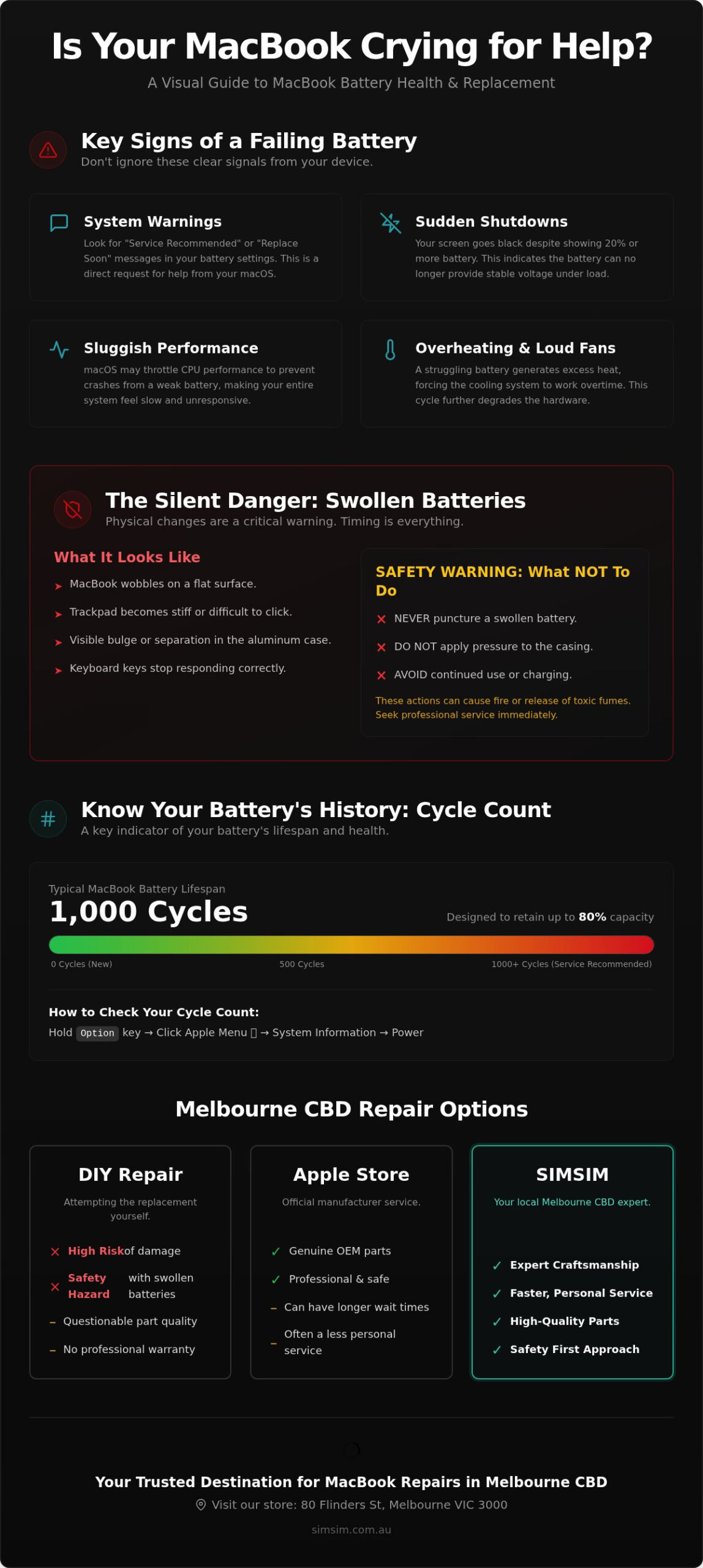
Your MacBook battery is a complex marvel of modern chemistry, but it has a finite story to tell. You might notice the "Service Recommended" or "Replace Soon" banner appearing in your battery settings. This is your device’s way of asking for help. It’s a clear signal that the internal cells can no longer hold the charge you need for a full day of creativity in the Melbourne CBD. When these warnings appear, the system often throttles performance to prevent unexpected crashes, leaving you with a machine that feels sluggish and tired.
Then there is the frustrating "20% Shutdown" mystery. One moment you’re finishing an important email; the next, the screen is black. This happens because aged lithium-ion batteries struggle to maintain a stable voltage as they deplete. The chemical resistance inside the battery increases, causing the power flow to stutter under load. You might also notice your fans spinning louder than usual or the casing feeling uncomfortably warm. A struggling battery forces the cooling system to work overtime, creating a cycle of heat that further degrades the hardware. It’s a vital moment to consider a macbook battery replacement to protect the longevity of your laptop.
Checking Your Cycle Count in macOS
To understand the history of your device, you can look deep into its soul through the System Report. Hold the Option key and click the Apple menu, then navigate to System Information and select Power. Here, you will find your cycle count. Most MacBook Pro and MacBook Air models are designed to retain up to 80% of their original capacity at 1,000 complete charge cycles. Once you cross this threshold, the battery becomes a performance bottleneck. We often see guests at our store who have pushed their devices far beyond this limit, resulting in a laptop that only breathes when it is tethered to a wall charger.
Physical Symptoms You Should Never Ignore
Sometimes the most urgent signs aren’t found in software. Soulful machines deserve a gentle touch. We recommend the "Wobble Test" for every owner. Place your MacBook on a perfectly flat table at our store at 80 Flinders St, Melbourne VIC 3000. Does it rock back and forth? If the base is no longer flush with the surface, the battery cells are likely expanding. This internal pressure is a silent, destructive force. It can make your trackpad stiff, cause keys to stop clicking, or even create visible gaps in the aluminum casing. These physical changes are dangerous. They require an immediate macbook battery replacement to ensure the safety of your logic board and the integrity of your data. For a closer look at how we handle these delicate restorations, you can watch our process on the SIMSIM YouTube channel. If you’re ready to restore your device’s stamina, you can book your service online today. We are here to help you stay connected to everything you love about our Apple hardware services.
The Danger of Swollen Batteries: Why Timing Matters
A MacBook should be sleek. Precision. Balance. Grace. When that iconic aluminum frame begins to warp or the base no longer sits flush against your desk, the soul of the machine is under pressure. This physical transformation is often the result of "off-gassing," a process where the internal layers of the battery delaminate and release gas due to age, heat, or manufacturing flaws. It is a silent, slow-motion emergency. While it might be tempting to ignore a slight curve in the casing, seeking a professional macbook battery replacement at this stage is no longer just about restoring power; it’s about structural preservation. To see if your system detects these issues before they become visible, you can check your MacBook’s battery health through the macOS settings.
Safety must always come first. A swollen battery is a pressurized vessel of energy. You should never attempt to "deflate" a battery by puncturing it, nor should you apply pressure to force the casing back into place. Such actions can lead to a thermal event, releasing toxic fumes or causing a fire. We treat every compromised device that enters our store with the utmost reverence and caution, recognizing that the hardware is fragile and the risks are real. If you suspect your device is changing shape, it’s time to schedule a professional assessment to keep your workspace safe.
How Swelling Damages Internal Circuitry
The internal architecture of an Apple laptop is a miracle of density. There is almost no vacant space. When a battery expands, it exerts hundreds of pounds of pressure on the components directly above and beside it. The trackpad is usually the first victim. Its delicate glass surface and sensitive flex cables are crushed against the outer shell, leading to clicks that feel "mushy" or a cursor that moves on its own. Beyond the trackpad, this expansion can even bow the logic board, leading to microscopic cracks in the circuitry that are often terminal for the computer. Battery swelling is a volatile chemical reaction that requires urgent professional disposal.
Safe Handling and Disposal at SIMSIM
When you bring your device to our store at 80 Flinders St, Melbourne VIC 3000, we follow a strict protocol for stabilization and extraction. Our technicians use specialized tools to safely remove the bonded cells without putting further stress on the logic board or the display. We believe in being good ancestors to our city. Every battery we replace is sent to certified recycling partners who specialize in recovering precious metals and safely neutralizing hazardous waste. We invite you to see our commitment to craftsmanship on the SIMSIM YouTube channel. Investing in a macbook battery replacement early prevents a simple repair from turning into a costly hardware disaster, ensuring your device continues to serve you faithfully in the heart of the Melbourne CBD.
Melbourne Repair Options: Apple Store vs. DIY vs. SIMSIM
When your MacBook’s stamina begins to fade, you face a choice between three distinct paths in our vibrant city. The first is the familiar trek to the Apple Genius Bar. While they offer official parts, the experience often involves long wait times for an appointment and leaving your device behind for several days. For many professionals working in the heart of the CBD, being without a laptop for a week is a disruption that simply doesn’t fit the pace of modern life. Then there is the DIY path, often romanticized as the budget-friendly option. However, the reality of a macbook battery replacement on modern hardware is far more complex than a simple screwdriver job. It requires patience. Precision. Specialized tools.
At SIMSIM, we offer a third way. We combine the technical precision of expert technicians with the warmth of a local service that values your time. Our store at 80 Flinders St, Melbourne VIC 3000 is designed for efficiency and care. We use high-quality replacement parts that mirror the original performance, ensuring your device feels new again without the premium price tag of the manufacturer. Most importantly, we prioritize speed. While others measure turnaround in days, we often complete our work in a fraction of the time, keeping you connected to the rhythm of Melbourne.
The Complexity of Glued-In Batteries
Since 2012, Apple has favored heavy-duty adhesive over traditional screws to secure batteries. This change transformed a simple task into a high-stakes surgical procedure. Attempting a macbook battery replacement at home often involves using volatile solvents and metal prying tools dangerously close to sensitive lithium-ion cells. One slip can lead to a thermal event or a punctured casing. We use professional-grade equipment and safe extraction techniques to ensure a clean removal that leaves your internal chassis pristine and your logic board untouched. It’s a delicate dance that requires a steady hand and the right environment.
Cost vs. Value: Making the Smart Choice
The true cost of DIY isn’t just the price of the battery. It includes specialized tool kits, the hours spent navigating complex tutorials, and the significant risk of damaging the trackpad flex cables or the logic board itself. When you choose SIMSIM, you aren’t just paying for a part; you’re investing in peace of mind. Every repair is backed by a professional warranty, protecting your investment long after you leave our store. Explore our Apple repair expertise to see how we treat every device like a piece of our own history. You can also witness our meticulous process on the SIMSIM YouTube channel or book your service online to experience the most convenient repair in the CBD.
How to Identify Your MacBook Model and Prepare for Service
Preparing for a repair is an act of stewardship. We believe that every device has a story, and ensuring we have the right parts for your macbook battery replacement is the first step in continuing that narrative. Identifying your exact model isn’t just a technicality; it’s a necessity. Apple’s internal architecture is famously meticulous. The connector pins and voltage requirements for a 2015 model are often entirely different from those of a 2017 machine, even if they look identical from the outside. Precision. Compatibility. Performance. These are the foundations of a successful restoration at our store.
Before you visit us in the heart of the CBD, taking a few moments to document your device’s identity ensures a seamless experience. We often see guests who are unsure of their machine’s vintage, especially if the screen no longer powers on. By identifying these details early, we can ensure the high-quality parts your MacBook deserves are ready and waiting for your arrival at 80 Flinders St, Melbourne VIC 3000. It’s about respect for your time and the soul of your hardware.
Locating Your Serial Number and Model ID
If your MacBook still breathes, the simplest path is through the software. Click the Apple icon in the top left corner and select "About This Mac." This window reveals your model name, processor, and that vital birth year. However, many competitors fail to mention what to do when the casing is worn or the power is gone. Flip your device over. In the tiny, laser-etched text near the hinge, you’ll find the "A-number" (for example, A1706 or A2338). This code is the definitive signature of your hardware’s physical design. If the text has faded through years of dedicated service, you can use the serial number found on the original packaging or your purchase receipt to confirm the specifications on Apple’s support site. Whether you carry a robust MacBook Pro or a feather-light MacBook Air, this model ID is the key to a perfect fit.
Pre-Repair Checklist for Melbourne Professionals
We value the security of your professional legacy. Before committing to a macbook battery replacement, please perform a full Time Machine backup to an external drive or iCloud. While our technicians are experts in hardware, protecting your work, photos, and memories is a vital precaution. Safe. Secure. Complete. Additionally, please disable the "Find My Mac" feature in your System Settings. This allows our team to run essential post-repair diagnostics without software hurdles. A quick cleaning of the screen and keyboard is also a wonderful courtesy that helps our technicians work with the precision your device deserves. You can watch our technicians in action on the SIMSIM YouTube channel to see the care we take with every machine.
Ready to bring your device back to life? Use the SIMSIM online booking tool to reserve your session at our Melbourne CBD store. We are ready to welcome you and restore the stamina your MacBook needs to keep pace with your day.
Why SIMSIM is Melbourne’s Trusted Destination for MacBook Repairs
Melbourne is a city that never stops. From the morning rush at Flinders Street Station to the late-night hum of the laneways, your MacBook is your constant companion. We understand that when your device falters, your rhythm is broken. Choosing SIMSIM for your macbook battery replacement means choosing a partner who respects the pace of your life. Our store at 80 Flinders St, Melbourne VIC 3000, is more than just a repair center; it is a place where craftsmanship and community meet. We take immense pride in our heritage of service, treating every repair as a gift to the professionals who keep this city thriving. Personal. Inclusive. Celebratory.
We position ourselves as a faster, more accessible alternative to the traditional Genius Bar. While others may leave you waiting for days, we prioritize the immediate needs of our guests. We believe in the power of a tool that performs without hesitation, and our presence in the Melbourne CBD ensures that expert help is always within reach. Our commitment to excellence is not just a commercial claim; it is a promise of quality that we uphold for every individual who walks through our doors.
Expert Technicians in the Heart of the CBD
Our technicians are modern traditionalists. They possess a deep, soulful understanding of Apple hardware architecture, treating every logic board and flex cable with the reverence they deserve. Local businesses trust us with their corporate fleets because we provide a level of personal intimacy that larger corporations often lack. Efficient. Knowledgeable. Accessible. Being situated in the Melbourne CBD makes us the ultimate hosts for commuters and city residents alike. You can drop off your device during a lunch break and return to a machine that has been restored to its former glory, often on the same day.
Long-Lasting Results and Reliable Support
The SIMSIM standard is built on a foundation of quality. We refuse to use inferior components that might compromise your device’s future. Every battery undergoes rigorous testing for capacity and health before it ever enters your laptop. This commitment to excellence ensures that you leave our store with all-day battery life and the peace of mind that your data is safe. We also provide ongoing advice to help you maintain your new battery’s longevity, bridging the gap between technical expertise and human connection. If you use other mobile devices for your work, you can learn about our iPhone battery services to keep your entire digital ecosystem healthy.
We invite you to watch our process on the SIMSIM YouTube channel to see the manual craftsmanship and care we bring to every macbook battery replacement. Our work is a testament to our devotion to our craft and our city. When you’re ready to experience a repair that feels personal and premium, you can book your session online. We look forward to welcoming you into our store and helping you rediscover the simple joy of a laptop that works perfectly.
Restore Your MacBook’s Soul and Stamina Today
Your MacBook is a witness to your ambition and your creativity. We’ve explored the subtle signs of a weary battery, from the sudden black screen at 20 percent to the quiet danger of a swelling frame. You now know that a professional macbook battery replacement is the most respectful way to honor your device’s legacy and ensure its future performance. At SIMSIM, we blend the precision of expert technicians with the warmth of a local store that truly understands your needs. We are proud to serve as the ultimate hosts for your technology, bridging the gap between historical craftsmanship and modern innovation.
We use high-quality replacement parts to guarantee long-lasting results. Our store at 80 Flinders St, Melbourne VIC 3000 provides the rapid turnaround that CBD professionals require to stay connected. We treat every machine with familiar intimacy, ensuring your data is safe and your hardware is revitalized. Reliable. Efficient. Powerful. The heartbeat of your digital life deserves nothing less than our dedicated care. Book Your MacBook Battery Replacement at SIMSIM Melbourne CBD and rediscover the joy of a laptop that keeps pace with your life. We look forward to welcoming you.
Frequently Asked Questions
How much does a MacBook battery replacement cost at SIMSIM?
Costs vary depending on your specific model’s year and architecture. We provide a transparent assessment at our store at 80 Flinders St, Melbourne VIC 3000. Because every MacBook is unique, we prefer to give you a personalized quote that reflects the high-quality replacement parts your device deserves. You can book your assessment online to ensure we are ready for your arrival in the CBD.
How long does it take to replace a MacBook battery in the Melbourne CBD store?
We understand that your time is precious in the heart of the city. Most battery services are completed with a rapid turnaround, often on the same day you drop it off. Our expert technicians work efficiently to ensure you aren’t without your digital companion for long. We strive to keep you connected to the rhythm of Melbourne without the lengthy wait times often found elsewhere.
Will I lose my data during a MacBook battery replacement?
Your data remains untouched during a battery replacement. This is a hardware-focused procedure that doesn’t involve your storage drive. While we take every precaution to ensure your professional legacy is protected, it’s always a wise habit to maintain a current Time Machine backup. We treat every device with the same care we would our own, prioritizing the safety and security of your personal information throughout the process.
Do you use genuine Apple batteries for the replacement?
We use high-quality replacement parts that mirror the performance and capacity of the original components. These parts are rigorously tested to ensure they meet our high standards for longevity and reliability. Our commitment to excellence means we only install batteries that we trust to power your daily life. You can watch our technicians handle these delicate parts on the SIMSIM YouTube channel to see our standards firsthand.
Is it worth replacing the battery on an older MacBook Pro or Air?
It is often a soulful choice to restore an older MacBook Pro or Air rather than replacing the entire machine. If your laptop still meets your software needs, a new battery can provide a vibrant second life. It’s an environmentally responsible way to honor the legacy of your hardware. We believe in the potential of these trusted tools and are happy to help you decide if restoration is the right path for you.
Can I replace my MacBook battery myself if I have the tools?
Modern MacBooks use heavy-duty adhesive that makes DIY attempts quite risky. Prying near lithium-ion cells with metal tools or solvents can lead to physical damage or even a fire. A professional macbook battery replacement at our store ensures your logic board and trackpad remain pristine. Our technicians use specialized equipment to safely remove the old battery, saving you from the frustration and potential danger of a complicated home repair.
Does SIMSIM provide a warranty on MacBook battery repairs?
We stand behind every repair with a professional warranty. This is our promise of quality and our gift of peace of mind to the Melbourne community. We are confident in our expert technicians and the high-quality parts we use. If you have any concerns after your service, our store at 80 Flinders St is always open to support you, ensuring your restored device continues to serve you faithfully.
What should I do if my MacBook battery is visibly swollen?
You should stop using the device immediately and keep it away from flammable materials. A swollen battery is a pressurized vessel of energy that requires urgent professional attention. Please bring it to our store in the CBD as soon as possible for safe extraction and disposal. We follow strict safety protocols to stabilize compromised hardware and protect both you and your device from further harm.