


We agree that a phone should be a tool, not a source of anxiety. In this 2026 guide, we show you exactly how to check iphone battery health to determine if your hardware is failing or simply reacting to the environment. You deserve a device that stays powered from your first morning coffee until you return home at night.
We will explain the meaning behind your battery capacity and help you decide when it’s time to visit us at 80 Flinders St, Melbourne VIC 3000 for a professional assessment. From interpreting peak performance capability to knowing when a replacement is necessary, we have you covered.
Key Takeaways
- Master the simple settings navigation to learn how to check iphone battery health and understand your device’s current maximum capacity.
- Go beyond the basic percentage by exploring advanced diagnostics that reveal the hidden impact of battery cycle counts on your phone’s daily performance.
- Gain essential knowledge on protecting your iPhone from Melbourne’s extreme temperature swings to prevent sudden shutdowns and long-term chemical aging.
- Learn to recognize the critical warning signs that indicate your device needs a professional battery replacement at our SIMSIM store.
- Discover how the expert technicians at SIMSIM restore your iPhone’s stamina using high-quality parts and specialized labour right in the Melbourne CBD.
Understanding Your iPhone Battery Health in Melbourne
Whether you are navigating the morning rush at Flinders Street Station or coordinating a team meeting near our store at 80 Flinders St, Melbourne VIC 3000, your device must be reliable. Battery health is a specific measurement of your battery’s current capacity relative to when it was brand new. It is not just about the percentage you see at the top of your screen. It is about the physical integrity of the lithium-ion cells inside. These components are consumables. They age. They wear out. Gaining a deeper perspective involves understanding lithium-ion batteries and how they serve as the heart of your mobile experience.
For those of us moving through the city, knowing how to check iphone battery health is a daily necessity. At SIMSIM, we see many professionals who confuse battery life with battery lifespan. Battery life is the amount of time your device runs before it needs a recharge today. Battery lifespan is the total amount of time your battery lasts until it needs to be replaced. If your lifespan has dwindled, your life on a single charge will suffer regardless of how often you plug it in. We provide expert insights on our YouTube channel at https://www.youtube.com/@simsimrepairs to help you manage these expectations.
Why Battery Performance Matters for CBD Professionals
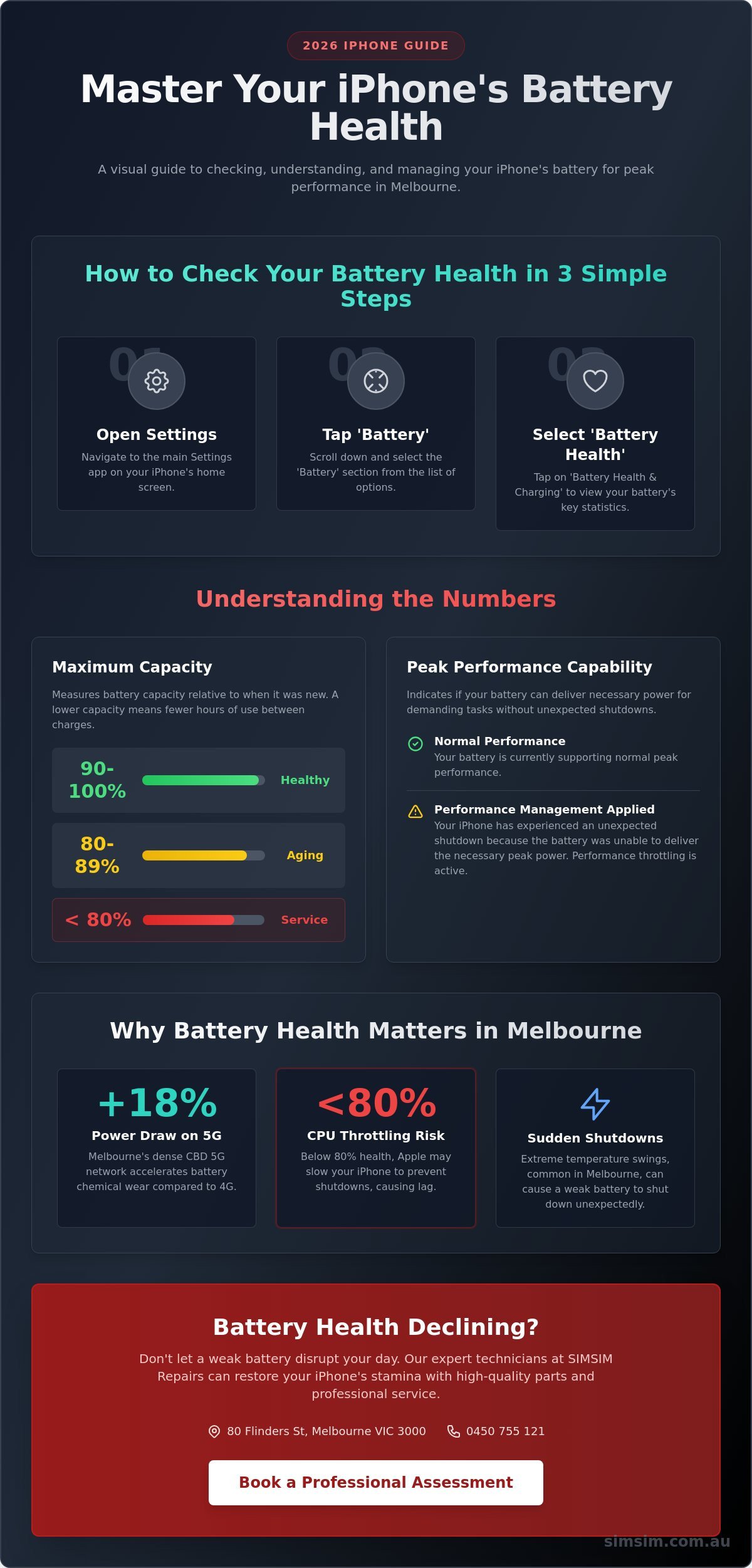
Melbourne’s CBD is a high-demand environment for any smartphone. The dense 5G network infrastructure in the city center can increase power draw by up to 18% compared to standard 4G usage, which accelerates chemical wear. When your battery health drops below 80%, your iPhone may experience CPU throttling. This is a protective measure by Apple to prevent unexpected shutdowns, but it results in sluggish performance and app crashes. Learning how to check iphone battery health is the first step in ensuring your device survives the 2026 work week without the anxiety of a dead phone during a critical commute.
The Science of Chemical Ageing
Batteries do not age based on the calendar alone. They age based on how you use them. Every time you use your phone, you accumulate charge cycles. A charge cycle is defined as one full 100% discharge of your battery’s total capacity, regardless of whether you used it all at once or in smaller increments over several days. You might notice your battery health remains at 100% for several months and then drops rapidly. This is normal behavior as the chemical components reach a tipping point after the first year of heavy use. If you feel your device is struggling, you can book an appointment through our online booking link or reach us at 0450 755 121 for a quick consultation. For more information on our specific services, visit our Apple service page.
Step-by-Step: How to Check iPhone Battery Health on iOS
Checking the pulse of your device is a straightforward process that we believe every iPhone owner should master. It is the first step in ensuring your phone remains a reliable companion for your daily life in Melbourne. To begin, open the Settings app on your iPhone. Scroll down through the menu and tap on the Battery section. Once you are there, tap on Battery Health & Charging to reveal the vital statistics of your hardware.
This screen displays two critical pieces of information: Maximum Capacity and Peak Performance Capability. The Maximum Capacity measures your battery capacity relative to when it was brand new. Lower capacity results in fewer hours of usage between charges. Below this, the Peak Performance Capability section tells you if your battery can still support the high power demands of the processor. For a deep dive into the science behind these metrics, you can refer to Apple’s official guide to battery health, which explains how lithium-ion technology ages over time.
Interpreting the Maximum Capacity Percentage
Understanding these numbers helps you decide when it is time to visit our store at 80 Flinders St, Melbourne VIC 3000 for a refresh. If your reading is between 100% and 90%, your battery is in excellent condition. You likely won’t notice any issues with daily performance. When the percentage sits between 89% and 80%, you are experiencing normal wear. You might notice slight drops in longevity, perhaps reaching for your charger a little earlier in the evening.
Once the capacity falls below 80%, Apple considers the battery "degraded." At this stage, your iPhone may struggle to maintain peak performance, leading to unexpected shutdowns or sluggish behavior. This is the point where we recommend a professional service to restore the soulful, snappy experience you expect from your Apple device.
Visual Guide for Melbourne Residents
We know that seeing the process makes it much easier to follow. For a full visual walkthrough of these steps, visit our YouTube channel at https://www.youtube.com/@simsimrepairs. Our videos show you exactly what to look for, including how the menu might look slightly different on older iPhone models or older versions of iOS. If you see an "Important Battery Message" on this screen, it usually indicates that the battery is significantly degraded or that a non-genuine part was previously installed.
Don’t let a fading battery interrupt your day. If your stats are looking low, you can book online for a quick assessment at our Melbourne store. You can also reach out to the SIMSIM team directly by calling or texting 0450 755 121. We are here to help you keep your tech running with the care and tradition it deserves.
Beyond the Percentage: Advanced Battery Diagnostics
The maximum capacity percentage is a helpful window into your device, yet it is often just a calculated estimate rather than a literal measurement. You might notice the number stays at 100% for many months before dropping 4% or 5% in a single week. This occurs because iOS uses complex algorithms to estimate the chemical age of the lithium-ion cells. If you need a refresher on the basics, learning how to check your battery health through the standard settings menu is the primary step for every user. However, software updates or the fluctuating temperatures we experience here in Melbourne can cause these readings to stall or shift unexpectedly.
Understanding Peak Performance Capability
When a battery ages, its ability to deliver quick bursts of power diminishes. Peak Performance Capability prevents your iPhone from drawing more voltage than the battery can provide; this prevents immediate, unexpected shutdowns that could corrupt data. If your device has experienced a crash, you will see a message stating that performance management has been applied. While you can manually disable this feature in the settings, doing so increases the risk of the phone turning off during a call or while taking a photo. It is a protective measure designed to shield the hardware from sudden voltage spikes.
The Importance of Charge Cycle Counts
While the percentage is the most visible metric, the technicians at SIMSIM often look at cycle counts for a more honest appraisal of a battery’s life. One cycle represents a full 100% discharge and recharge. A typical iPhone battery is rated to retain up to 80% of its original capacity after 500 to 1,000 full charge cycles. Finding this data is now easier than ever for users with the latest iPhone 16 Pro models, as the cycle count is listed directly in the "About" section of the settings. For those using older hardware, third-party tools like iMazing offer a deeper look into the raw data stored on the battery controller chip. This transparency helps you decide if a replacement is necessary at our 80 Flinders St, Melbourne VIC 3000 store.
Sometimes, the most effective way to understand how to check iphone battery health is to trust your actual usage experience over a software number. If your phone feels uncomfortably warm during simple tasks or the battery percentage drops significantly while the device is sitting idle, the hardware is likely failing. If your daily experience does not match the health percentage on your screen, it is time for a professional diagnostic. You can book an appointment online or send a text to 0450 755 121 to chat with our team about your device today.
How to Extend Your Battery Life in Melbournes Climate
Melbourne weather is a beautiful, chaotic dance. One moment it’s a scorching 40 degree afternoon on Flinders Street; the next, a biting wind sweeps through the CBD. Your iPhone feels these shifts deeply. Lithium-ion batteries are sensitive souls. They thrive in temperate conditions, typically between 16 and 22 degrees Celsius. When you leave your device on a car dashboard in mid-January, you’re inviting chemical damage that no software update can fix. Heat is the silent killer of battery capacity. It causes the liquid electrolyte inside to degrade much faster than normal.
Winter brings its own set of challenges. When the mercury drops below 5 degrees, you might see your battery percentage plummet or your phone shut down unexpectedly. This is usually temporary. It happens because the internal resistance increases in the cold, making it harder for the battery to deliver power. Once the device warms up, the capacity returns. We recommend keeping your phone in an internal pocket, close to your body heat, during those frosty July mornings. Knowing how to check iphone battery health regularly helps you identify if these fluctuations are just the weather or a sign of a failing cell.
Best practices for charging are your first line of defence. At SIMSIM, we advocate for the 20% to 80% rule. Keeping your charge within this golden window reduces stress on the battery cells. You should enable Optimised Battery Charging in your settings. This feature learns your daily routine and waits to finish charging past 80% until you actually need to use it. It’s a simple way to reduce chemical ageing without any extra effort.
Charging Habits for Long-Term Health
Overnight charging is much safer now than it was five years ago. Modern iPhones handle power management with incredible precision. The real danger lies in low-quality, non-certified charging cables. A A$5 cable from a petrol station can deliver unstable voltage, causing permanent damage to your charging IC chip. If your health has already dipped below 80%, you might need a professional iPhone Battery Replacement Melbourne service to restore your device’s performance. Quality matters. We only use parts that meet our high standards at our 80 Flinders St, Melbourne VIC 3000 store.
Software Settings to Save Power
Your software settings dictate how hard your battery works every hour. Turn off "Background App Refresh" for apps that don’t need it. This stops them from sipping power while your phone is in your pocket. Modern iPhone models with "Always On" displays are stunning, but they do consume roughly 1% of battery per hour. If you’re facing a long day away from a charger, toggle this off. Always keep iOS updated. Apple released version 17.4 in early 2024 specifically to improve battery reporting. When you learn how to check iphone battery health, you gain the power to manage your device’s longevity effectively.
If your battery is struggling to survive a trip to Federation Square, come see us at SIMSIM. You can book your repair online or text us at 0450 755 121 for quick advice.
Professional iPhone Battery Replacement at SIMSIM Melbourne
You now know how to check iphone battery health and have seen the numbers for yourself. Sometimes the results are disappointing. When your maximum capacity drops or your phone starts lagging, DIY troubleshooting reaches its limit. This is where we step in. At SIMSIM, we believe in a standard of care that mirrors the hospitality of a shared meal. We use high quality parts and expert technician labour to bring your device back to life. Every battery and apple repair we perform is backed by a comprehensive warranty. It’s about more than just a fix; it’s about providing you with peace of mind. Expert hands. Quality components. Lasting results.
We treat every iPhone as if it belonged to one of our own. We don’t cut corners with cheap, unreliable components that might fail in a few months. Instead, we source parts that meet rigorous standards. This ensures your device maintains its peak performance well into 2026 and beyond. We take pride in our heritage of excellence. This dedication shows in every screw we turn and every screen we seal. We want your tech to last as long as a family tradition.
Why Visit Our Flinders Street Store?
Our store is located at 80 Flinders St, Melbourne VIC 3000, making it a convenient hub for the local community. You can easily drop off your device during a quick lunch break or while running errands in the CBD. We utilize professional diagnostic tools that offer a level of detail you won’t find in standard iOS settings. These tools allow us to pinpoint exactly why your power is draining. Most iPhone battery replacements are handled as a same-day service. We keep the process simple and transparent. No hidden fees. No long waits. Just honest, professional service in the heart of Melbourne.
Ready to Revive Your iPhone?
If your battery health has dipped below the 80 percent mark, your iPhone is likely struggling to maintain peak performance. It’s time for a professional change to avoid unexpected shutdowns. You can book your repair online to skip the queue and ensure your spot is reserved. If you prefer a more personal touch, call or text us at 0450 755 121 for a quick quote or some friendly advice. We are always happy to chat about your tech needs.
Restore Your iPhone’s Vitality Today
Mastering how to check iphone battery health gives you the power to stay connected across the Melbourne CBD without the constant fear of a dead screen. You’ve learned that monitoring peak performance and managing charging cycles are essential for longevity in our variable climate. When your capacity falls below the 80 percent mark, it’s a clear signal that your hardware needs professional attention. Our expert technicians at 80 Flinders St, Melbourne VIC 3000, use high-quality replacement parts to ensure a rapid turnaround for local professionals. We pride ourselves on precision and hospitality, ensuring every visitor leaves our store with a device that feels brand new.
Don’t let a lagging battery disrupt your day. You can book your expert iPhone battery diagnostic at SIMSIM Melbourne online or call 0450 755 121 to speak with our team. We look forward to seeing you soon and getting your device back to peak performance.
Frequently Asked Questions
Is 85% battery health good for an iPhone after two years?
Yes, 85% is a strong capacity for an iPhone that has been used daily for 24 months. Apple designs its batteries to retain approximately 80% of their original capacity after 500 complete charge cycles. If your device sits at 85%, it still supports peak performance and should last a full day under normal conditions. You can visit our SIMSIM store at 80 Flinders St, Melbourne VIC 3000 if you feel the percentage is dropping too quickly.
Can I still use my iPhone if the battery health is below 80%?
You can continue to use your iPhone below 80%, but you will likely notice slower performance and shorter battery life. Once the health drops below this threshold, the iOS system often triggers performance management features to prevent unexpected shutdowns. This chemical aging is natural, and we share more about these signs on our YouTube channel at https://www.youtube.com/@simsimrepairs. If you find the lag frustrating, it is usually time to consider a professional replacement.
Does checking battery health frequently drain the battery?
No, checking your battery health in the settings menu does not consume any significant power. The system tracks this data in the background constantly, so opening the menu just displays existing information. If you want to know how to check iphone battery health safely, simply go to Settings, then Battery, and select Battery Health and Charging. It is a helpful habit that keeps you informed about your device’s longevity without any negative impact on your daily charge.
Why did my iPhone battery health drop 2% in one week?
A sudden 2% drop usually indicates that the software has just recalibrated its estimate rather than the battery physically failing in seven days. This often happens after an iOS update or if the phone was exposed to temperatures above 35 degrees Celsius. Lithium-ion batteries degrade in a non-linear fashion, and the digital readout sometimes catches up to weeks of invisible wear all at once. For more tips on preserving your device, watch our guides at https://www.youtube.com/@simsimrepairs.
How much does a professional battery replacement cost in Melbourne?
Apple Australia currently lists out-of-warranty battery service prices between A$109 and A$199 depending on your specific model. These prices are standard for genuine parts and professional labour across the country. At SIMSIM, we believe in transparency and hospitality, ensuring your device is treated with the care it deserves. You can book your repair online or visit our store at 80 Flinders St, Melbourne VIC 3000 for a precise assessment.
Will a software update fix my battery health percentage?
A software update cannot physically repair a chemically aged battery, but it can improve the accuracy of the health reporting. In the past, Apple released specific updates, such as iOS 14.5, to recalibrate battery health reporting for users seeing inaccurate data. While the update might change the number you see, it won’t add more capacity to the hardware. If your battery is physically worn out, the only soulful solution is a high-quality hardware replacement.
Can a cracked screen affect my iPhone battery health?
A cracked screen can indirectly damage your battery health by allowing moisture, dust, and debris to enter the internal casing. These contaminants can cause small short circuits or lead to increased internal heat, which is the primary enemy of lithium-ion longevity. If your display is shattered, it’s best to fix it quickly to protect the delicate components inside. You can text us at 0450 755 121 for a quick quote or visit our Melbourne store for a full inspection.