

Why is My Google Pixel Camera Blurry? Understanding the Clouded Lens
There is a unique frustration that comes with a failing smartphone camera. It’s more than just a malfunctioning piece of hardware; it’s a clouded window to your world. One moment, you’re capturing the vibrant chaos of a laneway coffee spot in the Melbourne CBD, and the next, your photos are a soft, indistinct mess. Those sharp, cherished memories you intended to save are lost to a persistent blur. This isn’t just an inconvenience; it’s the emotional toll of missing out, of knowing the perfect shot slipped away because your device couldn’t keep up.
For Google Pixel owners, who rely on world-class computational photography, a blurry camera feels like a betrayal. But what’s really happening behind that iconic camera visor? The issue typically falls into two camps: a software glitch that confuses the system or a physical hardware failure that no algorithm can fix. From the external glass protecting the lens to the intricate sensors and motors within, several components can be the source of the problem. Even the Pixel’s powerful Tensor chip, designed to work AI magic on your photos, is powerless against a mechanical fault. It can’t sharpen an image that was never in focus to begin with.
Software Glitch or Physical Damage?
Before assuming the worst, it’s crucial to determine if the blur is coming from a software conflict or a genuine hardware problem. A few simple diagnostic steps can help you pinpoint the cause and decide on your next move.
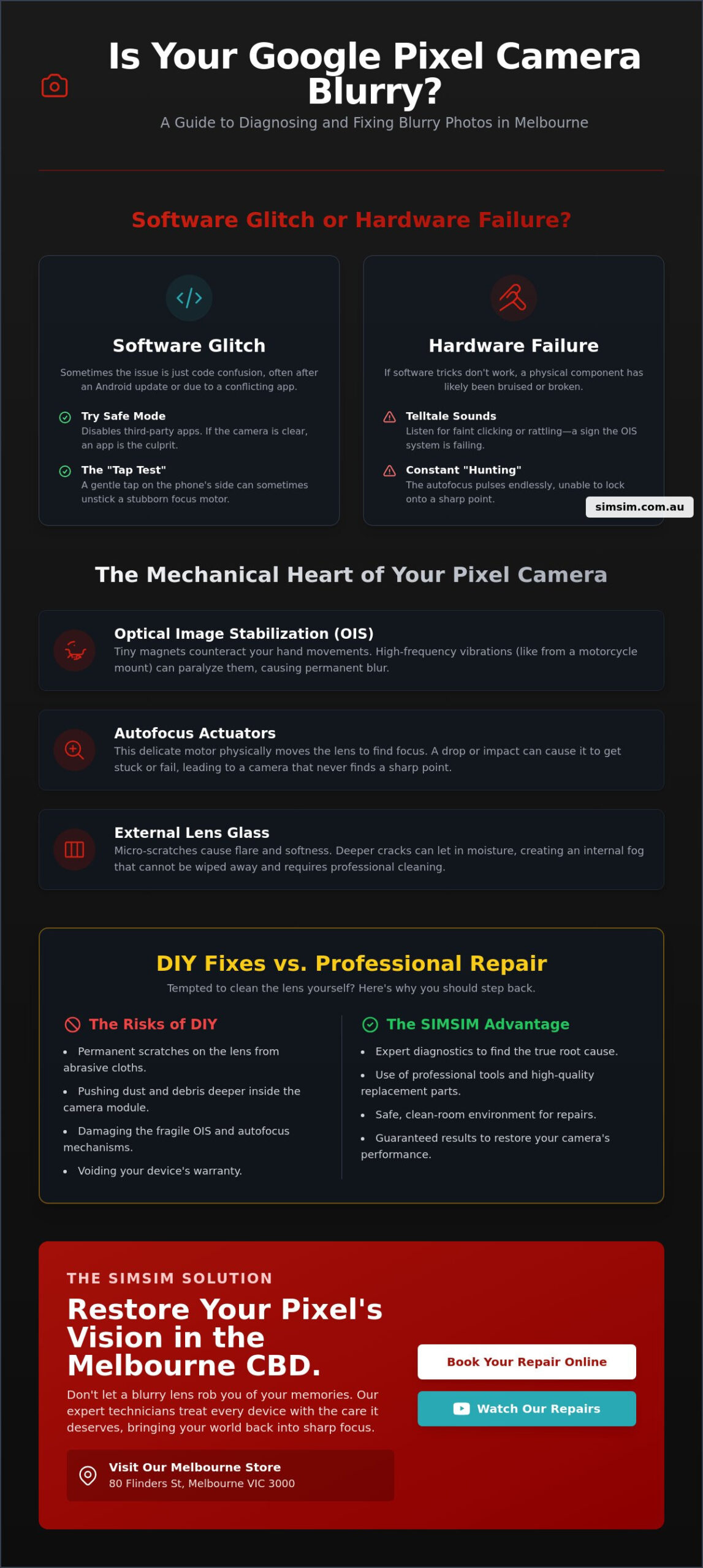
- Use Safe Mode to Isolate the Issue: Third-party apps, especially those with camera permissions, can sometimes interfere with the native camera software. Booting your Pixel into Safe Mode temporarily disables all downloaded apps. If your camera is suddenly sharp and responsive in Safe Mode, a recently installed app is likely the culprit.
- Consider Recent Updates: While Google’s Android updates (like Android 14 or 15) are designed to improve performance, they can occasionally introduce temporary bugs. If the blurriness started immediately after a system update, it might be a software issue that a future patch will resolve. Check for any pending Google Play System updates as well.
- The Tap Test: Sometimes, the delicate autofocus motor can get stuck. A gentle but firm tap on the camera visor area of your phone can sometimes physically jolt the mechanism back into place. If a light tap brings your world back into focus, it’s a strong indicator of a sticky focus motor—a hardware issue that may become permanent over time.
The Tell-Tale Signs of Hardware Failure
If software troubleshooting doesn’t clear things up, you are likely dealing with a physical problem within the camera module itself. These symptoms are often unmistakable and point directly to a need for professional repair.
- Constant “Hunting” for Focus: You’ll see this when you open the camera app and the image pulses in and out of focus, like it’s breathing. The autofocus is trying to lock on but can’t, constantly shifting the lens back and forth. This is a classic sign of a failing autofocus actuator.
- Audible Clicking or Rattling: When you open the camera app, do you hear a faint buzzing or clicking sound from the back of your phone? This is often the sound of a damaged Optical Image Stabilisation (OIS) system trying, and failing, to engage. If you gently shake your phone and hear a rattle, it could be a sign of a broken OIS component.
- Selective Blurriness: On modern Pixels with multiple lenses, you might find that one camera works perfectly while another is permanently soft. For example, your main 1x lens might be blurry, but the ultrawide or telephoto lens is crystal clear. This isolates the problem to a specific, damaged camera module.
The Mechanical Heart: OIS, Autofocus, and Lens Glass
Your Google Pixel camera is a marvel of miniature engineering, a complex assembly of glass, magnets, and motors working in perfect harmony. When one of these tiny components fails, the entire system can collapse, leaving you with blurry, unusable photos. Understanding these mechanical parts is key to understanding why your camera has lost its vision.
The system is far more than just a piece of glass. It’s a dynamic machine. Inside, the Optical Image Stabilisation (OIS) system acts as a tiny gyroscope, keeping your shots steady. The autofocus (AF) actuator moves the lens with microscopic precision to lock onto your subject. And the iconic Pixel Visor, while stylish, exposes the lens glass to the daily grind of scratches and impacts. A simple drop on the pavement or a tumble in a bag can be enough to paralyse these delicate systems, while internal dust can act as a silent enemy, settling on the 50MP sensor and degrading every photo you take.
The Fragility of Optical Image Stabilisation
Optical Image Stabilisation is the mechanical heartbeat of the Pixel camera system. It’s the unsung hero that allows you to take sharp, clear photos and smooth videos, even with shaky hands. It works by floating the lens or sensor in a magnetic field, using tiny electromagnets to counteract your movements in real-time. This is what makes a photo taken on a bumpy Melbourne tram ride look as steady as one taken with a tripod.
However, this system is incredibly delicate. One of the most common causes of OIS failure we see is from mounting the phone on motorcycle or bicycle handlebars. The constant high-frequency vibrations can permanently damage the tiny wires and magnets, killing the stabilisation system and often causing a persistent tremor or buzz in the camera. When the OIS fails, your photos lose their stability, and you may hear that tell-tale rattling sound—the sound of a system that has lost its anchor.
Cracked External Glass vs. Scratched Lenses
The glass on the outside of your Pixel’s camera bar is the first line of defence, but it’s also a point of vulnerability. Even a tiny crack or a collection of micro-scratches can have a profound impact on your photos.
- Light Refraction and Flare: Micro-fissures in the glass bend and scatter light before it ever reaches the sensor. This can cause a hazy, soft-focus effect across your entire image or create significant lens flare and light streaks when shooting near bright sources like streetlights or the sun.
– Moisture and Fogging: A cracked visor is an open door for humidity and moisture. On a rainy Melbourne day, that moisture can seep inside and fog up the internal lens, creating a permanent, cloudy filter on all your photos. Once inside, this moisture can also lead to corrosion on the sensitive camera electronics. The principles of protecting delicate internal components from external damage are universal, whether it’s the complex camera on a Pixel or the screen assembly on another device, like those we see for Samsung phone screen replacement in Melbourne CBD.
DIY Fixes vs. Professional Repair: When to Step Back
When faced with a blurry camera, the temptation to fix it yourself is strong. The internet is full of “quick fixes,” but many of these can do more harm than good. Your Pixel is a densely packed device, and the camera module is one of its most sensitive components. Attempting a home repair without the right tools and expertise can quickly turn a fixable problem into a permanent one.
There’s the Microfiber Myth—the belief that you can simply buff out a scratch on the lens. In reality, aggressively rubbing a scratched lens with a cloth only grinds the abrasive particles deeper into the glass, making the problem worse. Using compressed air to blow out dust seems logical, but a powerful blast can dislodge the delicate OIS magnets or force dust deeper into the sensor assembly. And attempting to open the device yourself? That requires specialised heating pads to soften the adhesive without damaging the OLED screen, a risk that often ends in a cracked display and a much more expensive repair bill.
What You Can Safely Try at Home
While major hardware repairs are best left to professionals, there are a few safe and simple steps you can take to rule out software issues or simple external problems.
- Proper Lens Cleaning: The most common cause of blur is a simple smudge. But don’t just use your t-shirt. Use a clean microfiber cloth and a tiny drop of 70% isopropyl alcohol. Wipe gently in a circular motion to remove fingerprints and oils without leaving streaks or damaging the lens coating.
- Clear the Camera App Cache: Sometimes, the camera app’s temporary files can become corrupted, affecting its performance. Go to your phone’s settings, find the Camera app, and clear its cache and data. This will reset the app to its default state and can sometimes resolve focus issues.
- Update Your System: Navigate to Settings > Security & privacy > System & updates. Check for both security updates and Google Play system updates. Installing the latest software ensures your device has all the recent bug fixes from Google, which can sometimes include patches for camera performance.
Why Professional Calibration Matters
If the steps above don’t work, it’s time for a professional. Replacing a Pixel camera module is not a simple swap. It’s a precision operation that requires recalibration to ensure the new hardware communicates perfectly with your phone’s software.
- Edge-to-Edge Sharpness: At SIMSIM, our technicians use professional, standardised charts to test and calibrate the new camera. This ensures that your photos are perfectly sharp from the centre all the way to the edges, with no distortion or soft corners.
- Hardware and Software Handshake: A new camera module needs to be properly recognised by the Pixel’s secure hardware. We ensure this digital handshake is successful, so all features—from Night Sight to Portrait Mode—function exactly as they did when your phone was new.
- Peace of Mind: A professional repair comes with a warranty on both the parts and the labour. This gives you the confidence that the fix is reliable and that you are covered in the unlikely event of an issue, something no DIY repair can offer.
Expert Pixel Camera Repair in the Melbourne CBD
When your Pixel’s vision is clouded, you need a clear solution. SIMSIM is the heartbeat of expert phone repair in Melbourne, located conveniently at 80 Flinders St, Melbourne VIC 3000. Our store is perfectly positioned for city professionals, commuters, and residents who need a fast, reliable fix without disrupting their busy day.
We understand that you can’t be without your phone for long. That’s why we’ve built our service around efficiency and excellence. For most Pixel camera issues, we offer same-day service. You can drop your device off during your lunch break and pick it up, fully restored, before you head home. We are committed to using high-quality replacement parts that meet the original engineering standards of your Google Pixel, ensuring the repair is not just a quick fix, but a lasting solution.
A Store Built on Trust and Quality
At SIMSIM, we are more than just a repair store; we are part of the Melbourne community. We believe in pairing expert technical labour with a warm, welcoming environment where every customer feels valued. Our difference lies in our dedication to the craft. We don’t just replace parts; we restore devices. This philosophy extends to every service we offer, from a complex camera replacement to our wider phone repair in Melbourne. We are here to provide a trustworthy service that keeps our city connected.
Preparing for Your Visit to Flinders St
To make your repair experience as smooth and efficient as possible, we recommend a few simple steps before you visit our Flinders Street store.
- Back Up Your Memories: While a camera repair does not typically affect your data, we always recommend backing up your photos and videos to Google Photos or another cloud service. It’s better to be safe and ensure your cherished memories are secure.
- Find Us with Ease: Our store is located at 80 Flinders St, Melbourne VIC 3000, easily accessible for anyone in the CBD.
- Book Your Spot: To guarantee the fastest possible turnaround, you can book your repair in advance through our simple online portal. This allows us to prepare for your arrival and get straight to work on restoring your Pixel’s camera.
Choose SIMSIM: Restoring Your Pixel’s Vision
Choosing SIMSIM is choosing a repair philosophy built on three core principles: Expert. Reliable. Soulful. We understand that your phone is an essential part of your life, a keeper of memories and a tool for connection. That’s why we treat every device that comes into our store with the same care and attention we would give our own family’s phone. It’s a level of dedication that sets us apart.
Beyond the Camera: Total Device Care
Our expertise doesn’t stop at Pixel cameras. We are a hub for total device care, ready to tackle a wide range of issues across different brands and models. Whether you need a fast iPhone battery replacement to get you through the day or a complex iPad repair, our technicians have the skills and experience to get the job done right. We also invite you to join our growing community of tech enthusiasts and DIYers on our YouTube channel, where we share tips, tricks, and insights from behind the repair bench. You can find us at SIMSIM Repairs on YouTube.
Book Your Repair Today
Don’t let a blurry camera rob you of another memory. Bring your Google Pixel to our 80 Flinders St store in the Melbourne CBD and let our experts restore its vision. We promise a fast, professional service that will get you back to capturing your world in stunning clarity. Walk-ins are always welcome, but we encourage you to book online to secure your spot. We look forward to welcoming you and showing you the SIMSIM difference.