

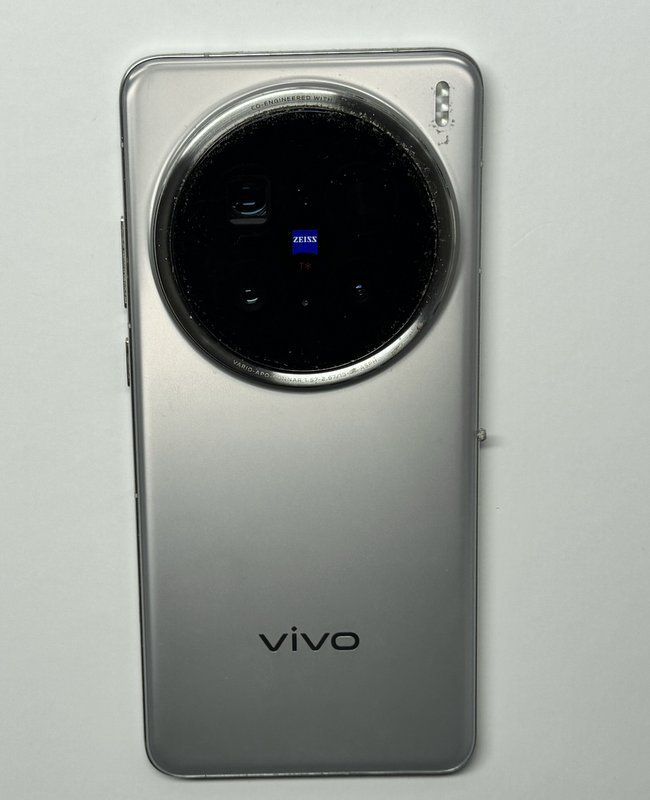
A cracked camera cover doesn’t always mean the camera itself needs replacing. A Vivo X200 Pro camera lens replacement can restore clear photos when cracked or scratched lens glass is causing blur or flare, while damage to the camera sensor may call for a camera module replacement instead. The right repair starts with understanding what’s damaged.
It’s frustrating when a phone built for detailed shots can’t capture them cleanly. The good news is that the visible lens glass and the camera hardware are different parts, so the repair depends on where the damage lies.
This guide explains what lens glass replacement involves, how its symptoms differ from possible camera module damage, and what to consider before arranging service in Melbourne. It also covers practical steps to help you understand the problem and choose a suitable next step.
Key Takeaways
- Learn how a technician distinguishes damage to the outer lens glass from a fault deeper in the camera system.
- Understand why clear photos depend on assessing the affected camera and the symptoms, not just the visible crack.
- See why careful handling matters during lens glass replacement, and how a poor fit can affect the camera.
- Find out what to consider before arranging Vivo phone camera lens repair service in Melbourne.
- SIMSIM’s camera lens repair service is for Vivo devices, with separate repair options for selected Apple and iPad devices.
Vivo X200 Pro Camera Lens Replacement
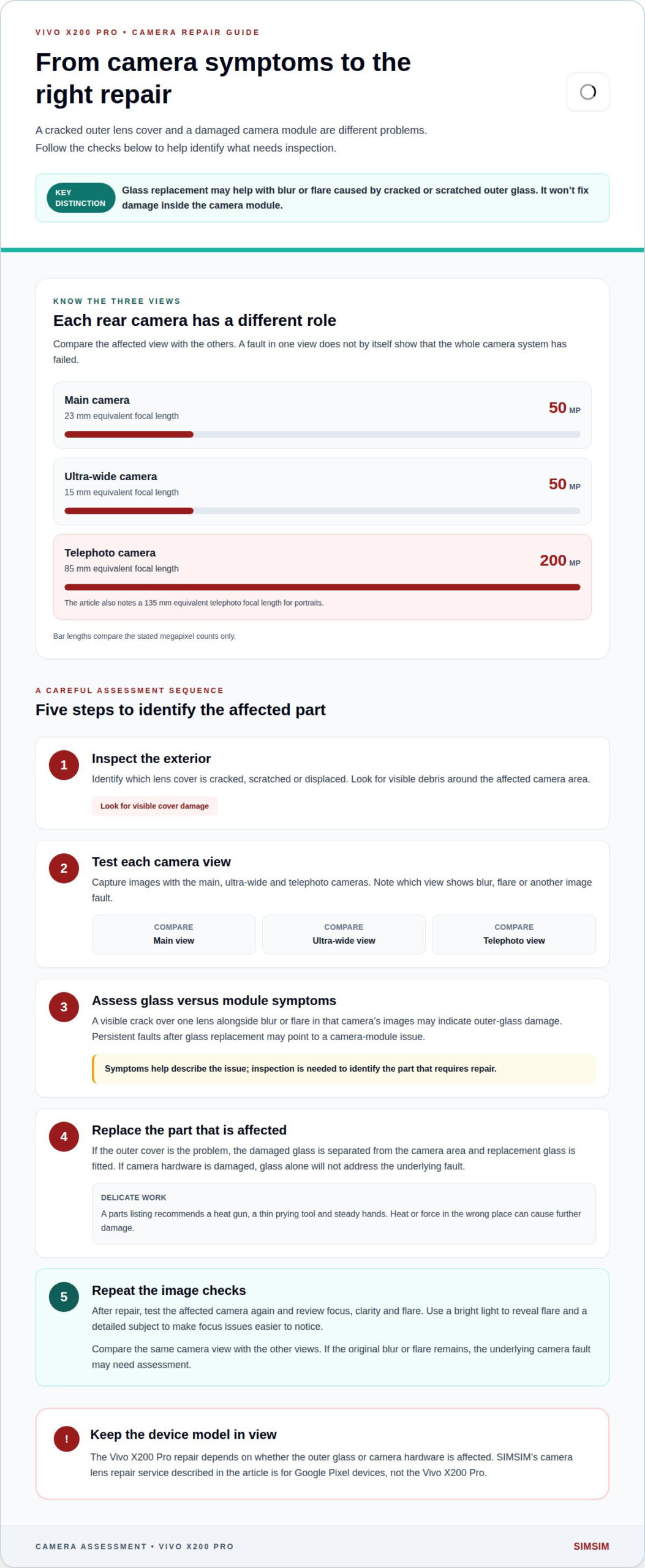
A cracked camera cover and a damaged camera module are different problems. On the Vivo X200 Pro, replacing the outer lens glass may help when cracks or scratches cause blurry photos or lens flare. If the sensor or camera hardware is damaged, replacing the glass alone won’t address the underlying fault. Identifying which part is affected guides the repair.
The distinction matters because the Vivo X200 Pro has three rear cameras with different roles. Its main camera and ultra-wide camera are both 50 megapixels, while its telephoto camera is 200 megapixels. A flaw over one lens can affect images from that camera without proving the whole camera system has failed.
Note when the image problem appears. A visible crack over one lens, along with flare or blur in images from that camera, may indicate damage to the outer glass. Persistent image faults after the glass is replaced may point to damage within the camera module. Symptoms can help describe the issue, but an inspection is needed to identify the part that requires repair.
The camera’s specifications explain why accurate assessment matters. The main camera has a 23 mm equivalent focal length; the telephoto lens is 85 mm. The ultra-wide camera has a 15 mm equivalent focal length. Each view uses a different camera, so testing the affected view helps isolate the issue. For example, compare a main-camera image with an ultra-wide image, then note whether blur or flare appears in both.
Lens glass replacement involves separating the damaged outer cover from the camera area and fitting replacement glass. A parts listing for the Vivo X200 Pro describes a camera lens glass component with a frame. It recommends a heat gun, a thin prying tool and steady hands. Those tools require care: heat or force in the wrong place can cause further damage. This is delicate work, not a routine wipe or polish.
A considered repair process follows clear steps:
- Inspect the exterior: identify which lens cover is cracked, scratched or displaced, and look for visible debris.
- Test each camera view: compare images from the main, ultra-wide and telephoto cameras to record which view shows the fault.
- Assess the damage: distinguish surface glass damage from symptoms that may indicate a camera module fault.
- Replace the appropriate part: remove and fit glass carefully when the outer cover is the problem; address the module if hardware damage is found.
- Test again: capture images with the affected camera and review focus, clarity and flare after repair.
After a glass replacement, the image test should cover more than one subject. A bright light can reveal flare, while a detailed subject can make focus problems easier to notice. Testing the 85 mm telephoto view separately from the 23 mm main view helps show whether the repair addressed the affected camera.
The Vivo X200 Pro also offers a 135 mm equivalent telephoto focal length for portraits. That makes checking the telephoto view useful if portrait images were affected. Its 200-megapixel telephoto camera and 50-megapixel main and ultra-wide cameras shouldn’t be treated as one interchangeable lens.
For Melbourne readers comparing device-specific information, the iPhone 16 Pro repair page concerns an Apple model, not the Vivo X200 Pro. Keep that distinction clear when considering a repair at SIMSIM Repairs: the right replacement depends on whether the damage is in the outer glass or the camera hardware.
Technicians carefully compare the results across the affected view and the other camera views. If the visible cover is damaged while the problem is limited to the view behind it, that observation can help guide an inspection; it does not by itself confirm that the camera module is intact. Testing each view separately keeps the comparison focused on the camera that showed symptoms. That listing advises using a heat gun, a thin prying tool and steady hands to replace the lens glass. The listed price is for the glass component, not a diagnosis of the fault, so first establish whether the outer cover or the camera module needs attention. After replacement, repeat the same image checks and note whether the original blur or flare remains. If it does, the glass replacement may not have addressed the underlying camera fault, and the affected module may need assessment.
SIMSIM Repairs: Google Pixel Camera Lens Repair
SIMSIM Repairs provides Vivo X200 Pro camera lens Repair for Vivo owners dealing with damaged camera lens glass. You can also follow the business on its YouTube channel. The repair discussed above concerns the Vivo X200 Pro.
If you have a Vivo X200 Pro camera with a cracked lens or affected camera images, SIMSIM’s camera lens repair service offers a focused next step. For other device needs, available options include iPhone Screen Replacement, MacBook Battery Replacement and iPad Charging Port Repair.
For assistance with a Google Pixel camera lens issue, contact SIMSIM Repairs.
Choose the Next Step That Fits Your Device
Keep the exact phone model at the centre of your repair decision. A Vivo X200 Pro camera lens replacement is a model-specific matter, so don’t treat a service for another brand as an equivalent option. Clear details about your device and the repair you’re considering help keep the next step focused on the right phone.
SIMSIM Repairs offers Vivo X200 Pro camera lens Repair for Vivo all devices. Its other services include iPhone Screen Replacement, MacBook Battery Replacement and iPad Charging Port Repair. Each is intended for its stated device type, so the make and model matter when choosing a repair path.
If you have a Vivo X200 Pro camera lens issue, contact SIMSIM Repairs about your repair.