


A battery that drains quickly or leaves your Samsung phone switching off can make replacement seem like the obvious answer. But the battery may not be the only factor: the phone model and what an assessment finds also shape the repair. For Samsung phone battery replacement in Melbourne, the price depends on the case and is provided after a quote request.
It’s understandable to want a clear idea of the cost before deciding what to do with a phone you rely on every day. This guide explains what can affect the repair, how battery symptoms are assessed, and what may influence turnaround time, without treating every fault as the same.
You’ll also learn when replacing the battery may make more sense than replacing the phone. With those details, you can weigh the next step more confidently.
Key Takeaways
- Repair cost depends on the phone model and what the assessment finds, so the cause of the problem matters as much as the battery symptoms.
- Fast draining, unexpected shutdowns and visible swelling are different warning signs; a careful assessment helps distinguish battery wear from another fault.
- Repair warranty terms are part of the decision. Understand what the stated coverage applies to before weighing the repair.
- Minor repairs may take a few hours, while more complex work could take several days; the fault and repair steps affect the turnaround.
- Compare the phone’s age and overall condition with the value of restoring it before deciding between a battery replacement and a new device.
Repair warranty
SIMSIM Repairs provides Samsung phone repairs in Melbourne CBD. The repair quote should identify the exact Galaxy model and the work being done, so you can see what the battery replacement covers.
A repair warranty covers the repair under its stated terms, which may differ from the phone’s original warranty. Before agreeing to battery work, read the written terms for coverage, exclusions, duration and the remedy if the repair fails. Check whether the terms cover the replacement part, labour, or both.
For example, warranty terms may cover a faulty replacement battery but exclude unrelated screen damage. That distinction matters if the phone has more than one fault. Review the assessment and warranty terms in writing so the covered work is clear before the repair begins.
Walk-in, mail-in and same-day service are different arrangements, and availability depends on the repairer’s process, parts and workload. The Melbourne CBD store location is 80 Flinders St, Melbourne VIC 3000. Opening hours aren’t included here, so don’t assume a walk-in can be assessed at any particular time.
A walk-in assessment lets a technician inspect the phone in person and discuss the symptoms. Mail-in repair involves sending the device for assessment and work. Same-day completion depends on the fault and repair steps, so it shouldn’t be assumed from a walk-in option alone. Confirm the chosen intake method and timing before handing over the phone.
Before battery replacement, back up important photos, messages and files using a Samsung or Google backup option. Then make sure you can access the relevant account and device passcode. Keep the SIM card and any removable memory card with you if you take them out. A backup gives you another copy of important data; it doesn’t replace checking what the repair process requires.
For a third-party repair service, compare the written warranty rather than relying on a verbal assurance. Look for the repairer’s name, the work covered, the period of coverage, exclusions and the process for raising a fault. Ask whether labour is included, and keep the receipt with the repair record.
Note the phone’s exact model and describe its behaviour, such as rapid battery drain or unexpected shutdowns. If the assessment identifies a screen fault or another issue, ask how it relates to the battery work. A repair warranty usually concerns the stated repair, so separate faults should be documented separately.
These details make the decision easier: know what work is proposed, what the warranty covers and how the device will be received. For a Melbourne CBD walk-in, SIMSIM Repairs is on Flinders St. Check the current opening hours before visiting.
Battery drain, shutdowns and swelling assessment
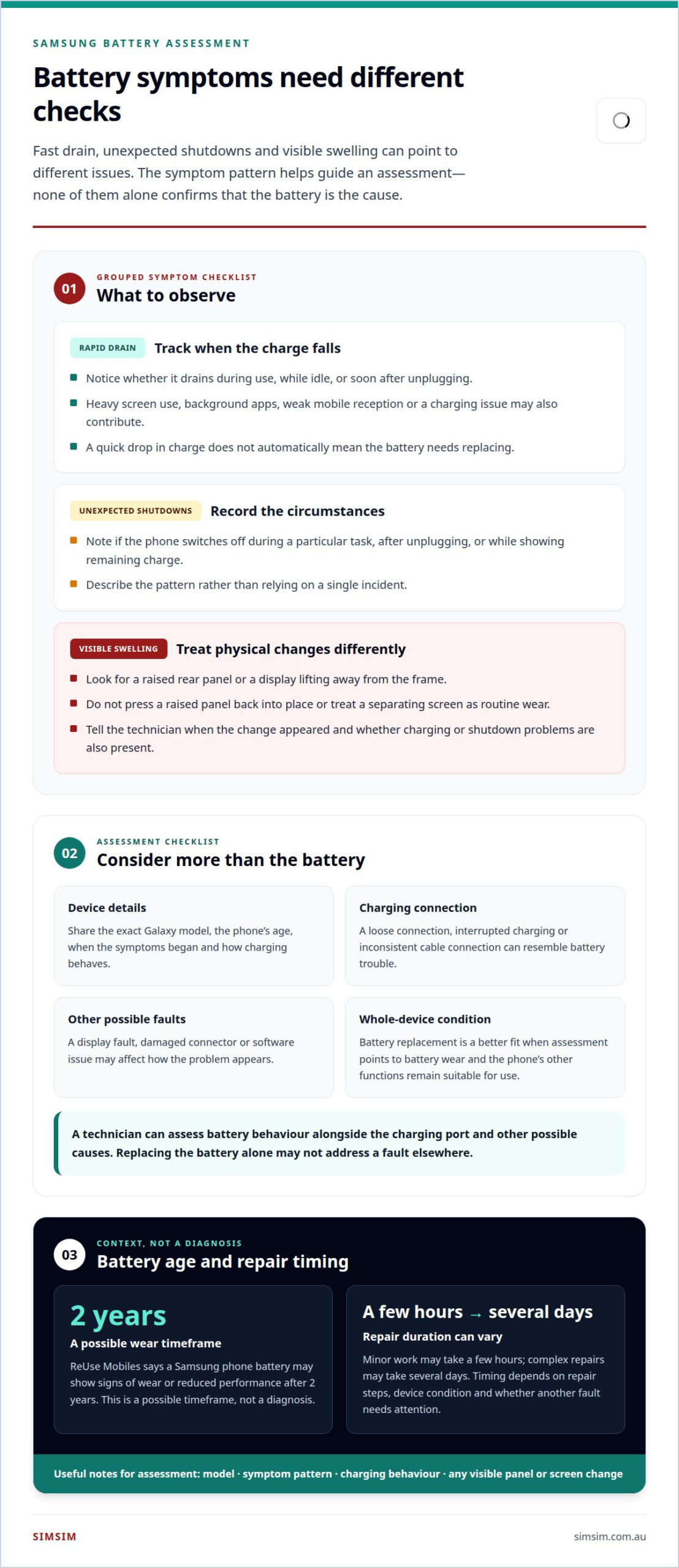
A Galaxy phone losing charge quickly doesn’t automatically need a new battery. The drain may follow heavy screen use, background apps, weak mobile reception or a charging issue. A useful assessment starts with the pattern: does the charge fall during use, while idle or immediately after unplugging? Those details help distinguish battery wear from other causes.
According to ReUse Mobiles, a Samsung phone battery may show signs of wear or reduced performance after 2 years. That’s a possible timeframe, not a diagnosis. A technician also considers the device’s age, reported symptoms and charging behaviour. For example, a phone that drains rapidly while idle presents a different clue from one that only struggles during demanding apps.
Unexpected shutdowns need the same careful approach. Note whether the Galaxy switches off during a particular task, after unplugging, or while showing remaining charge. Record the circumstances rather than relying on one incident. Samsung repair assessment can then consider whether battery performance fits the symptoms or whether another component needs attention.
The charging port is another part of the picture. A loose connection, interrupted charging or an inconsistent cable connection can resemble battery trouble. A technician can inspect the port and charging response alongside battery behaviour. A display fault, damaged connector or software issue may also affect how the problem appears, so diagnosis shouldn’t rely on the battery percentage alone.
Swelling calls for a different assessment from ordinary battery drain. A raised rear panel or a display lifting away from the frame is visible evidence of a physical change. Don’t press the panel back into place or treat a separating screen as routine wear. Describe when the change appeared and whether the device has also had charging or shutdown problems.
Before assessment, note the Galaxy model and describe the symptoms plainly. Include when the drain began, whether charging is consistent and whether the screen or rear panel has shifted. If Samsung or Google account backups are enabled, confirm important data is saved. These details give the technician a clearer starting point without assuming the battery is the cause.
Battery replacement makes sense when assessment points to battery wear and the device’s other functions remain suitable for use. If the charging port, display or another component explains the fault, replacing the battery alone may not address it. A focused inspection helps distinguish those possibilities and identify a repair that matches the symptoms.
For a direct assessment of the symptoms, book a repair assessment.
Battery replacement time
A Samsung battery repair can take a few hours for minor work, while complex repairs may take several days. The difference depends on the repair steps, the phone’s condition and whether another fault needs attention. That broad range helps set expectations, but it isn’t a fixed appointment length for every Galaxy model.
Battery replacement involves more than removing one component. The phone must be assessed, opened, repaired and checked before it is returned. A model’s construction can affect the access and care involved. Galaxy phones from different series may require different repair steps, so identifying the exact model matters when estimating timing.
Assessment also shapes the schedule. If the symptoms point clearly to battery wear, the work may be more straightforward. If technicians find a charging port fault, damage near the display or another issue, they need to determine how it affects the repair. Extra diagnosis and repair steps can extend the work beyond battery replacement alone.
Parts are another timing factor. A repair can only proceed when the correct battery for the phone model is available. “Original” describes a part’s relationship to the manufacturer, but the word alone doesn’t establish what a repairer will use or how quickly it can be supplied. Ask for the part type and expected timing as part of the written quote.
Repair cost and turnaround time are related to the case, but they aren’t the same question. The quote depends on the phone model, replacement part, labour and any additional fault found during assessment. Timing depends on the repair process and required checks. Review both details in the quote rather than treating an estimate as a promise.
For a smoother handover, have the exact model name ready and describe when the battery problem began. Mention whether the phone has been opened or repaired before and whether charging is inconsistent. These details help technicians plan the repair and identify possible complications early.
Before leaving a device for service, back up important data and make sure you can access the account used on the phone. Keep a record of the agreed work and the expected return timing. If the phone is needed for calls or travel, plan around the longer end of the stated timeframe until the assessment clarifies the job.
Once the repair is complete, allow time for the technician’s checks. The phone should be examined for normal startup, charging response and basic operation. Those checks are part of completing the repair, not wasted time. For a minor job, the overall visit may still take longer than the hands-on replacement itself.
Battery replacement turnaround time
Minor Samsung phone repairs may take a few hours, while complex repairs could take several days. These are broad timeframes, not a guaranteed collection time. The total turnaround includes assessment, the repair itself and checks before the phone is returned. A straightforward battery job and a device needing extra attention follow different paths.
The model can affect the repair schedule. Galaxy phones differ in construction, and the battery must match the specific model. The phone’s series and condition help determine the work involved. If the required part isn’t ready, the repair cannot be completed until it is available.
Other faults can add steps. For example, a shattered screen may make handling more involved, while screen replacement is separate work from changing a battery. Water damage can also require investigation before battery work proceeds. These issues don’t automatically mean a repair will take several days, but they can change the sequence and time needed.
Charging problems may also affect the plan. If the phone doesn’t charge reliably, technicians need to distinguish a battery issue from a charging fault. Repairing the charging system may involve different work from battery replacement alone. The assessment and any agreed additional repairs shape the overall turnaround.
Part descriptions matter, too. A quote should identify whether the replacement battery is described as genuine or another part type. The word “genuine” alone doesn’t explain when the part will be ready or how long installation takes. Timing still depends on the exact model, the repair steps and whether other faults are present.
To plan around the repair, provide the exact Galaxy model and describe the problem clearly. For example, note whether charging cuts in and out or the phone has suffered a drop. Mention any previous repairs, especially screen work or water damage. These details help technicians understand the likely scope before setting expectations.
Ask for the estimated turnaround alongside the written repair details. Clarify whether the estimate covers assessment, battery installation and final checks. If the repair scope changes after inspection, the revised timing should reflect the added work. This is more useful than relying on a simple label such as “same day”.
Before handing over the phone, back up important data and arrange access to another device if you rely on your Galaxy. Keep the agreed repair details and collection estimate together. A minor repair may fit within a few hours, but planning for the stated timeframe helps avoid depending on an early return.
Battery replacement versus buying a new phone
A Samsung Galaxy with battery trouble may still suit you if its other functions meet your needs. According to ReUse Mobiles, a Samsung phone battery is expected to last an average of 5 years. That figure is a guide, not a verdict on an individual device. The phone’s condition and your day-to-day needs matter too.
Start by distinguishing battery wear from other problems. A repair assessment can identify whether the battery explains the symptoms or another fault is involved. A cracked screen, unreliable camera or charging issue changes the decision. If those problems also affect everyday use, compare the full repair scope with the cost and features of a replacement phone.
Next, weigh the repair quote against your replacement budget. The quote should make clear which work is included, such as the battery, labour and any separately identified fault. A battery-only repair is a different decision from one that also addresses damage. Don’t compare a partial repair estimate with the price of a new phone as if they cover the same needs.
Think about how you use the Galaxy. If calls, messages, apps and the camera still serve you well, restoring battery performance may keep a familiar device useful. If you need features your current model doesn’t provide, a new phone may better match your priorities. Storage needs, daily apps and expected use are practical points to consider.
Unexpected faults deserve attention in the comparison. For example, a phone with a failing camera and battery trouble may need more than one repair. Water exposure or damage can also affect the condition of internal components. Cleaning or diagnosis may be relevant when contamination is suspected, but it doesn’t by itself establish that a battery replacement will solve the problem.
Before deciding, consider the data and setup involved in changing phones. Back up photos, contacts and messages, then check that you can access your Samsung or Google account. If you choose a replacement phone, those steps support the transfer. If you repair the existing Galaxy, the backup keeps important files available during the service process.
A simple decision sequence can help: review the device’s condition, identify the faults, read the repair quote, then compare the outcome with your needs for a new phone. The average battery life reported by ReUse Mobiles offers context, while the assessment and your priorities determine whether repair or replacement makes more sense.
For a battery assessment and a repair quote to inform that choice, book an assessment.
SIMSIM Repairs
SIMSIM Repairs can help you move from battery symptoms to a clear repair decision in Melbourne. If your Samsung phone drains quickly, shuts down unexpectedly or shows another fault, an assessment can help identify the issue and the next step. The repair choice should reflect the phone’s condition, not battery symptoms alone.
For related device damage, SIMSIM Repairs also handles Samsung Galaxy Back Glass Repair, alongside services such as iPhone Screen Replacement and MacBook Battery Replacement. The store is located at 80 Flinders St, Melbourne VIC 3000.
If you’re weighing repair options for your Samsung phone, contact SIMSIM Repairs to arrange the next step, and explore SIMSIM’s YouTube channel.
Make your next move with confidence
Samsung phone battery replacement in Melbourne can be the next step when you want to keep using a device that still fits your routine. Before deciding, consider what you want from the phone going forward and what repair outcome would make it useful to you. That gives the conversation a clear purpose beyond addressing a symptom.
Bring your priorities into the discussion, whether that means keeping a familiar device or understanding the proposed work before making a decision. SIMSIM Repairs also handles other device repairs, including iPhone Screen Replacement, MacBook Battery Replacement and iPad Charging Port Repair.
A useful next step is to discuss the battery issue and the repair options with SIMSIM Repairs about your battery. You can then consider the proposed work in light of your needs and choose a path that feels right for your device. Take it one step at a time, with a clear decision ahead.
Frequently Asked Questions
What Are the Factors Influencing Samsung Phone Repair Costs?
The model, replacement part, labour and additional faults influence the quote. A Galaxy needing battery work alone differs from one with a damaged charging port or screen. The repair scope matters: replacing one component isn’t the same as addressing several. For a useful comparison, review the written quote’s exact model, parts and labour, then check whether it includes every fault you want repaired.
When to Replace Your Samsung Battery?
Consider replacement when battery behaviour regularly interrupts normal use, such as repeated rapid drain or unexpected shutdowns. Samsung phone batteries may show wear or reduced performance after 2 years, according to ReUse Mobiles, though age alone doesn’t establish that replacement is needed. Note how the phone behaves during ordinary tasks, then use that pattern to guide an assessment and decide whether the device remains useful to you.
Where can I get a Samsung phone battery replaced in Melbourne?
You can arrange a Samsung phone battery assessment at SIMSIM Repairs’ store, located at 80 Flinders St, Melbourne VIC 3000. The assessment can help identify whether battery work fits the symptoms or another fault needs attention. To arrange the next step, book an assessment with SIMSIM Repairs and provide your phone model and a short description of the problem.
What is the cost to replace a Samsung phone battery in Melbourne by model?
The price depends on the case and is given after a quote request. The exact Galaxy model, replacement part, labour and repair scope shape the quote. A battery-only job and a device with additional damage are different cases. Include the model name with your request, then review the written quote to see which work and parts it covers before deciding.
How long does Samsung phone battery replacement take in Melbourne?
Minor Samsung phone repairs may take a few hours, while complex repairs could take several days. The model, repair steps and any additional fault affect the turnaround. For example, a charging problem that needs separate diagnosis can add work beyond battery replacement. Ask for the expected timing alongside the agreed repair scope, and plan around that estimate rather than assuming collection will be immediate.
What are the signs a Samsung phone battery needs replacing?
Common signs include charge falling unusually quickly, unexpected shutdowns or swelling that changes the phone’s shape. A single symptom doesn’t identify the cause by itself. Inconsistent charging, for example, can also point to a connection problem. Note when the behaviour occurs and what the phone was doing. That record gives an assessment a more useful starting point.
What risks come with third-party Samsung battery replacement, including water resistance and warranty?
Risks depend on the part, repair and written terms. Don’t assume a device’s water resistance remains unchanged after it has been opened for repair. Warranty coverage also depends on the stated conditions, so read which parts and labour are covered and what exclusions apply. Keep the quote and repair record together, especially if another fault appears later.
How can I compare genuine Samsung batteries with third-party replacement batteries in Melbourne?
Ask for a quote that identifies the exact Galaxy model and replacement battery. Compare the stated part, labour, repair scope and written warranty, not just a part description. A clear quote should distinguish the battery replacement from any additional work. These details help you understand what is being fitted and what support applies to the completed repair.