

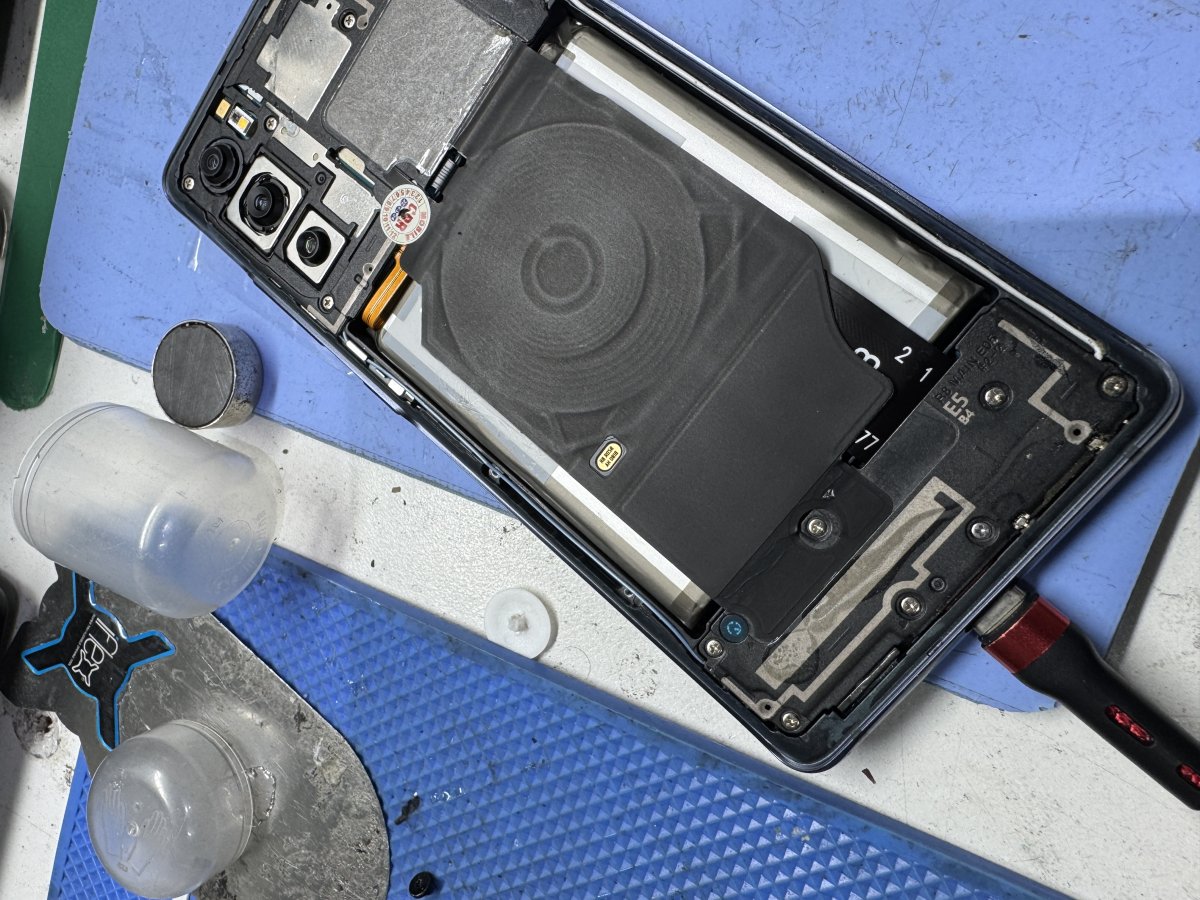
What if a blurry photo doesn’t mean your Samsung camera is broken? When your samsung phone camera not focusing, a fingerprint, case edge or setting may be enough to affect the shot. It’s frustrating, especially when you’re not sure whether a simple check will help or make things worse.
Start with low-risk checks. You don’t need to open the phone or change anything complicated to narrow down what’s happening. Working through a few reversible steps can help you spot an obstruction or settings issue, and decide whether the camera needs professional assessment.
This guide walks through those checks in order, from cleaning the exterior lens safely to comparing camera views and reviewing settings. It also explains what persistent blur, a cracked lens or unusual focus behaviour may suggest, and when it makes sense to stop troubleshooting and ask about an assessment in Melbourne.
Key Takeaways
- If your samsung phone camera not focusing, note whether the blur is occasional or constant. The pattern can help narrow down what to check.
- Start with quick, reversible checks and retest after each one so you can tell whether anything changes.
- Compare the Camera app with other apps for clues, but don’t treat different results as proof of the cause.
- Persistent blur, visible damage or focus trouble after an impact are sensible reasons to stop troubleshooting and ask about an assessment.
- Back up important data before a service visit if you can, and confirm whether your model and camera issue can be assessed.
Why is your Samsung phone camera not focusing? Start with the symptoms
A blurry photo can be maddening, especially when the subject looked clear on screen. If your samsung phone camera not focusing, pause before assuming the camera is damaged. Notice when the blur appears and which camera view is affected. Those details can help you choose what to check next without trying risky fixes.
Autofocus adjusts the camera lens so the subject looks sharp. It may briefly struggle, or leave images consistently soft. For a plain-language overview of how autofocus works, see Wikipedia’s explanation. Focus trouble can relate to an obstruction, settings, software or hardware, but one symptom alone can’t identify the cause.
What does a Samsung camera focus problem look like?
Photos may look soft or hazy, or the camera may keep shifting focus between the subject and background without settling. Sometimes the subject never looks sharp, even after you tap it on screen. Test with a still subject in good light, then try something at a different distance. Note whether the issue mainly affects nearby subjects, distant subjects, moving subjects or low-light scenes. These observations are clues, not a diagnosis.
Compare the camera modes and views available on your phone. If one view is blurry while another looks clear, note which one behaves differently. If several views struggle, record that too. Neither pattern proves a hardware fault, but a clear description is more useful than simply reporting that the camera is blurry.
Could something simple be blocking the camera?
Check the camera area for fingerprints, dust, moisture, a case edge or a lens protector covering the camera. Gently wipe the exterior lens area with a clean, soft cloth. Temporarily remove the case or accessory, then take another test photo. Don’t press or tap the lens, and don’t open the phone. These small, reversible checks are a safer place to begin.
Change one thing at a time and retest with a still subject. For example, take a photo before and after removing the case so you can tell whether that change affected the image. Then move on to settings or software checks if the blur remains. For more device-related videos, visit SIMSIM’s YouTube channel.
How to troubleshoot a Samsung phone camera that will not focus
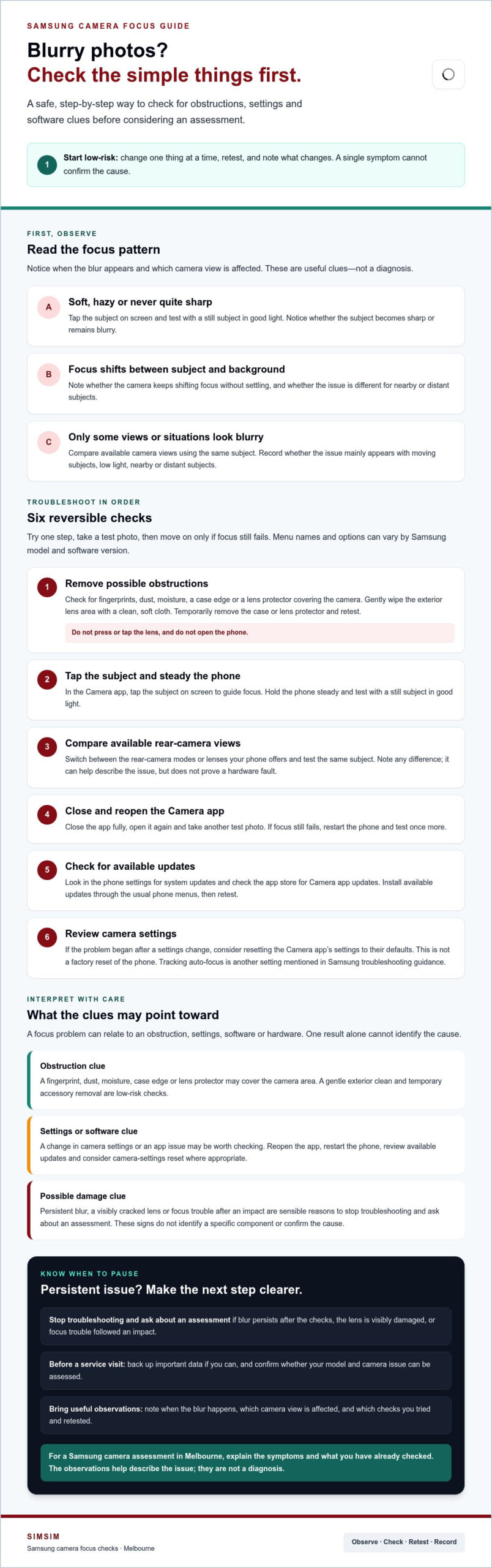
Try one step at a time and retest after each change. This makes it easier to spot what helps without changing several things at once. Menu names and available options vary between Samsung models and software versions, so look for the closest matching option on your phone.
- Remove possible obstructions. Temporarily take off the case and lens protector, then check that the camera lens area is clean and uncovered. Take a test photo before moving on.
- Tap the subject and steady the phone. Open the Camera app, tap the subject on screen to guide focus, and hold the phone steady while taking a photo. Test with a still subject in good light.
- Compare available rear-camera views. Switch between the rear-camera modes or lenses your phone offers, then test the same subject again. If one view is sharp and another is not, make a note of the difference. It’s a useful clue, not a diagnosis.
- Close and reopen the Camera app. Close it fully, open it again and take another test photo. If focus still fails, restart the phone and test once more.
- Check for updates. Look in your phone’s settings for available system updates, and check the app store for Camera app updates. Install available updates through the usual phone menus, then retest.
- Review camera settings. If the problem began after a settings change, consider resetting the Camera app’s settings to their defaults. This is not a factory reset of your phone. Samsung’s official Samsung troubleshooting guide also outlines checks such as turning off Tracking auto-focus and resetting camera settings.
If the blur remains after these checks, that doesn’t identify which component, if any, is affected. Keep track of what you tried and whether the issue affects one camera view or several. That information can make a follow-up conversation more useful and help avoid guessing at the cause.
If the camera still won’t focus, you can ask SIMSIM about an assessment and confirm whether your specific issue can be assessed. For more from SIMSIM, visit the SIMSIM YouTube channel.
Is it a setting, an obstruction, or possible camera hardware damage?
Patterns can help you decide what to check next, but they can’t confirm the cause. If your samsung phone camera not focusing in one mode, across several modes or in another app, treat that as a clue rather than a verdict. Use the comparison below to organise what you’ve noticed.
| Observed pattern | Plausible cause category | Sensible next check |
|---|---|---|
| Focus trouble appears in one camera mode or rear-camera view | A mode-specific setting, software behaviour or an issue affecting that camera view | Compare with another available mode, then restart or check for updates |
| The Samsung Camera app struggles, but another app appears to focus normally | A Camera app setting or software glitch is one possibility | Reopen the Camera app and review its settings; don’t treat another app’s result as proof |
| Focus trouble appears in the Camera app and other apps | A shared obstruction, software issue or hardware problem may be involved | Check for visible obstruction or damage, then note whether the issue began after an impact |
| Blur started after a drop, or the camera lens looks cracked or damaged | Physical damage may be affecting the camera system | Stop repeated camera tests and arrange a professional assessment |
| The phone or camera area was exposed to liquid | Moisture may have affected internal components | Stop testing and seek advice about assessment |
Signs that point towards an app or settings issue
If one camera mode focuses and another doesn’t, review the affected mode’s settings and compare again after restarting or updating the phone. If only the Camera app seems affected, its settings or software may be involved, but another app can behave differently too. These comparisons help narrow down the possibilities; they don’t identify a failed component. Avoid factory resets or other steps that erase data as an early fix.
When physical damage may need professional assessment
Consider whether the focus problem began after a drop, whether the lens cover is visibly damaged, or whether the phone was exposed to moisture. If the lens area is cracked or the device has had liquid exposure, stop taking repeated test photos. More testing won’t establish what is damaged, so asking about a professional assessment is a sensible next step. For broader device information, you can also visit the SIMSIM YouTube channel.
Symptoms can suggest possibilities, but an assessment is needed to help determine whether a component has failed.
What to do next if Samsung camera focus still fails
If images remain blurry after basic checks, or you can see damage or the problem began after an impact, stop troubleshooting and ask about an assessment. Repeated testing is unlikely to show which part is affected. A professional can investigate the issue, but the cause and suitable next step need to be confirmed for your phone.
Before a service visit, back up important data if you can. This is a sensible precaution, not a sign that an assessment or repair will erase your files. Make a short note of what you’ve observed so you can explain the issue clearly.
How to prepare for a camera assessment
Bring the phone and note its model, when the focus problem began, and whether it affects the front camera, rear camera or a particular mode. Include the troubleshooting you’ve tried and what changed, if anything. Mention relevant events such as a drop, liquid exposure, a new case or lens protector, or a software update before the issue appeared.
These details help describe the pattern, but they don’t confirm a fault or guarantee a particular repair outcome. Ask whether your specific model and camera concern can be assessed, and confirm service availability before making plans.
Where can Melbourne CBD customers ask for help?
SIMSIM is an independent repair provider at 80 Flinders St, Melbourne VIC 3000. If you’re in Melbourne CBD, use the booking link to ask about an assessment and confirm whether your particular Samsung camera issue can be assessed. The link is an enquiry route, not confirmation that a specific repair is available.
For general device guidance, visit the SIMSIM YouTube channel. If you’re ready to ask about the next step, book an assessment enquiry.
Get a clear next step for your Samsung camera in Melbourne
If your Samsung camera is still blurry, follow the checks in order: clear possible obstructions, test the Camera app and settings, compare how different modes behave, then ask about an assessment if the problem remains. This approach helps you describe what you’ve tried without guessing at the cause.
If your samsung phone camera not focusing, the pattern you’ve noticed may help guide an enquiry, but it can’t confirm which part is affected. SIMSIM is a local repair provider in Melbourne CBD. Contact the team to ask whether your specific phone and camera issue can be assessed and whether the relevant service is available. Wait for confirmation rather than assuming a camera repair is available.
What to expect when contacting a repair provider
Share your Samsung model and describe what happens. For example, explain whether focus trouble affects the front camera, rear camera, one mode or several. Mention when it began and which checks you’ve completed, such as removing the case, restarting the phone or reviewing settings. If the issue followed a drop, liquid exposure or software update, include that too.
An enquiry or assessment is a way to discuss the issue and confirm possible next steps. It isn’t confirmation that a repair has been booked or that a particular outcome, timeframe or part is available. Ask what can be assessed for your model before making plans.
Book an enquiry with SIMSIM Repairs
SIMSIM’s store is at 80 Flinders St, Melbourne VIC 3000. If you’re nearby, get in touch to ask about an assessment and confirm whether your Samsung camera concern can be assessed. The booking link is for an enquiry, so wait for confirmation before treating it as a repair booking.
For another resource, visit the SIMSIM Repairs YouTube channel. Ready to ask about your next step? Book an assessment enquiry.
Take the next step towards sharper Samsung photos
If the samsung phone camera not focusing, start with simple checks: clear anything covering the lens, test the Camera app and settings, then compare results across the available modes. These clues can help narrow down what to investigate, but they can’t confirm whether a component has failed.
Persistent blur, visible lens damage or a problem that began after an impact are good reasons to stop troubleshooting and ask about an assessment. Note your Samsung model, when the issue started and what you’ve already tried. That gives the repair provider useful context without assuming a specific repair is needed.
SIMSIM Repairs is located at 80 Flinders St, Melbourne VIC 3000, and offers Samsung phone services and general hardware troubleshooting. Contact SIMSIM to ask whether your camera concern can be assessed and confirm service availability for your device. You can also find more resources on the SIMSIM Repairs YouTube channel.
Ready to discuss a sensible next step? Ask SIMSIM about an assessment. Sharing what you’ve observed can help start the conversation.
Frequently Asked Questions
Why is my Samsung phone camera not focusing?
A Samsung camera may struggle to focus because something is blocking the lens, a setting is affecting focus, the Camera app or phone software has a glitch, or hardware may be damaged. Notice whether the blur happens in one mode or across different camera views, and whether it began after a drop or software change. These patterns can guide your checks, but they can’t confirm the cause by themselves.
How do I fix blurry focus on a Samsung phone camera?
Start with low-risk checks: remove the case or lens protector, gently clean the exterior lens with a soft cloth, then tap your subject on screen and hold the phone steady. Retest after each change. If the blur remains, close and reopen the Camera app, restart the phone, check for updates and consider resetting camera settings. Menu names can vary by model. Persistent blur may need assessment rather than more troubleshooting.
Can a dirty lens make my Samsung camera fail to focus?
Fingerprints, dust or moisture on the exterior camera lens can make photos look soft or hazy and may affect the camera’s view of the subject. Wipe the lens area gently with a clean, soft cloth, then take a test photo in good light. Check that the case or lens protector isn’t covering the camera. Don’t press hard on the lens or open the phone to clean inside.
Why does my Samsung camera focus and then go blurry again?
Focus that shifts in and out can happen when the camera is trying to settle on a subject, especially if the scene is moving or the light is low. A setting such as Tracking auto-focus may also keep attention on a specific subject rather than the whole scene. Try a still subject in good light and review the focus settings. If the behaviour continues across modes, note the pattern for an assessment.
Will restarting my Samsung phone fix the camera focus?
Restarting may help if a temporary software glitch is affecting the Camera app, but it isn’t a guaranteed fix. Close the Camera app, restart the phone, then test focus on a still subject. If the issue persists, check for available phone or app updates and review camera settings. Keep track of what you tried. A restart won’t repair a dirty or damaged lens or confirm whether internal hardware is affected.
What should I do if my Samsung camera stopped focusing after a drop?
Stop repeated camera tests if the lens area is cracked or visibly damaged, or if the phone was also exposed to liquid. Focus trouble after a drop doesn’t confirm which part is affected. Note when it happened and back up important data if possible. Ask about a professional assessment, and confirm whether your specific model and issue can be checked before arranging service.
Can SIMSIM Repairs assess a Samsung phone camera problem in Melbourne?
Contact SIMSIM Repairs to ask whether your particular Samsung camera issue and model can be assessed, and confirm service availability before making plans. SIMSIM provides Samsung phone services and general hardware troubleshooting from its store at 80 Flinders St, Melbourne VIC 3000, but camera-specific capability needs confirmation. Share the symptoms and checks you’ve completed. You can ask SIMSIM about an assessment or visit the SIMSIM Repairs YouTube channel.