


You’re likely asking yourself: is it worth fixing an old macbook when the shiny allure of a new M4 model beckons from the CBD windows? We understand the hesitation. New Apple hardware carries a heavy price tag. The transition feels daunting. The fear of data loss is real. We treat every device that enters our space as a guest, honoring the history it holds while looking toward its future.
At SIMSIM, we believe in the beauty of preservation and the wisdom of a well-timed upgrade. We’ve crafted this 2026 guide to give you a clear, financial "Go/No-Go" decision using our signature 50% Rule. You will discover the technical benchmarks that separate a machine with years of life from one facing a graceful retirement, especially as macOS 27 Golden Gate approaches for Intel models. We’ll walk through the lifespan of repaired parts and ensure you have total peace of mind that your data remains safe, sound, and celebrated. It’s a journey toward clarity, confidence, and quality.
Key Takeaways
- Master the 50% Rule to weigh repair costs against current market values, ensuring your financial decision is grounded in logic and wisdom.
- Uncover why the architecture divide matters in 2026, helping you decide is it worth fixing an old macbook before Intel support fades into history.
- Identify why battery and screen replacements are often the most soulful investments to restore the vibrancy and portability of your machine.
- Gain peace of mind with a clear framework that protects your data and honors the legacy of your daily workhorse.
- Visit our store at 80 Flinders St, Melbourne CBD, for a diagnostic that treats your device with the respect and expertise it deserves.
The Dilemma: Assessing the Value of Your Aging MacBook
Your MacBook has been a silent partner in every triumph, creative spark, and late-night struggle. It’s more than just a slab of aluminum; it’s a repository of your history and a trusted companion through years of hard work. But as we move through 2026, you might notice a certain hesitation in its response. The fan whirrs louder. The boot-up takes longer. You start to wonder, is it worth fixing an old macbook or is it time to let it go? At SIMSIM, we treat these machines with the same reverence you do, understanding that a repair is often about preserving a legacy of productivity.
2026 marks a significant shift in the technological landscape. With Apple Silicon now the standard, older Intel models are facing their final chapters of official software support. Deciding whether to invest in your current device requires looking at three vital pillars. Performance keeps your workflow smooth. Portability ensures you can work from any corner of the Melbourne CBD. Security protects your digital life from modern threats. We believe every assessment should be a mix of cold logic and warm appreciation for what the device has provided.
The Emotional Bond with Hardware
We often hesitate to replace a device because of the physical familiarity. The way your fingers find the keys. The weight in your bag. The stickers on the lid. Repairing is a soulful choice that honors sustainability. It’s a win for your wallet and the planet. This philosophy is at the heart of the Right to Repair movement, which champions the idea that we should be able to mend what we own. At our store, we help you differentiate between a machine that is "old but capable" and one that is truly stagnant.
Signs Your Mac is Crying for Help
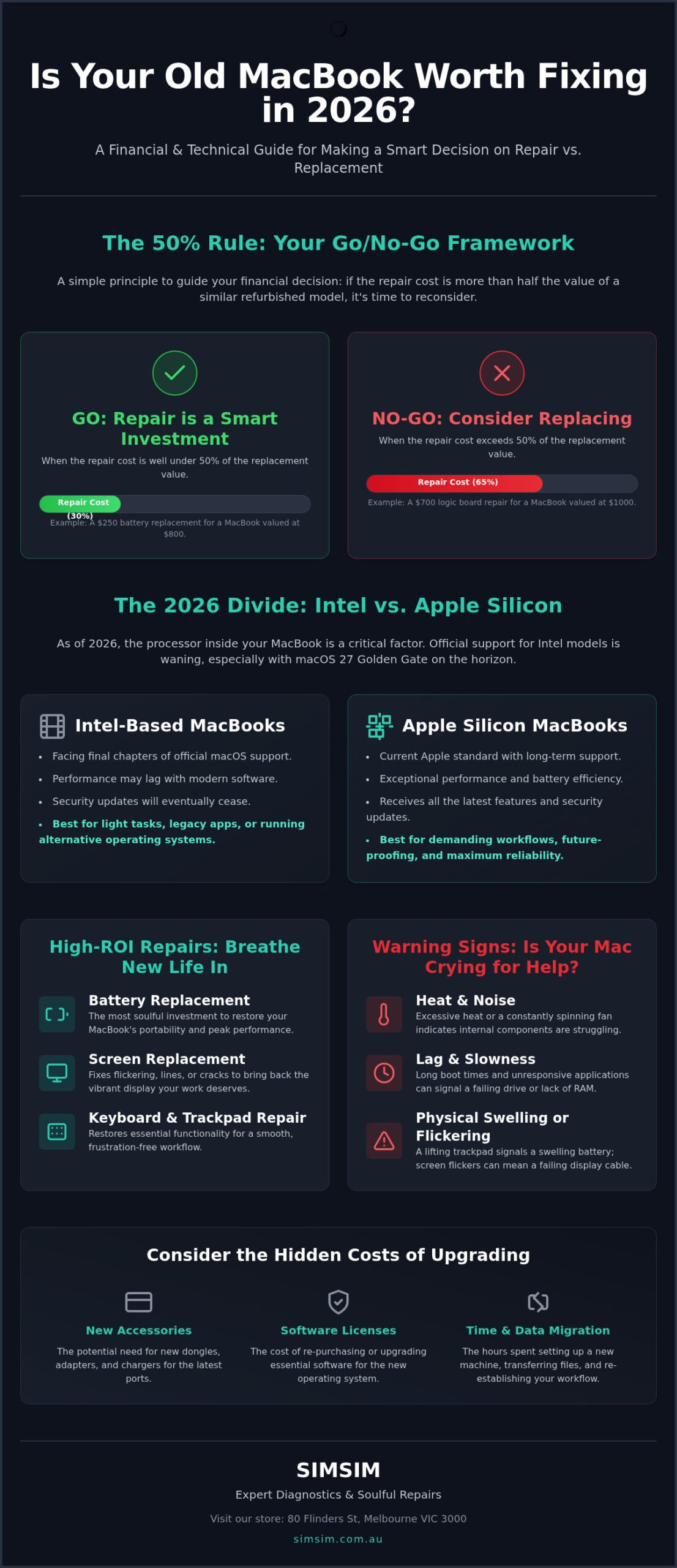
Your device speaks to you through a triad of trouble: heat, noise, and lag. If the bottom casing feels like a hot plate or the fan never stops, the internal components are struggling. Physical warnings are even more urgent. A lifting trackpad often signals a swelling battery, while screen flickers suggest a failing display cable. We can help you determine if these are simple hardware fixes or if the logic board is reaching its end. Visit us at our Apple service hub at 80 Flinders St, Melbourne VIC 3000 to get a clear, honest diagnostic.
The 50% Rule: A Practical Framework for Repair Decisions
Deciding if a repair is a wise investment shouldn’t feel like a guessing game or a cold transaction. At SIMSIM, we guide our neighbors through this choice with a simple, soulful metric we call the 50% Rule. It’s a framework built on respect for your hardware and your finances. If the cost of a repair exceeds half the price of a comparable, high-quality refurbished model, it’s time to pause. You aren’t just looking at a quote; you’re weighing the longevity of a machine that has already served you well. When you ask, is it worth fixing an old macbook, the answer often lies in the balance between immediate cost and extended life.
Think about the "Cost Per Year" rather than just the upfront price. A repair might cost a few hundred dollars, but if it provides three more years of reliable, efficient, and enduring performance, the annual investment is minimal. Compare this to the high cost of a new machine, which can easily reach several thousand dollars. We also encourage you to consider the "hidden costs" of upgrading. A new Mac often requires fresh dongles, updated software licenses, and hours of time spent migrating data. Keeping your current device at our store at 80 Flinders St, Melbourne, often saves more than just money; it saves your established workflow.
Comparing Repair Costs vs. Replacement
In the Melbourne market of 2026, a refurbished MacBook Air M1 can be found for as low as A$580. If you are facing a massive logic board failure that approaches this price, replacement is the logical path. However, a MacBook Battery Replacement is almost always a high-ROI fix. It restores the portability you love for a fraction of the cost of a new machine. We provide honest, clear, and decisive diagnostics to help you see where your model sits on this spectrum.
Resale Value Considerations
Even if you are leaning toward an upgrade, a repair can be a gift to your future self. A Mac with a cracked screen or a dead battery has very little trade-in value in the CBD. By choosing a professional repair at SIMSIM, you close the "Broken" vs. "Refurbished" price gap. A healthy, functional machine is much easier to sell or gift within the community. If you are unsure about your device’s current health, you can book a diagnostic consultation at our store to see how a small investment today could boost your resale value tomorrow.
Intel vs. Apple Silicon: The Architecture Divide in 2026
The architecture of your MacBook is the foundation of its soul. It determines how it breathes, how it thinks, and how long it can stay by your side. In 2026, we find ourselves at a historic crossroads between the Intel era and the vibrant energy of Apple Silicon. This shift has fundamentally changed the repair math for every owner. When you ask, is it worth fixing an old macbook, the answer now depends heavily on whether your machine speaks the language of Intel or the modern dialect of M-series chips. Apple Silicon (M1 through M4) has redefined efficiency, making these models incredibly resilient guests in our store at 80 Flinders St, Melbourne.
The divide isn’t just about speed; it’s about the horizon of support. With the release of macOS 27 Golden Gate in late 2026, Apple is officially dropping support for Intel-based MacBooks. Running an unsupported operating system is a risk we don’t want our community to take. It leaves your data vulnerable to security threats that modern patches would otherwise catch. Beyond security, Intel MacBooks often suffer from the "Thermal Throttle." They run hot. They loud. They slow. Even with a fresh battery, an Intel chip may struggle to keep up with the demands of 2026 software, leading to a frustrating experience in the CBD or at home.
The Longevity of M-Series MacBooks
An M1 MacBook Pro from 2020 remains a repair-worthy powerhouse today. These machines were built with a forward-looking soul. At SIMSIM, we treat the delicate logic board and integrated components of Apple Silicon with expert precision. If your machine boasts 16GB of RAM, it is a treasure worth preserving. These models handle modern workflows with a grace that 8GB models may lack, making a screen or battery replacement a wise, soulful investment in your digital future.
The Intel "Legacy" Phase
There comes a time to honor the service of a device and transition it to a new role. For many 2017-2019 MacBook Airs, especially those from the "Butterfly Keyboard" era, the cost of major repairs can be hard to justify. These keyboards were delicate. Finicky. Fragile. If you’re facing a significant hardware failure on a machine nearing its software sunset, we often suggest a different path. These older Macs make wonderful secondary machines or dedicated media servers, allowing them to live out their retirement with dignity without the pressure of being your primary workhorse.
Common MacBook Repairs That Are Almost Always Worth It
We see it often at our store at 80 Flinders St, Melbourne VIC 3000. A minor crack or a sluggish battery doesn’t mean the end of your journey together. It’s an invitation for renewal. When clients ask is it worth fixing an old macbook, we point to the parts you touch and see every single day. These tactile interfaces define your experience. Replacing them is a gift of longevity. It’s a choice that feels personal. Inclusive. Celebratory.
Reviving the Battery Life
The "Service Recommended" warning is more than a nudge to find a power outlet. It’s a signal that your macOS is likely throttling the CPU to prevent unexpected shutdowns. This leads to the lag and heat we’ve mentioned before. A fresh SIMSIM battery replacement restores the rhythm of your workday. It provides 3 to 5 more years of reliable cycles. It’s fast. Professional. Essential. If you’re looking for ways to keep your tech ecosystem healthy, check out our guide on MacBook repair for similar device longevity tips, or consider specialized providers like Pleasanton Computer Repair for expert iPhone and iPad support to keep your hardware humming.
Restoring Visual Clarity
A cracked Retina display can feel like a heartbreak, but it’s not a death sentence for your hardware. You might consider an external monitor, but that sacrifices the very portability that makes a MacBook special for Melbourne CBD life. A professional MacBook Screen Replacement at our store uses high-quality panels that honor the original design. We prioritize color accuracy. Brightness. Clarity. When you’re commuting through the CBD, ensure your laptop bag has a dedicated, padded sleeve to protect this new investment from the hustle and bustle of Flinders St.
Data Recovery and Security
Your files are the memories and milestones of your digital life. We treat your data "soul" with absolute devotion during every hardware intervention. For newer models, the storage is often soldered to the board, making a dead Mac a high-stakes situation for recovery. If you choose to transition to a preowned iPhone or a newer Mac, we help keep your data intact. It’s about peace of mind and the simple joy of knowing your history is safe. If your device is acting up, you can book a professional diagnostic session to ensure your data remains protected and accessible.
Trusting Your Device to SIMSIM: Expert Repairs in the Melbourne CBD
At SIMSIM, we honor that invitation with a philosophy rooted in warmth, expertise, and an unwavering commitment to quality parts. Our store, located at 80 Flinders St, Melbourne VIC 3000, serves as a sanctuary for devices that have seen better days. We don’t see ourselves as just technicians; we are the ultimate hosts for your hardware. When you ask is it worth fixing an old macbook, we provide an answer that respects both your budget and the soul of your machine. We understand the pace of the CBD. We know that for professionals working near Flinders St, every hour without a laptop is a challenge. That’s why we focus on rapid, reliable, and expert service that gets you back to your rhythm without delay.
The SIMSIM Store Experience
Your journey begins with a professional MacBook diagnostic. We look deeper than the surface. We examine the logic, the power, and the pulse of your device. This process is:
- Transparent: You see what we see.
- Honest: We tell you if a repair is a wise investment or a lost cause.
- Decisive: We provide a clear "Go/No-Go" path based on the 50% Rule.
There are no hidden fees or clinical jargon here; just soulful advice on whether to fix your current companion or move toward a new one. Our location is a gift to your busy schedule. You can drop off your Mac at our store and enjoy a coffee at one of the vibrant cafes in the CBD while we perform our assessment. We bridge the gap between technical precision and human connection, making the process feel both premium and approachable.
Ready to Decide?
Clarity is just a few clicks away. You can use our one-line booking tool to secure a priority assessment at our store at 80 Flinders St. If you want to see our commitment to quality in action, watch our latest repair success stories on our YouTube channel. We take immense pride in our heritage of service, which is why Melbourne locals choose us for their most critical Apple repairs. Whether it is a battery revive or a screen restoration, we are here to ensure your technology continues to serve you with the same devotion you’ve given it. Visit us in the heart of the CBD and experience a repair service that feels personal, inclusive, and celebratory.
Ensuring Your MacBook’s Soulful Second Act
Deciding whether to breathe new life into your trusted device or bid it a fond farewell comes down to the wisdom of the 50% Rule and the reality of 2026 software support. We’ve explored how Apple Silicon remains a repair-worthy powerhouse, while older Intel models might be better suited for a gentle retirement as media servers. When you weigh the cost of a new machine against the simple joy of a restored battery or screen, the path forward becomes clear. You don’t have to wonder is it worth fixing an old macbook in isolation. We are here to provide the clarity you deserve.
Our store at 80 Flinders St, Melbourne VIC 3000, stands ready to be the ultimate host for your diagnostic journey. Our expert technicians use high-quality parts and provide rapid service in the heart of the CBD, ensuring your data and your time are treated with absolute reverence. We invite you to Book Your MacBook Diagnostic at SIMSIM Melbourne today for an honest, transparent assessment. Your technology is an extension of your creative self, and we are here to help you honor that legacy with clarity and care.
Frequently Asked Questions
Is it worth fixing a MacBook that is over 7 years old?
Deciding is it worth fixing an old macbook from 2019 or earlier requires a look at the software horizon. In 2026, Intel-based MacBooks are losing official macOS support, which means they won’t receive the latest security patches. If the repair is minor, it might be worth keeping as a secondary machine, but major investments are often better spent on a newer model with Apple Silicon.
How much does a typical MacBook battery replacement cost at SIMSIM?
We provide personalized, transparent quotes for every guest who visits our store. Because each MacBook model has a unique internal architecture, we don’t use a flat pricing structure. We invite you to visit us at 80 Flinders St in the Melbourne CBD so we can assess your specific model and provide an honest, clear quote that respects your budget.
Will repairing my MacBook make it run faster?
Yes, specific hardware repairs can significantly restore the spirited performance of your device. When a battery is degraded, macOS often throttles the processor speed to prevent unexpected shutdowns. By replacing the battery or clearing out internal dust that causes thermal throttling, we allow your Mac to breathe and think at its full intended capacity once again.
Can SIMSIM recover data from a MacBook that won’t turn on?
We specialize in Data Recovery Services for devices that have gone silent. Even if your MacBook refuses to boot, your precious files and memories are often still resting on the drive. Our expert technicians use advanced methods to retrieve your data, treating your digital history with the same devotion and care we would show to a family heirloom.
How long does a MacBook screen replacement usually take at the Melbourne store?
We prioritize a rapid turnaround to respect the busy lives of our CBD professionals. Most screen replacements are completed efficiently, often within a few business days depending on the specific part required. You can drop off your machine at 80 Flinders St and enjoy the city while we work to restore your visual clarity with precision and speed.
Does SIMSIM use high-quality parts for Apple repairs?
We use only high-quality parts paired with expert labor in every repair we undertake. Our commitment to excellence means we never cut corners on the components that go into your machine. This dedication to quality craftsmanship is our gift to the Melbourne community, ensuring that every repair is an enduring investment in your technology.
Is it better to fix my old Mac or buy a preowned one from SIMSIM?
This choice depends on the 50% Rule and the heart of your current machine. If your Mac is an Apple Silicon model with a minor issue, fixing it is a soulful and sustainable path. However, if you’re facing a high repair bill for an aging Intel model, moving to a newer preowned machine from our store often provides a more vibrant and secure experience.
How do I know if my MacBook logic board is failing?
Common signs of a failing logic board include random shutdowns, distorted graphics, or a complete failure to power on. These symptoms suggest the central nervous system of your device is struggling. We recommend a professional diagnostic at our Melbourne store to confirm the issue and discuss whether a repair or a transition to a new device is the right path for you.