

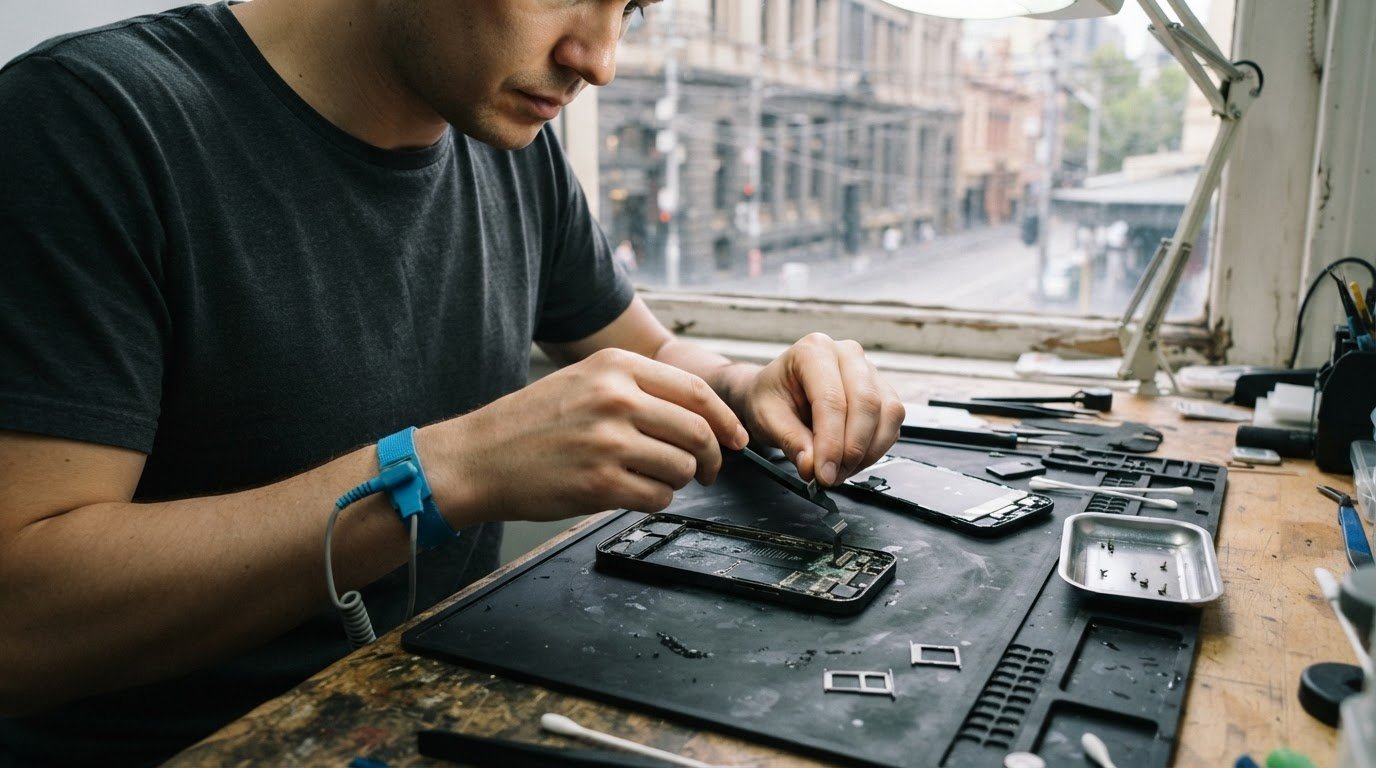
If you need to retrieve photos from a water-damaged phone in Melbourne, power it down if it’s still on, and don’t charge it or keep testing it. Photos may still be recoverable, but repeatedly switching on a wet device can make the situation worse. If the phone is completely unresponsive, a professional assessment is a sensible next step.
It’s natural to worry about losing photos stored on your phone. A broken screen doesn’t necessarily mean the images are gone. If the device still works, check for a backup before arranging a repair. If it won’t respond, don’t try to turn it on.
This guide explains what to do first, what to avoid, and when to seek help recovering photos. It also explains why your passcode matters during an assessment. Start by keeping the phone switched off, leaving the charger disconnected, and choosing a safe next step.
Key Takeaways
- Power down a wet phone if it’s still on, and avoid charging or repeatedly testing it.
- If the phone works but its screen is broken, check for photo backups before arranging repairs.
- Keep the phone’s passcode handy when seeking a professional assessment for photo recovery.
- Repairs already attempted can affect the next recovery steps, so share what work has been done and how the phone responded.
- Recovery time depends on the device’s condition and the damage; DIY repairs can add risks to the recovery process.
When Should You Contact a Professional Data Recovery Service?
Whether phone insurance covers water damage or data recovery in Australia depends on the policy. Manufacturer warranties have separate terms. Read your policy and ask your insurer what evidence and steps it requires before authorising repair work.
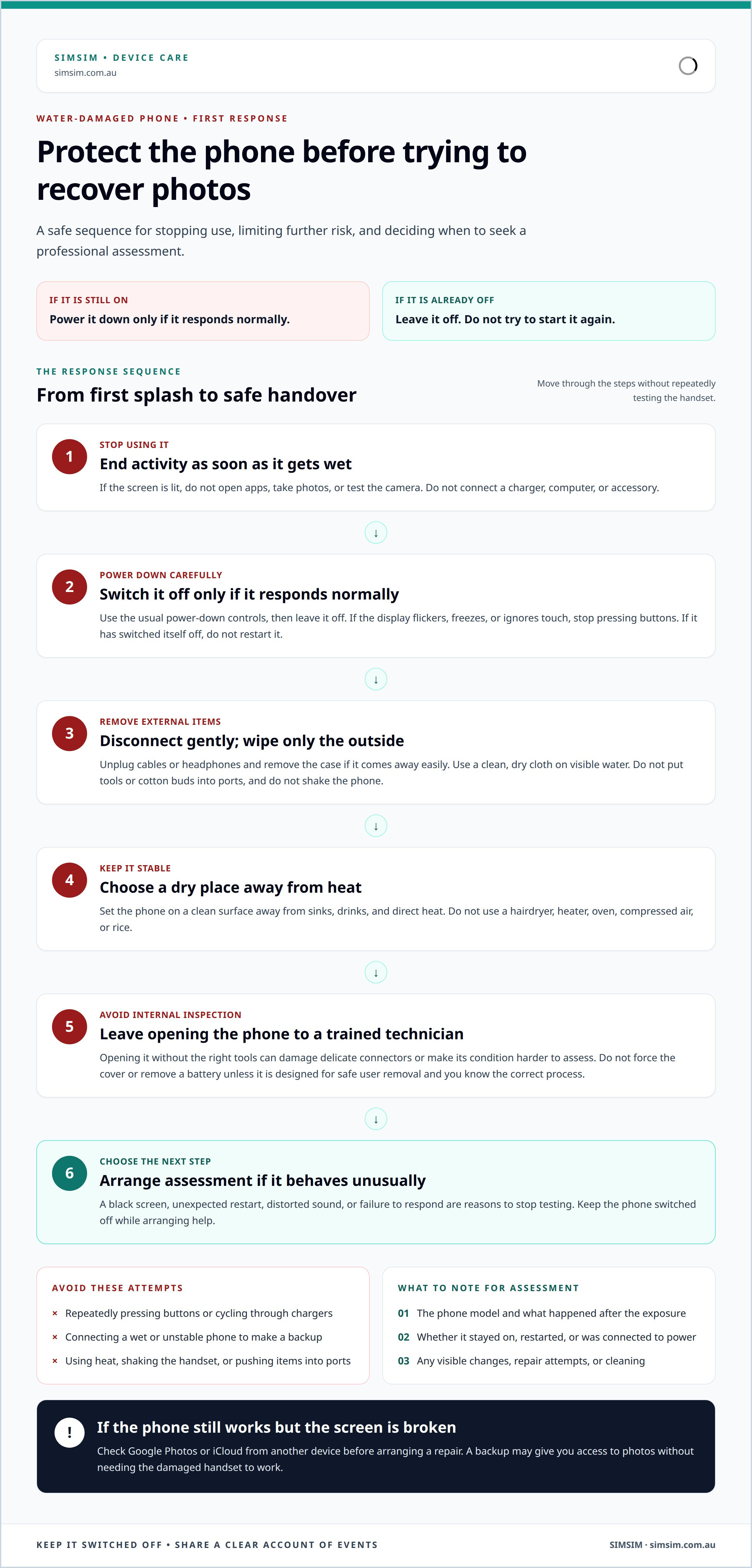
- Check for existing backups before arranging a repair. If your phone still works despite a broken screen, check Google Photos or iCloud from another device. Look for images in the account linked to your phone, including archived or recently deleted items. For an iPhone, check whether iCloud Photos or an iCloud backup was enabled. A backup may give you access to photos without needing the damaged handset to work.
- Use a trusted computer only if the phone is stable. If you previously connected an iPhone to a trusted Mac or PC, check for an existing Finder or Apple Devices backup. Don’t connect a wet or unstable phone to create a new backup. If the phone needs unlocking or shows a trust prompt, stop rather than repeatedly trying while water damage may still be present. Repeated attempts won’t secure the photos.
- Seek professional assessment if the phone won’t respond. An unresponsive device needs assessment to establish what recovery options may remain. Keep the passcode available, as access may be needed to inspect its data. Explain what happened, whether it was switched on afterwards, and any changes in sound, heat, screen display, or charging behaviour. These details help describe the fault.
- Describe any repair work already attempted. If another repairer opened or worked on the phone, bring the receipt or a clear description of the work. Note replaced parts, cleaning, battery disconnection, or restart attempts. Be open about previous repairs so the technician has useful context. If photos disappeared after a repair, say when you last saw them and whether the phone was reset or restored.
- Choose assessment over repeated recovery attempts. If Google Photos and iCloud show no copy, or the phone remains unresponsive, stop cycling through chargers and power buttons. A professional can assess the device and determine whether its stored data may be accessible. To retrieve photos from a water-damaged phone in Melbourne, bring the handset and passcode, along with a short timeline of the water exposure and any repairs.
Coverage varies by phone and policy. Confirm the applicable terms and any required evidence or steps with your insurer before authorising repairs.
Powering down a damaged device
- Stop using the phone as soon as it gets wet. If the screen is lit, don’t open apps, take photos, or test the camera. These actions keep the phone operating while moisture may be present. Don’t connect a charger, computer, or accessory. A cable can supply power before you know what has happened inside.
- Switch it off only if it responds normally. Use the usual power-down controls for your model, then leave it off. Don’t repeatedly press buttons if the display flickers, freezes, or ignores touch. If the phone has already switched itself off, don’t try to start it again. Repeated attempts won’t provide useful information.
- Disconnect external items without forcing them. Unplug headphones or charging cables, and remove the case if it comes away easily. Wipe visible water from the outside with a clean, dry cloth. Don’t insert tissue, cotton buds, or tools into ports. Avoid shaking the handset, which can spread moisture through openings.
- Keep the device in a dry, stable place. Set it on a clean surface away from sinks, drinks, and direct heat. Don’t use a hairdryer, heater, oven, or compressed air. Heat can affect phone components, and airflow may push moisture further inside. Don’t place the handset in rice, as grains and dust can enter its ports.
- Leave internal inspection to a trained technician. Opening a phone without the right tools can damage delicate connectors or make its condition harder to assess. Don’t remove the battery unless the device is designed for safe user removal and you know the correct process. Modern phones often have sealed assemblies, so forcing a cover can cause further damage.
- Arrange an assessment if the phone behaves unusually. A black screen, unexpected restart, distorted sound, or failure to respond are reasons to stop testing it. Describe the exposure and what happened afterwards, such as whether the phone stayed on or was connected to power. For a measured next step, book a water-damage assessment rather than trying another restart.
Keep the phone switched off while arranging help. Note the model and any visible changes, but don’t turn it on just to check details. A clear account of events, from the first splash to the last response, helps with the handover.
How do Melbourne phone data recovery specialists retrieve photos from water-damaged phones?
- Record the phone’s history before assessment. Tell the specialist the make and model, when it got wet, and what happened afterwards. Mention whether it stayed on, restarted, or stopped responding, as well as any repair or cleaning attempts. These details help explain the phone’s condition and guide the assessment. Bring the passcode, too, since access may be needed to check whether photos remain available.
- Assess the device before attempting access. A specialist first considers the reported symptoms and the phone’s visible condition. A dark screen, failed buttons, or unexpected shutdown can indicate different access problems. Assessment helps establish whether the handset responds and what needs attention before trying to access photos. Don’t request repeated power tests as a shortcut. Each step should be guided by the device’s condition.
- Check whether the images exist elsewhere. Recovery can start with account-based copies, not just the handset. Google Photos and iCloud are examples of places to check for synced or backed-up images. The specialist can help identify which account or backup path applies. If the pictures are there, you can access them without retrieving them from the damaged device.
- Address the fault that blocks access. A phone may be inaccessible because it won’t power on, its screen won’t display, or another fault prevents normal use. Assessment identifies the obstacle before recovery steps proceed. A working handset with an unusable display, for example, presents a different access problem from a phone that shows no response. The aim is to reach the stored photos without unnecessary changes to the device.
- Check which photos are available and discuss the next step. Once access is possible, the specialist can establish which images are present and discuss recovery options. Keep the passcode ready and identify important albums or date ranges, such as a recent family event. If repairs were done earlier, explain what changed afterwards, including any reset, restored backup, or replaced part.
There is no single recovery process for every water-damaged phone. An accessible iPhone, an Android device with a failed display, and a handset that won’t turn on each present different starting points. Assessment brings together the symptoms, repair history, and backup options to identify a practical next step.
How long does water-damaged phone data recovery take in Melbourne?
- Arrange an assessment before relying on a deadline. Recovery time depends on the phone’s condition and the steps needed to access its photos. A handset that responds but has a display fault presents a different task from one that won’t turn on. Share the model, symptoms, and water exposure details at the outset to give the assessment useful context instead of relying on a guessed timeframe.
- Distinguish backup access from recovery from the phone. Checking Google Photos or iCloud can show whether images are already available through an account. That differs from accessing data stored on a damaged handset. Tell the technician whether you used either service and which account might hold the photos. If a backup contains the images, the next steps may differ from a phone that holds the only copy.
- Describe the exact fault, not just “water damage”. Note whether the screen stays black, the phone restarts, or the buttons no longer respond. A phone that powers on but cannot display its contents has a different access barrier from one that shows no response. Record when each symptom appeared. Clear details help establish what needs assessment before the work involved can be estimated.
- Include previous repair work in the timeline. Tell the technician if another repairer opened the phone, replaced a part, cleaned it, or attempted a restart. Explain what changed afterwards, such as a new screen or a reset. Previous work can affect the phone’s current condition and the route to its stored photos. Receipts or repair notes can help you describe that history accurately.
- Keep the passcode and account details ready. A passcode may be needed to access the phone, while account information can help identify cloud backups. Don’t send passwords in an ordinary message. Ask how to provide access details securely during assessment. Missing credentials can create a separate obstacle, even if the phone itself can be accessed.
- Ask what milestone will prompt the next update. Clarify whether the next step is an initial assessment, access testing, or checking recovered files. These milestones make progress easier to understand than an unsupported promise of a finish time. Knowing that the device is still being assessed, for example, is different from knowing that images have been located. Agree on how you’ll receive updates before leaving the phone.
For phone recovery in Melbourne, the device’s condition, account backups, passcode access, and repair history shape the work. These details, rather than a generic time estimate, provide the clearest basis for discussing progress.
What are the risks of DIY water-damaged phone repair for photo recovery
- Don’t repeatedly power on the phone to test it. Each restart asks a possibly damaged device to operate again. If the screen flickers, the handset heats up, or it shuts down, stop pressing the power button. A failed test doesn’t show whether photos remain stored. It only shows that the phone isn’t responding normally. Note what happened and when, then leave further checks to an assessment.
- Avoid charging a wet phone. A cable or wireless charger adds power before you know the device’s condition. Don’t connect it to a wall adapter or computer to see if it starts. A charging symbol, for example, doesn’t establish that the phone can safely remain on or that its photos are accessible. Disconnect accessories and note whether the phone was charging when the water exposure occurred.
- Don’t open the handset without suitable repair skills and tools. Phone assemblies vary by model, and force can damage screens, connectors, or other internal parts. A slipped tool near a connector can add physical damage to an existing access problem. If a repair has already been attempted, keep any removed parts and explain what was done. This history helps a technician understand the device’s condition.
- Skip heat, rice, and improvised cleaning. A hairdryer, heater, or oven can expose the phone to heat it wasn’t designed to withstand. Rice grains, dust, or cotton buds can enter charging ports and openings. Don’t pour cleaning products into the handset or scrape visible residue with metal. Instead, wipe the outside gently with a dry cloth and leave internal cleaning to a trained technician.
- Don’t reset or restore the phone as a shortcut to recovering photos. A factory reset changes the device’s data state, while restoring a backup may replace current content with older information. First check whether Google Photos or iCloud already holds the images. If neither account shows them, preserve the phone’s current state and seek advice before making software changes.
- Share every DIY step before further work begins. List any restart attempts, cables used, cleaning products applied, and parts removed. Include the phone model and symptoms, such as a black display or failed charging. These details help shape the assessment. If the phone has been exposed to water and contains photos you need, book a professional assessment rather than opening it or trying another repair.
SIMSIM Repairs: Water Damage Diagnostic and Cleaning
SIMSIM Repairs offers Water Damage Diagnostic and Cleaning for phones exposed to spills or splashes. If your device has stopped responding, behaves unusually, or was repaired elsewhere, an assessment can help identify its current condition and the next practical step. Share what happened, any repair attempts, and whether the phone still turns on. You can also find the SIMSIM Repairs YouTube channel among the brand’s online resources.
An assessment cannot promise that every photo can be recovered. Existing copies in Google Photos or iCloud may offer another route to your pictures, while the phone’s condition shapes what can be assessed. Clear details about the device and its history make the discussion more useful.
Contact SIMSIM Repairs to discuss a water-damaged phone.
Take the next step toward your photos
Your next decision is whether to check for a copy in your cloud account or assess the phone itself. If the images are precious or irreplaceable, avoid changing the device further before deciding. A clear account of what happened, which repairs were attempted, and which photos matter can help focus the discussion.
If you want to retrieve photos from a water-damaged phone in Melbourne, SIMSIM Repairs provides water-damage assessment and data recovery services. The phone’s condition and access to its stored data shape what can be attempted, so recovery isn’t assured in every case.
Contact SIMSIM Repairs about photo recovery and take a considered step towards finding your pictures. Your memories matter. Start with the information you have, and let the device’s condition guide what happens next.
Frequently Asked Questions
Can You Recover Photos from a Broken Phone?
Often, yes, if the photos remain stored on the phone or in a backup. A broken screen can stop you viewing images without meaning the image files are gone. First, check whether the photos appear in Google Photos, iCloud, or a computer backup. If they don’t, the phone’s condition and whether it can be accessed will determine whether recovery is possible.
Can photos be recovered from a water-damaged phone if it won’t turn on?
Possibly, but a phone that won’t turn on needs professional assessment to establish what access options remain. A missing display or power response doesn’t, by itself, show whether photos are still stored. Don’t turn the device on to test it. Note what happened before it stopped responding, and bring the passcode for assessment.
What should I do immediately after a phone gets wet to protect its photos?
Stop using the phone, disconnect accessories, and gently dry its exterior with a clean cloth. Remove the case if it comes away easily, then leave the device on a dry surface. Don’t use heat, rice, or tools to clean its ports. Note what liquid reached the phone and which areas were exposed, as this can help explain its condition.
Should I avoid charging or turning on a water-damaged phone?
Yes. Don’t turn on a water-damaged phone or connect it to a charger, computer, or other powered accessory. If it’s already on, switch it off only if it responds normally, then leave it off. Repeated button presses or charging tests won’t confirm that photos are safe. Keep the handset disconnected and arrange an assessment before trying to use it again.
Can photos be recovered from a water-damaged phone without a backup or working screen?
Recovery may still be possible, but it depends on whether the phone can be accessed and its condition. A missing backup and unusable screen don’t show whether photos remain on the device. Don’t reset the phone or attempt a screen repair just to reach the images. A professional assessment can identify options suited to the device’s condition.
How can I check iCloud, Google Photos or other backups before paying for phone recovery?
Use another trusted device to sign in to the Apple or Google account linked to the phone. In Google Photos, check the photo library and make sure you’re viewing the right account. For Apple, check iCloud Photos and any available device backup. Also check other computers or storage accounts you regularly used. Don’t restore a backup onto another device until you understand which existing data it may replace.
Which Melbourne phone data recovery services specialise in water-damaged iPhones and Android phones?
SIMSIM Repairs provides water-damage diagnosis and cleaning, along with data recovery services for phones. Its technicians assess the device’s condition and discuss the available next step.